10
Sound menu
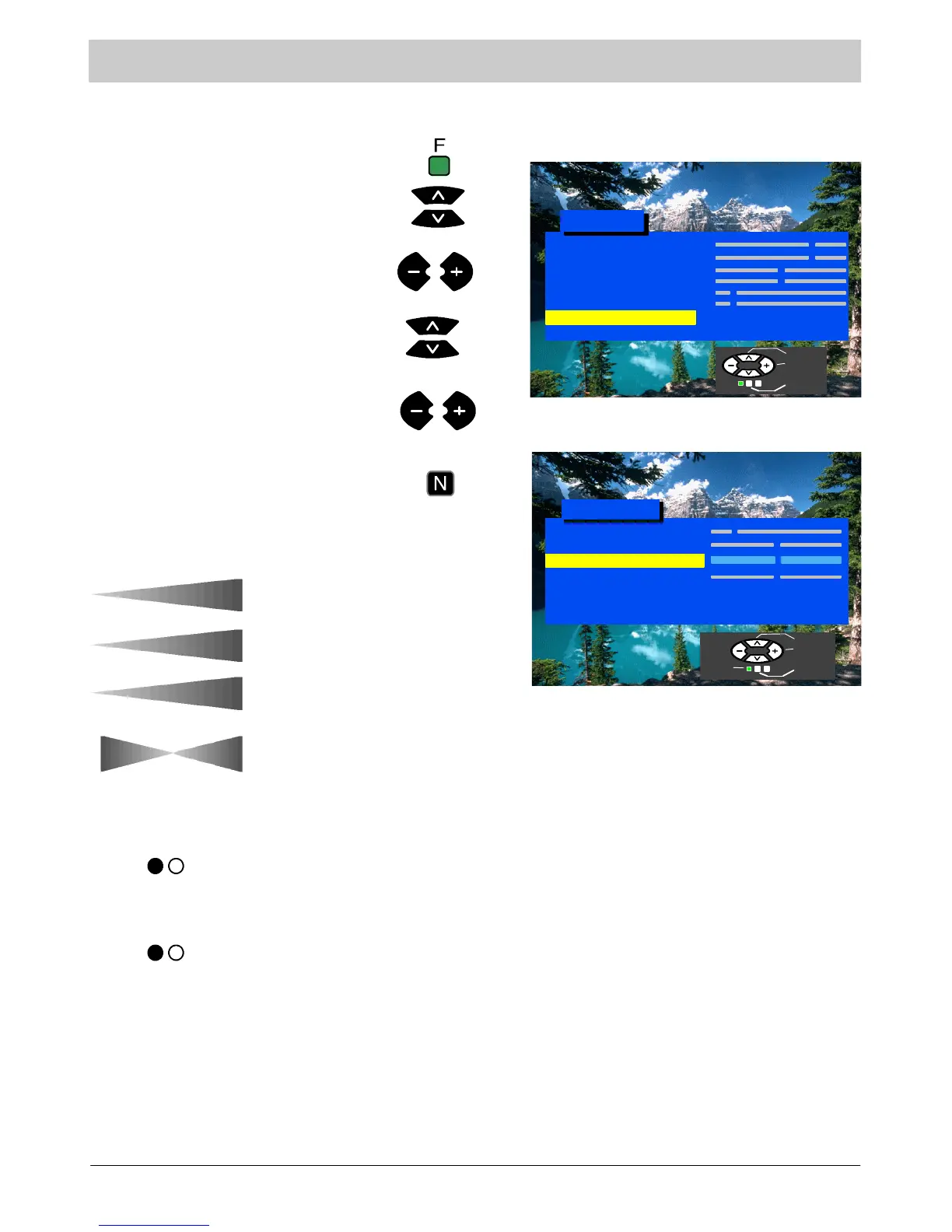
This menu allows you to adjust the sound settings.
Press the F button.
Select Sound menu
Move to your choice.
Press the N button to exit.
Bass adjustment affects the lower
frequencies and can be increased or
decreased.
Trebl e adjustment affects the higher
frequencies and can be increased or
decreased.
Access Sound menu
Increase or decrease levels or set
options.
Volume adjustment sets the overall
output volume.
Contrast
Brightness
Colour
Shar p n ess
C --- A --- T --- S
Tint (NTSC only)
Sound Menu
Setup Menu
Main Menu
Access
Volume
Bass
Treble
Balance
Balance affects t he sound level between
theleftandrightspeakers.Adjustment
can be made so that the level from the
speakers suits your listening position.
NICAM
Mode
NICAM stereo signal is received and
reproduced automatically if transmitted.
If not, the NICAM option will display “No
Service”.
The sound quality may be changed by
selecting the Music or Speech modes.
Sound Menu
Volume
Bass
Stereo
Music
Trebl e
Balance
NICAM
Mode
Select
Adjust
Exit
Select
Adjust
Exit
Return




 To Next Page