8
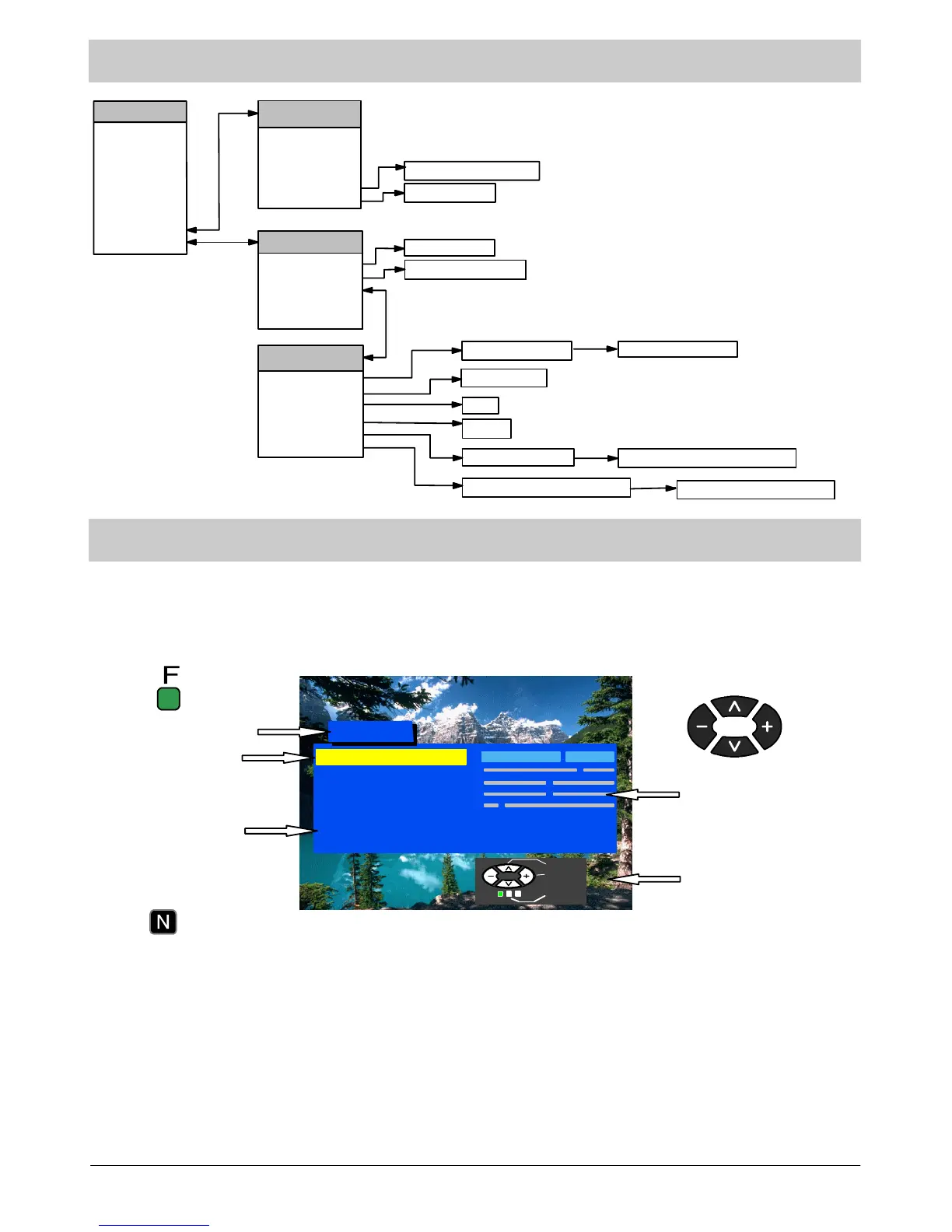
MAIN MENU FLOW CHART
Main Menu
Contrast
Brightness
Colour
Sharpness
C --- A --- T --- S
Tint (NTSC only)
Sound Menu
Setup Menu
Sound Menu
Volume
Bass
Treble
Balance
NICAM
Mode
Auto Setup searching
Auto Setup warning
Manual Tuning
Swap
Off / On
Owner ID --- enter PIN number
O w n e r I D --- c h a n g e d e t a i l s
Setup Menu
Aspect
Colour Balance
Tuning Menu (TV)
Volume Correction
(AV)
Shipping Condition confirmation
Music / Speech
Auto/4:3/16:9
Normal / Warm / Cool
Tuning Menu
Auto Setup
Manual Tuning
Programme Swap
Child Lock
Shipping Condition
Owner ID
Stereo / Mono / M1 / M2
Shipping Condition
ON SCREEN DISPLAYS
Your TV is equipped with a comprehensive menu system for tuning and selection of levels.
Contrast
Brightness
Colour
Shar p n ess
C --- A --- T --- S
Tint (NTSC only)
Sound menu
Setup menu
Main Menu
Menu title
S u b --- m e n u
Selection bar
Instructions
Level indicator
Pres s th e F button to
enter the menu.
Pres s t h e N button to
exit the menu.
The cursor buttons are used to
navigate the menu system and to
select levels.
Select
Adjust
Exit
Some selections, such as Contrast, Brightness, Colour and Sharpness will allow you to increase or decrease their
level.
Some selections, for example, Mode, allow a change of setting to be made.
Some selections, such as Setup menu, will lead to another menu.
The F button is used to open the main menu and also to return to the previous menu.
The N buttonisusedtoexitanopenmenucompletely.
The TV/AV button is used to confirm a selection.



 To Next Page