11
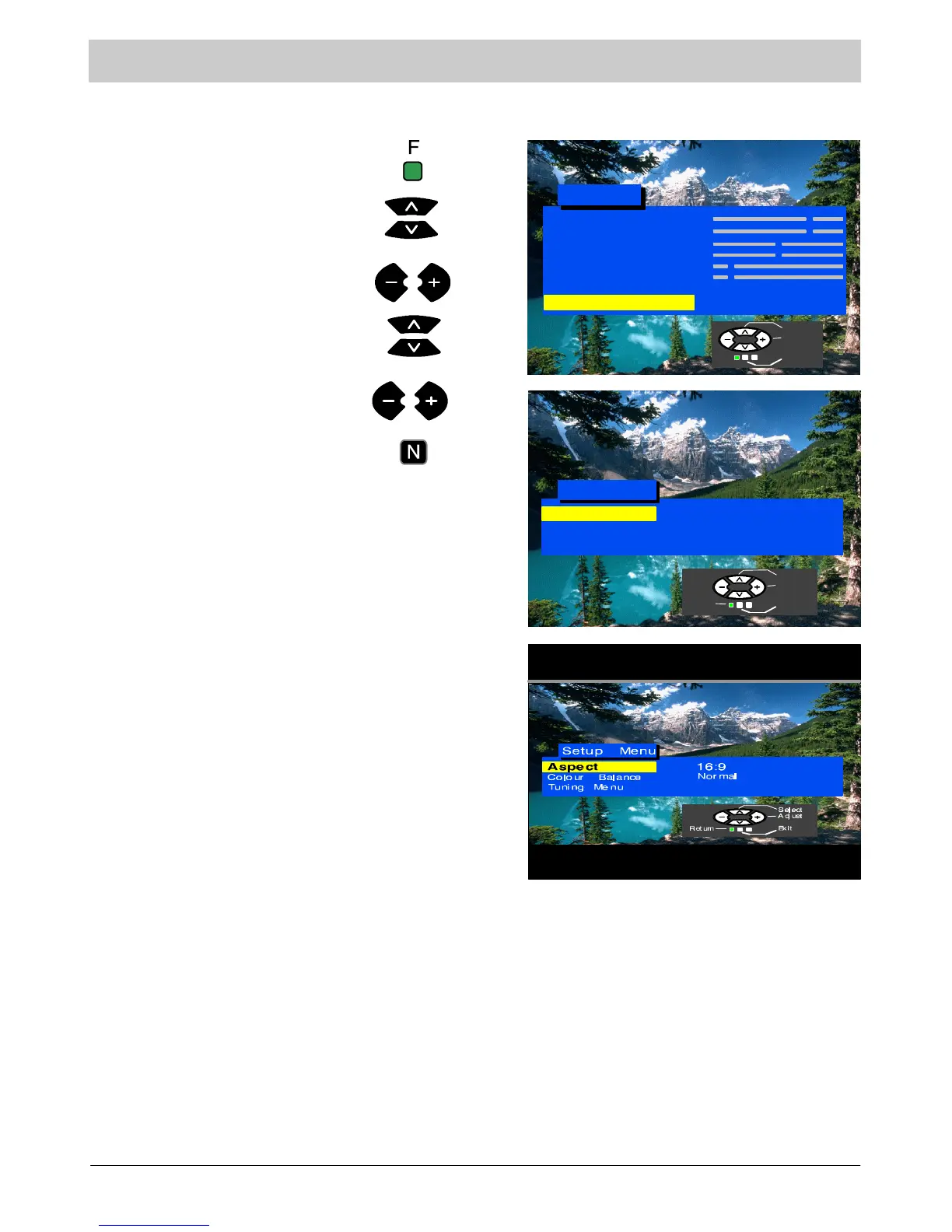
Setup menu
This menu gives access to various advanced features and the Tuning menu.
Press the F button.
Select Setup menu.
Setup M enu
4:3
Normal
Move to your choice.
Set options or access Tuning
Menu.
Press the N button to exit.
Tuning Menu
The Tuning Menu provides access to
many other features including Auto
Setup a nd Programme swap. See page
12.
Access Setup menu.
Aspect
Aspect allows you to view widescreen
programme material with the correct
aspect ratio (16:9).
When viewing with the TV in 16:9
aspect mode, you may observe a
horizontal line above the picture. This is
not a malfunction. The TV uses the line
for technical purposes.
Contrast
Brightness
Colour
Shar p n ess
C --- A --- T --- S
Tint (NTSC only)
Sound Menu
Setup Menu
Main Menu
Access
Co lou r Ba la n c e
Tuning Menu
Aspect
Select
Access
Exit
Select
Adjust
ExitReturn
Colour Balance
Colour Balance a llow s you to set th e
overa ll colour ton e of t h e pict u r e .
Volume
Correction
The line Volume Correction will appear
asamenulineonlyintheAVmode.It
allows you to adjust the volume level of
individual AV sources.





 To Next Page