18
VCR Controls
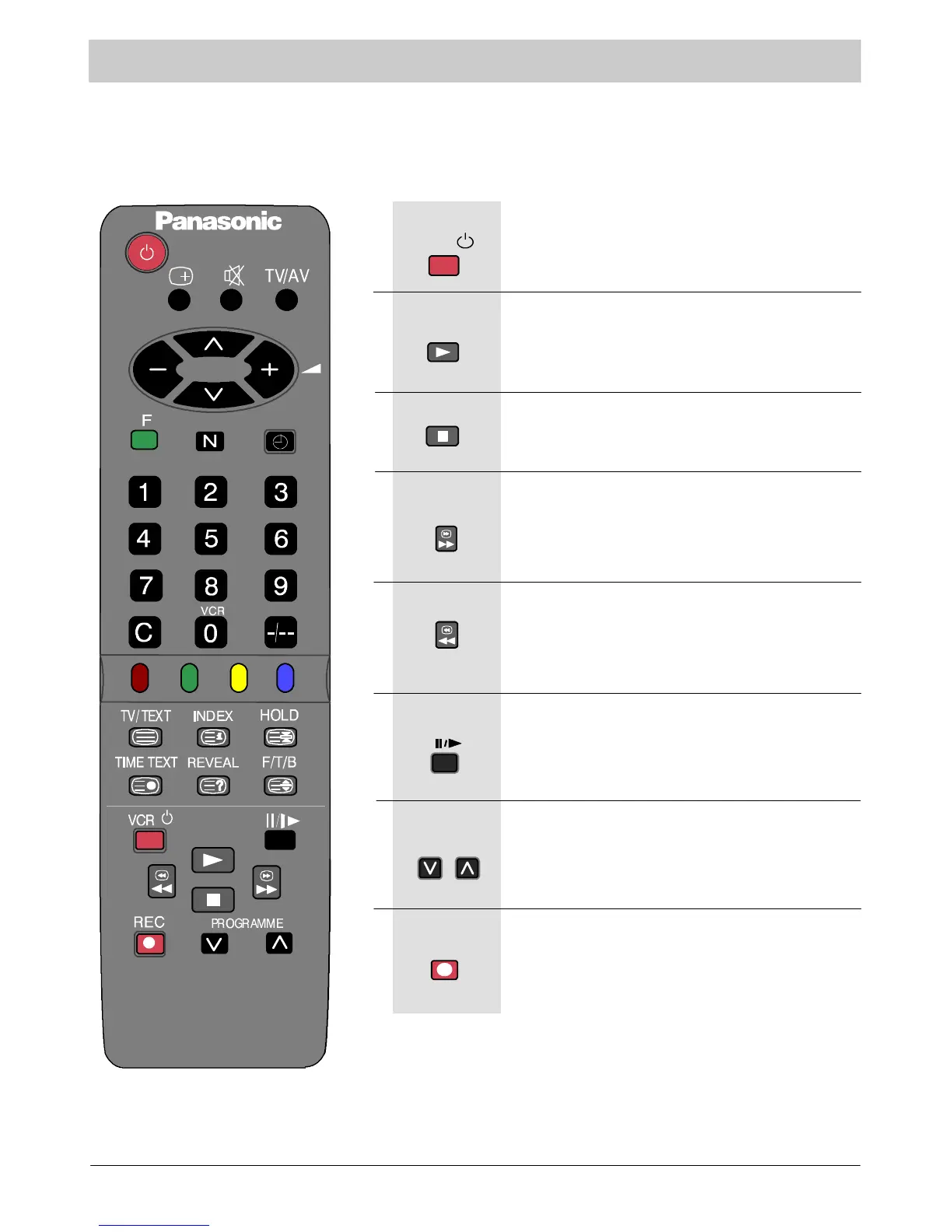
The Remote Control is capable of operating some functions of selected Panasonic VCRs. Other VCR
equipment may have different functions, so to ensure compatibility please refer to the equipment’s
instruction book or consult your dealer for details.
Press to switch t he VCR to standby mode. Press
againtoswitchbackon.
VCR Standby
Press to playback the tape.
Play
Press to stop the tape.
Stop
Press to fast forward the tape. In Play mode, press
to view the picture rapidly forward (Cue).
Fast Forward/Cue
Press to rewind the tape. In Play mode, press to
view the picture rapidly in reverse (Review).
Rewind/Review
Press in playback mode, the picture will pause.
Press again to restart play.
Pause/Still
Press to increase or decrease the VCR programme
position by one.
Programme Number Up And Down
Press this button to start recording.
Record
REC
VCR



 To Next Page