12
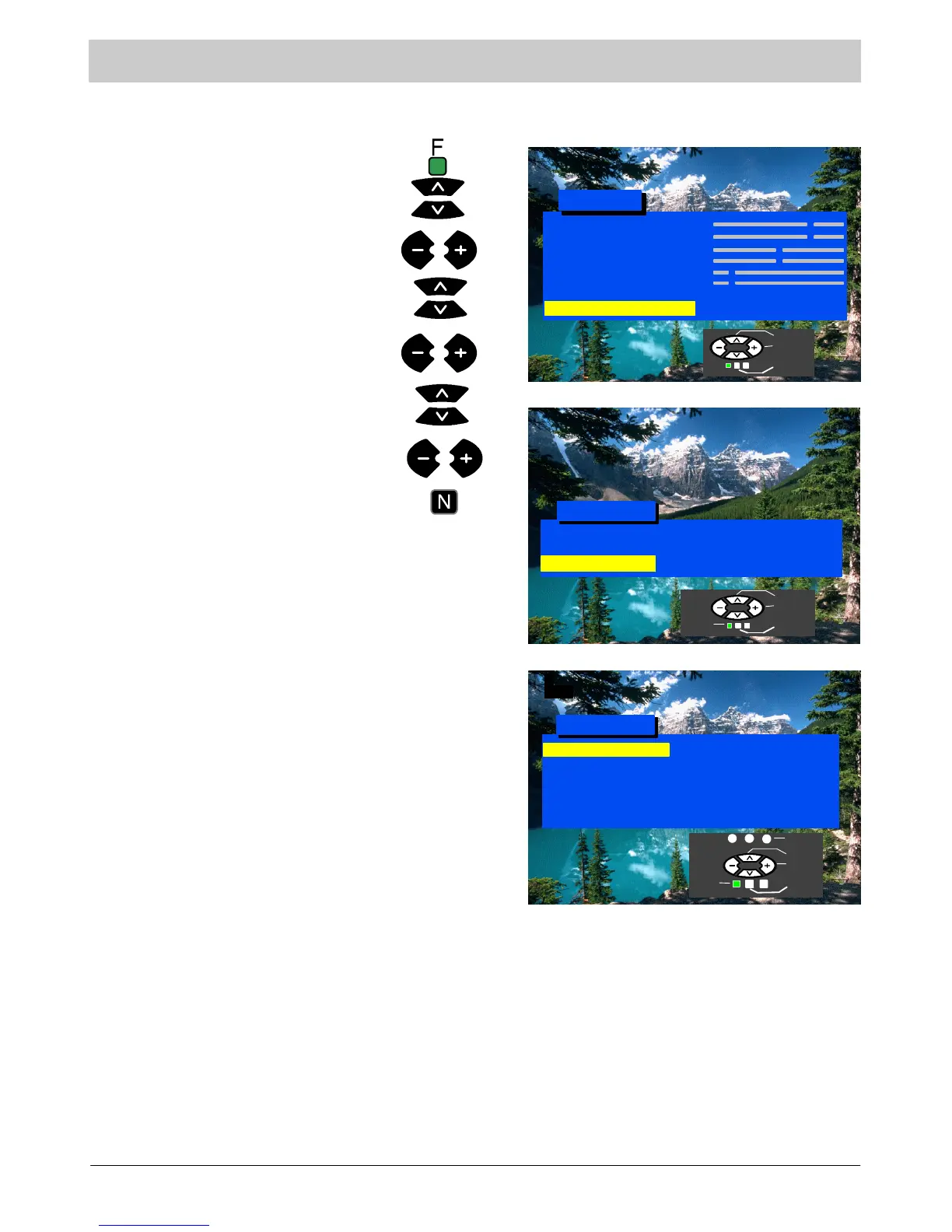
Tuning menu
This menu provides access to Auto Setup, Manual Tuning and various other features.
Press the N button to exit.
Manual Tuning
Prog ra mme Sw ap
Owner ID
Auto Se tup
Tuning Menu
Off
Access
1
CH44
Child Lock
Set or access options.
Auto Setup
Manual Tuning
Programme
Swap
Child Lock
The Auto Setup menu allows you to
automatically retune the TV. See page
13.
Allows manual tuning of individual
channels. See page 14.
Ship p ing Co nd ition
Press the F button.
Select Setup menu.
Select Tuning menu.
Access Setup menu.
Access Tuning menu.
Move to your choice.
Allows you to swap programme
positions. See page 17.
Locks the programme position to
prevent access.
Contrast
Brightness
Colour
Shar p n ess
C --- A --- T --- S
Tint (NTSC only)
Sound Menu
Setup Menu
Main Menu
Access
Setup M enu
4:3
Normal
Access
Co lou r Ba la n c e
Tuning Menu
Aspect
Shipping
Condition
Owner ID
Allows you to clear all tuning
information and reset all control levels
back to factory settings. See page15.
Allows you to enter a security code a nd
address information. See page 16.
Select
Access
Exit
Select
Access
Exit
Return
Select
Access
Return
Exit
Store



 To Next Page