16
Tuning --- Owner ID
Owner ID allows you to enter a security code and address information so that in the unfortunate event
of theft it will help the Police to determine the owner.
If the Owner ID information was not entered after Auto setup or it is necessary to alter some of the ID
information it can be re-- accessed via the Tuning menu.
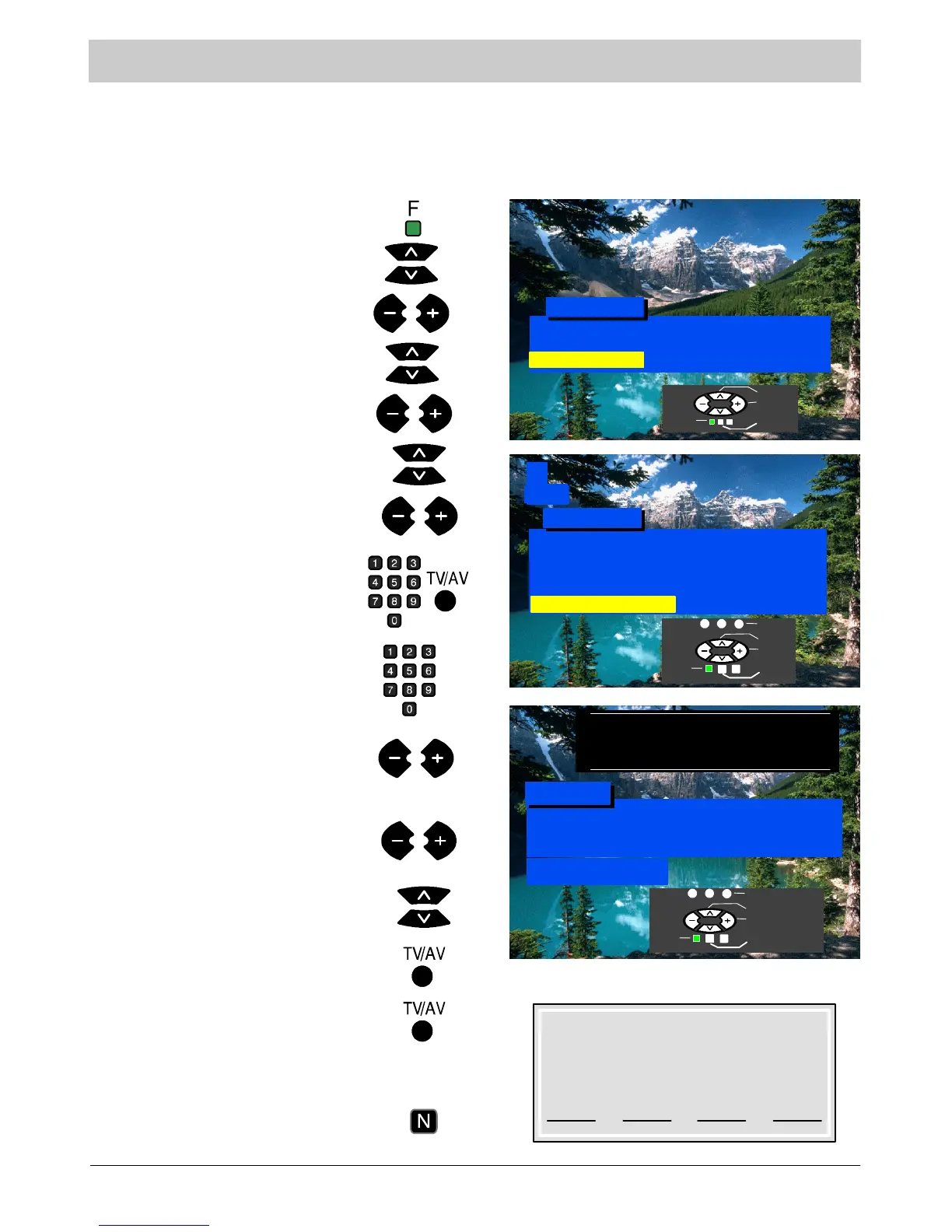
Press the F button.
Select Setup menu.
Select Tuning menu.
Select Owner ID.
Access Setup menu.
Access Tuning menu.
Access Owner ID.
If the Owner ID has previously been
set, enter the PIN NUMBER (using 0
to 9 on the remote control) followed by
TV/AV to proceed, this will take you to
the NAME option
If no Owner ID has previously been
set, enter the required 4 digit Owner ID
PIN NUMBER (using 0 to 9 on the
remote control).
If a 4 digit PIN NUMBER was entered
above, you will be taken automatically
to the NAME line.
If not, move to the NAME line.
Change character.
Select character position.
Repeat above until NAME, HOUSE
NUMBER and POSTCODE are
entered.
Press again, to confirm when asked
“A r e y o u s u r e ?”
The Tuning menu will be displayed.
Press the N button to exit
Press TV/AV to store the details.
1
CH44
For future reference,
write your PIN Number here :
Owner ID
PINNUMBER : 1234
NAME: KKKKKKKKKKKKKK
HOUSE NO : KKKKKKKKKKK
POSTCODE : KKKKKKKKKKK
ABCDEFGHIJKLMNOPQRST
UVWXYZ+-- . 0123456789
You now have the opportunity
to enter your details and
helpthepolicecrackcrime
see instruction book
Setup M enu
Auto
Normal
Access
Co lou r Ba la n c e
Tuning Menu
Aspect
Manual Tuning
Prog ra mme Sw ap
Auto Setup
Tuning Menu
Off
Access
Child Lock
Ship p ing Co nd ition
Owner ID
Select
Access
Exit
Return
Select
Access
Return
Exit
Store
Select character
Change character
Return
Exit
Store owner ID





 To Next Page