19
VCR and Satellite Receiver installation
Your new TV is supplied with programme position ‘0’ set to receive an RF signal from your VCR, although a Scart connectio n is
preferable if the VCR is so equipped.
However, if for some reason your VCR is tuned to a different RF channel then you will not receive any picture or sound from your VCR on
programme position ‘0’ of the TV. It will be necessary to either adjust the RF channel of your VCR (some VCR’s allow adjustment of their
RF channel via their remote control unit) or to adjust the tuning of the TV’s programme position ‘0’ or both until it receives the RF output
channel of your VCR.
It is intended that this advice is used in conjunction with the instruction books for your ancillary equipment.
Use the AV Scart terminal for a VCR.
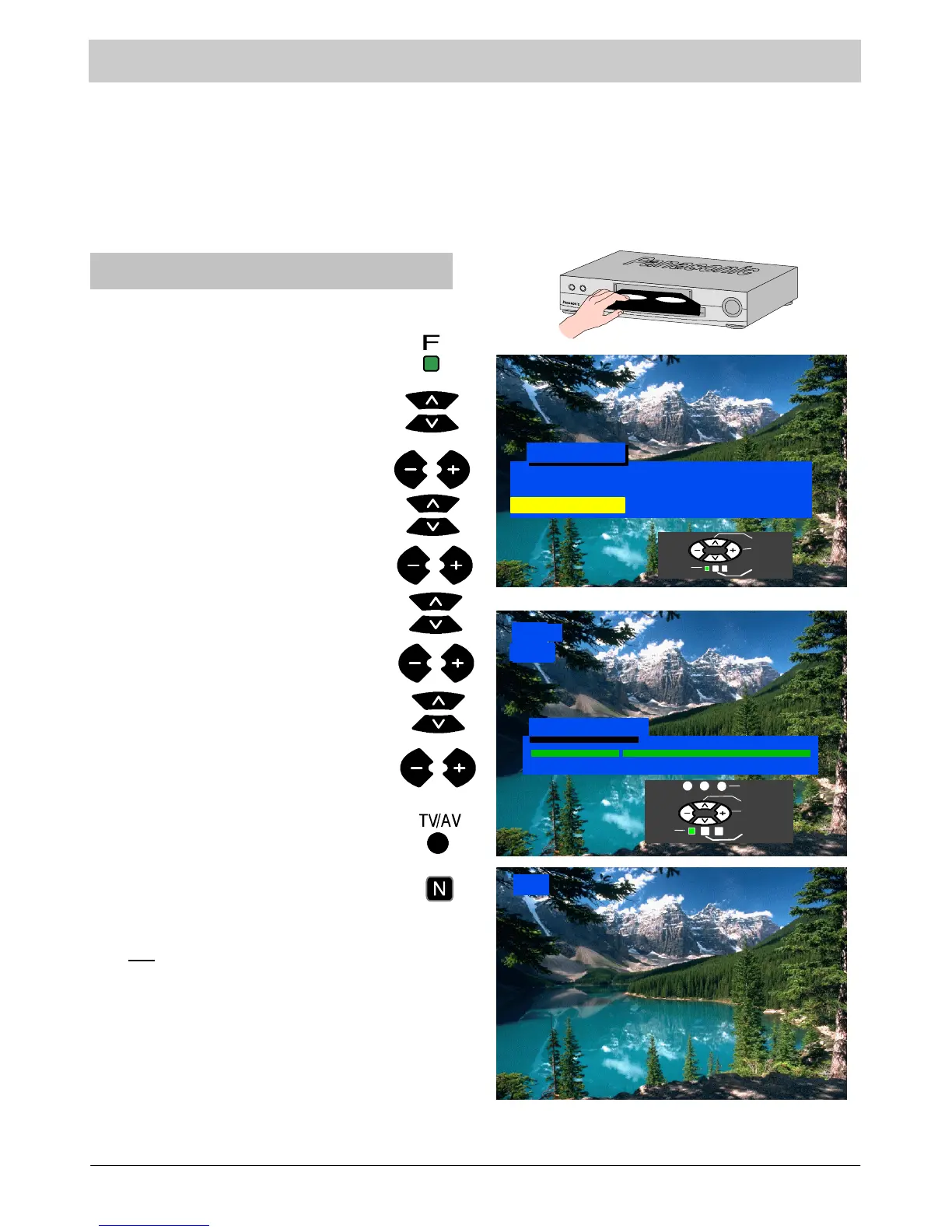
To tune your TV to the VCR
Switch on the VCR, insert and play a
pre-- recorded tape with known content.
Press the F button.
Select Setup menu
Access Setup menu
Select Tuning menu.
Access Tuning menu.
Select Manual tuning
Access Manual tuning
Select programme position “0” VCR.
Start searching for the VCR playback
of the k nown content tape.
When the VCR playback is found, press
TV/AV to store.
Press the N button to exit.
See below for installation of
VCR and Satellite Receiver.
Notes :
` If picture patterning occurs on programme position ‘0’ it
may be necessary to adjust the RF output channel of the
VCR, refer to the VCR instruction book.
If a Satellite Receiver and a VCR are going to be used with
RF cable connections it is important to avoid both units
being set on the same channel.
Refer to the Satellite Receiver and VCR instruction books
for precise tuning information.
VCR
CH32
VCR
Setup M enu
4:3
Normal
Access
Co lou r Ba la n c e
Tuning Menu
Aspect
21
68
Manual Tuning
Select
Access
Exit
Return
Programme
Search
Return
Exit
Store



 To Next Page