9
Main menu
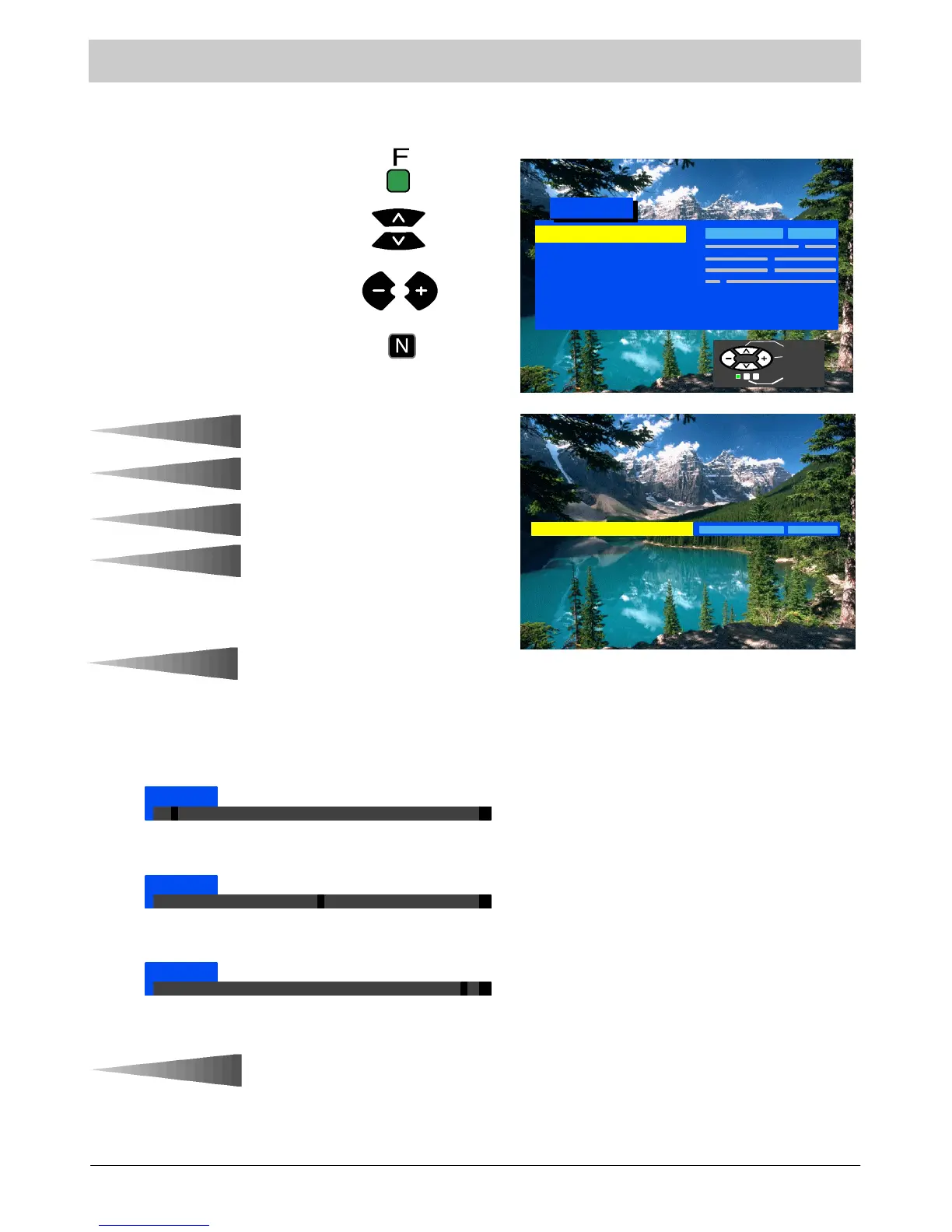
This menu allows adjustment of picture quality and gives access to various other features.
Pres s t h e F button.
Contrast
Brightness
Colour
Shar p n ess
C --- A --- T --- S
Tint (NTSC only)
Sound Menu
Setup Menu
Main Menu
Select
Adjust
Exit
Move to your choice.
Increase or decrease levels, set
option or access further menus.
Press the N button to exit the menu.
Contrast
The Contrast, Brightness, Colour and
Sharpness levels can be adjusted to
suit your own preferences. You can
revert to the factory set levels at a ny
time by pressing the N button.
The Tint adjustment will only appear
as a menu item if you have an NTSC
signal source connected to the TV
and will allow adjustment of the hue.
Sharpness
Colour
Brightness
Tint
C --- A --- T --- S
Contrast Automatic Tuning
System
Automatically adjusts the contrast to
matchanychangesintheambient
lighting of the room.
TogetbestresultsfirstsetContrast
to maximum and then select any of
the three positions:
C --- A --- T --- S
C --- A --- T --- S
C --- A --- T --- S
Turned off
Medium sensitivity
High sensitivity
Contrast



 To Next Page