7
QUICK START GUIDE
2
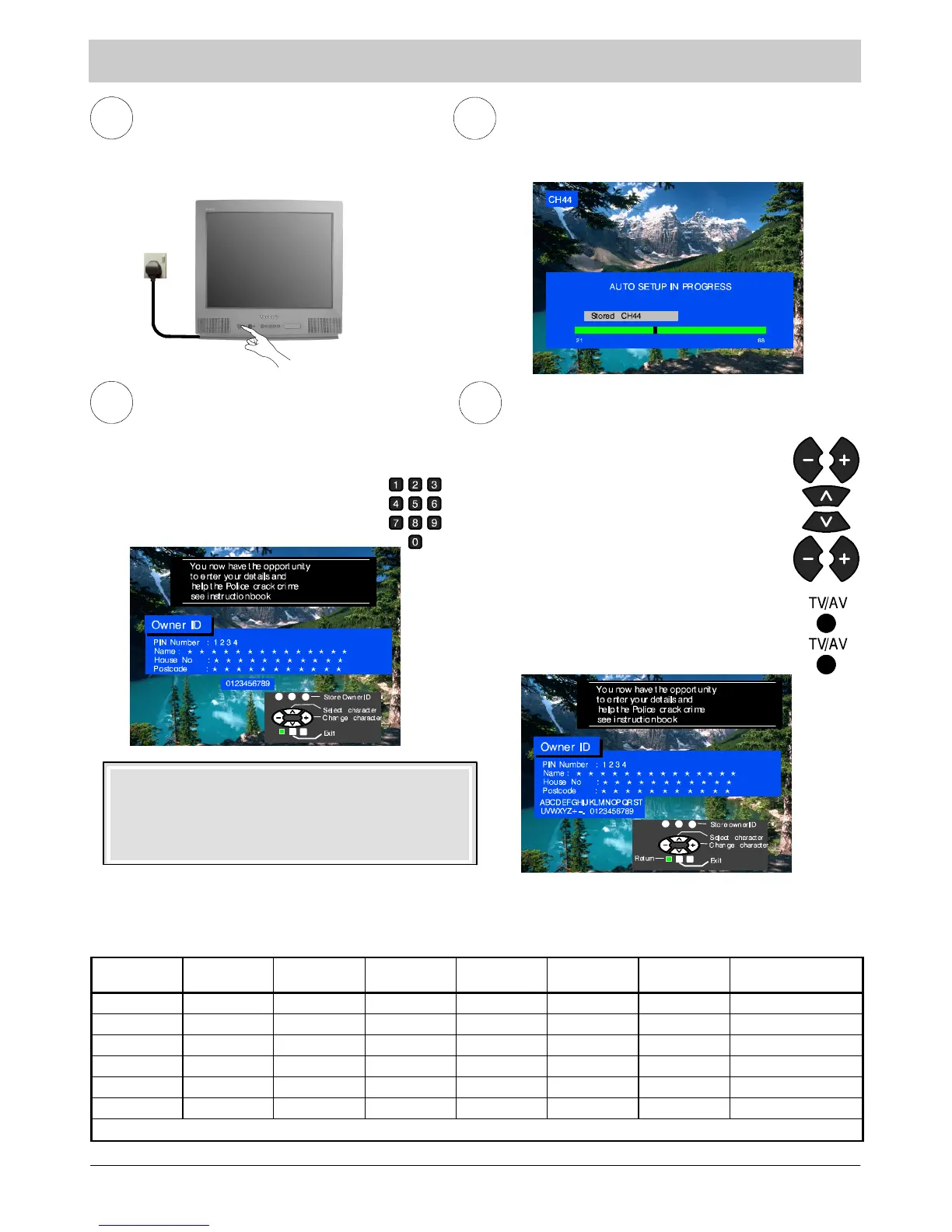
Programmes will appear immediately if your dealer has
programmed the TV for you.
If the TV has not been programmed for you then Auto
setup will begin. TV stations will be located, sorted into
order and stored ready for use.
*2
1
Ensure that the VCR is in Standby mode.
Switch ON your Satellite Receiver
Plug the TV into mains socket and switch ON.
3
Owner ID
As an added feature, this TV has the option of
adding a security code (Owner ID) and personal
details into its memory, so that in the unfortunate
event of theft it will help the Police to trace the
owner.
Enter required 4 digit Owner ID PIN NUMBER.
(using 0 to 9 on the remote control).
4
Enter NAME, HOUSE NUMBER and
POSTCODE. If a 4 digit PIN NUMBER was
entered above, you will be taken automatically
to the NAME line.
If not, move to the NAME line.
Change characte r.
Select character position.
Repeat above until NAME, HOUSE NUMBER
and POSTCODE are entered.
Press “TV/AV” to store the details.
Press “TV/AV” again, when you are asked
“A re y ou su re ?”
For further information on Owner ID, see page 16.
A space is provided on page 16 to write down the PIN
NUMBER for future reference.
Mains
Socket
*1. If, after Auto Setup is complete, the programme position of the digital satellite receiver is not to your preference, you can re--- arrange
the programme position with the Swap feature. (See page 17 for details.)
*2. The sorting order depends upon the TV signal, the broadcasting system, and reception conditions. If either BBC1, BBC2 or ITV are
not locat ed, then their respective pre--- allocated programme positions (1 to 3) will remain unused.
Programme
Position
All stations
available
No C hannel 5
No Channel 5 /
S4C
No C hannel 4 /
Channel 5
No S4C
No C hannel 4 /
S4C
No C hannel 4 / S4C /
Channel 5
1 BBC1 BBC1 BBC1 BBC1 BBC1 BBC1 BBC1
2 BBC2 BBC2 BBC2 BBC2 BBC2 BBC2 BBC2
3 ITV ITV ITV ITV ITV ITV ITV
4 Channel 4 Channel 4 Channel 4 S4C Channel 4 Channel 5 ~
5 S4C S4C ~ ~ Channel 5 ~ ~
6 Channel 5 ~ ~ ~ ~ ~ ~
Note : The next available channel will appear, if no other stations are available then the Programme position will remain unused.





 To Next Page