EasyManua.ls Logo

Panasonic TX-86PW100A - Page 36

Panasonic TX-86PW100A
48 pages
Print Icon
To Next Page IconTo Next Page
To Previous Page IconTo Previous Page
Loading...
«
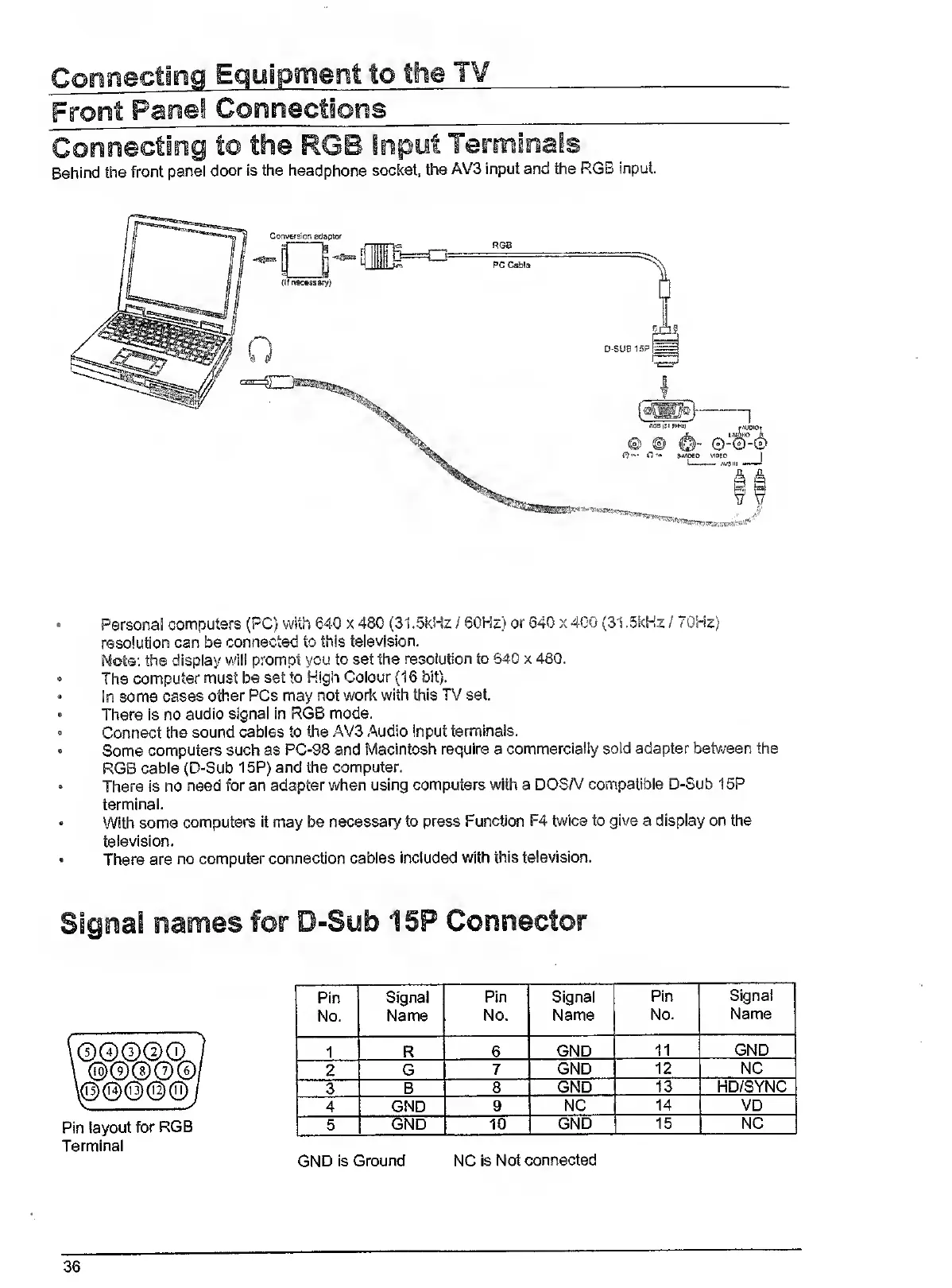
Personal
computers
(PC)
with
640
x
480
(31.5kHz
/
60Hz)
or
640
x
4G0
(31.5kHz
/
70Hz)
resolution
can
be
connected
to
this
television.
Mote:
the
display
will
prompt
you
to
set
the
resolution
to
640
x
480.
The
computer
must
be
set
to
High
Colour
(16
bit).
In
some
cases
other
PCs
may
not
work
with
this
TV
set.
There
is
no
audio
signal
in
RGB
mode.
»
Connect
the
sound
cables
to
the
AV3
Audio
Input
terminals.
Some
computers
such
as
PC-98
and
Macintosh
require
a
commercially
sold
adapter
betv/een
the
RGB
cable
(D-Sub
15P)
and
the
computer.
There
is
no
need
for
an
adapter
when
using
computers
with
a
DOSA/
compatible
D-Sub
15P
terminal.
With
some
computers
it
may
be
necessary
to
press
Function
F4
twice
to
give
a
display
on
the
television.
There
are
no
computer
connection
cables
included
with
this
television.
\@@@
0
©
Pin
layout
for
RGB
Terminal
Pin
Signal
Pin
Signal
Pin
Signal
i
No.
Name
No.
Name
No.
Name
1
R
6
GND
11
GND
2
G
7
GND
12
NC
3
B
8
GND
13
HD/SYNC
4
GND
9
NC
14
VD
5
GND
10
GND
15
NC
GND
is
Ground
NC
is
Not
connected
36

Related product manuals