19
8 Disassembly and Assembly Instructions
8.1. Remove the Rear cover
1. See Service Hint (Section 3)
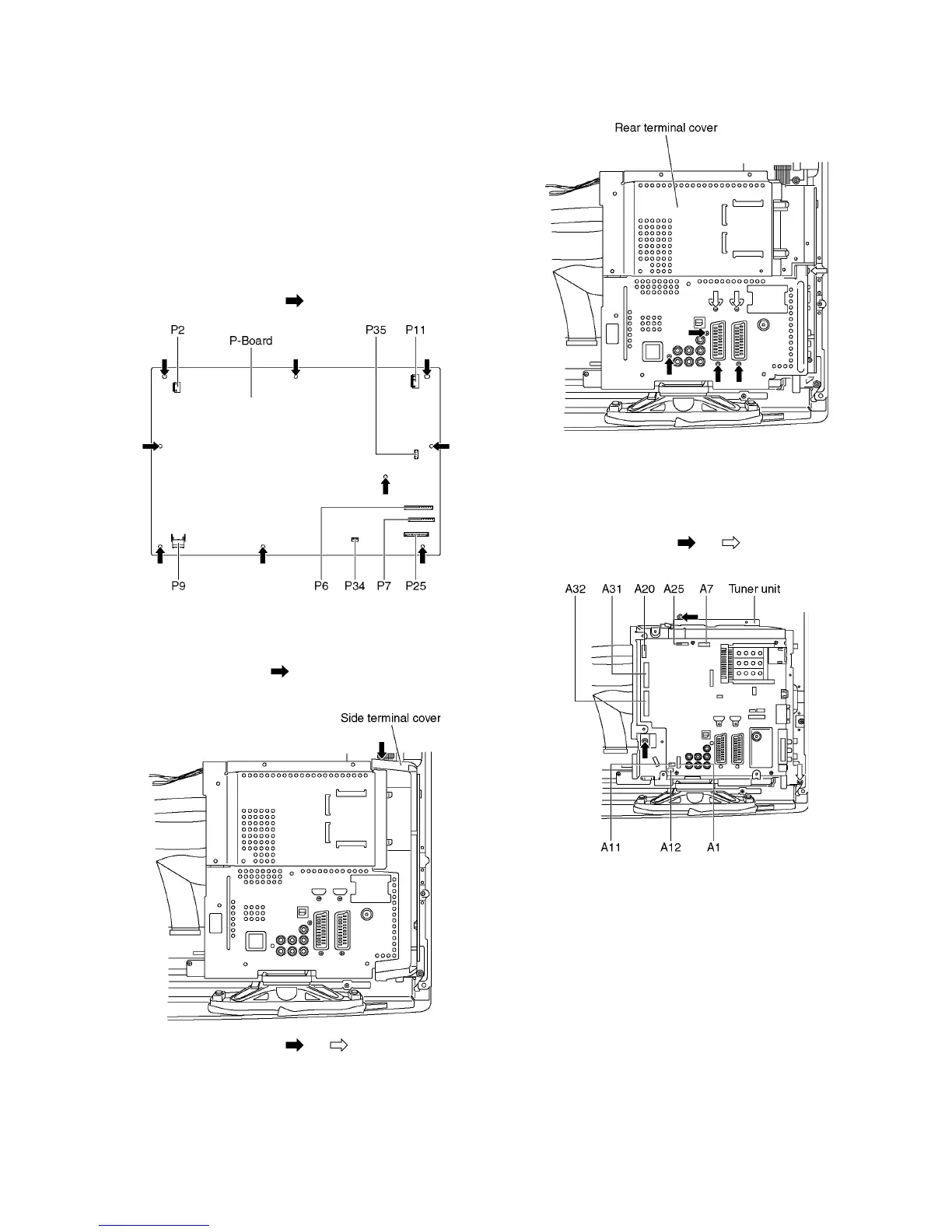
8.2. Remove the P-Board
Caution:
To remove P.C.B. wait 1 minute after power was off for dis-
charge from electrolysis capacitors.
1. Unlock the cable clampers to free the cable
2. Disconnect the connectors (P2, P6, P7, P9, P11, P25,
P34 and P35).
3. Remove the screws (×9 ) and remove the P-Board.
8.3. Remove the Side terminal
cover and Rear terminal cover
1. Remove the claw (×1 ).
2. Remove the Side terminal cover.
3. Remove the screws (×4 , ×3 ).
4. Remove the Rear terminal cover.
8.4. Remove the Tuner unit
1. Unlock the cable clampers to free the cable.
2. Disconnect the connectors (A1, A7, A11, A12 and A25).
3. Disconnect the flexible cables (A20, A31 and A32).
4. Remove the screws (×2 , ×1 ) and remove the
Tuner unit.







 To Next Page