23
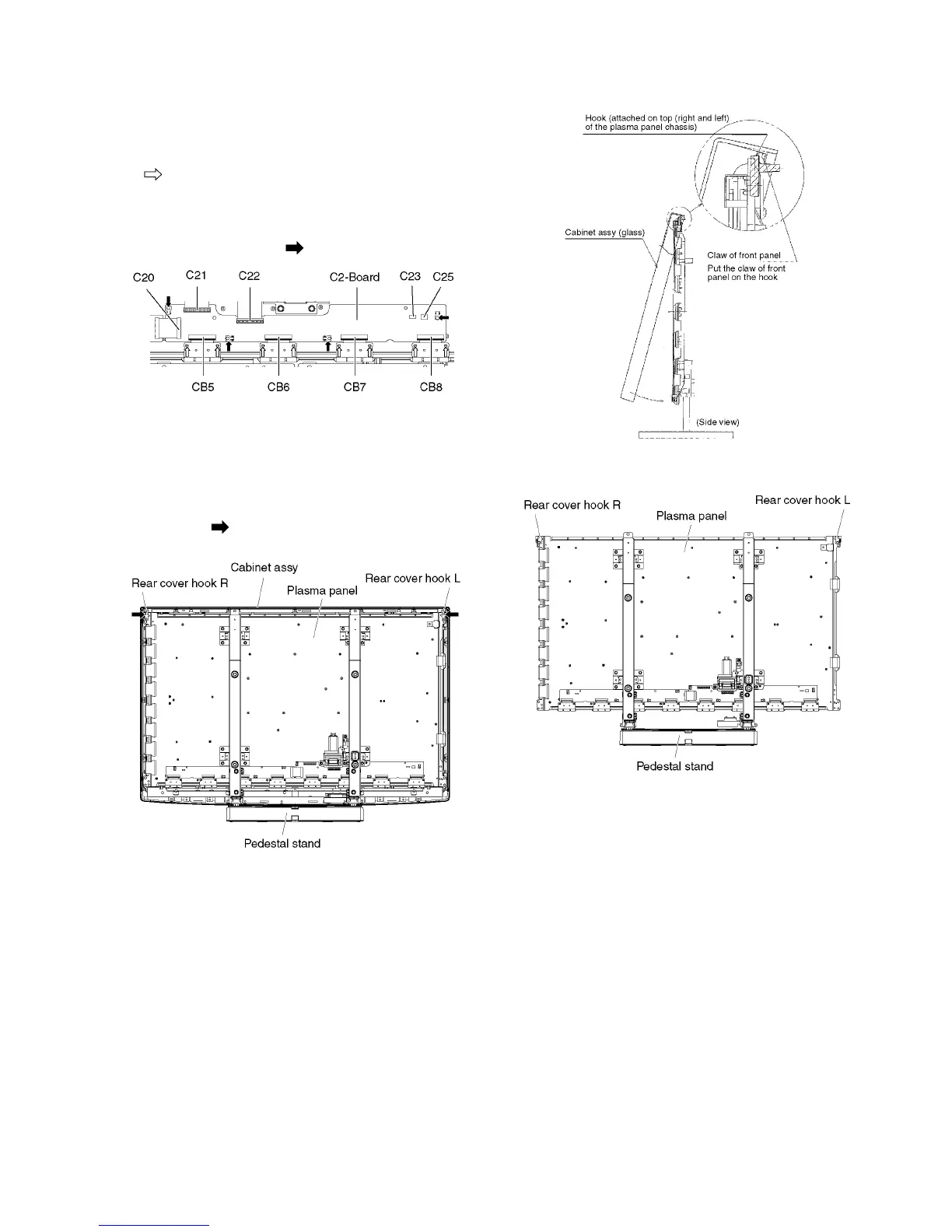
8.16. Remove the C2-Board
1. Remove the Tuner unit. (See section 8.4.)
2. Remove the Hanger metal L and the Stand bracket L.
(See section 8.14.)
3. Remove the flexible cables holder fastening screws (×8
).
4. Disconnect the flexible cables (CB5, CB6, CB7 and CB8).
5. Disconnect the flexible cables (C20, C21 and C22).
6. Disconnect the connectors (C23 and C25).
7. Remove the screws (×4 ) and remove the C2-Board.
8.17. Remove the Plasma panel sec-
tion from the Cabinet assy
(glass)
1. Remove the cabinet assy and the plasma panel fastening
screws (×2 ).
2. For leaving the plasma panel from the front frame, pull the
bottom of the cabinet assy forward, lift, and remove.
3. Remove the Rear cover hooks (L, R).







 To Next Page