18 English18
Basic Use
Continued
Multi connection
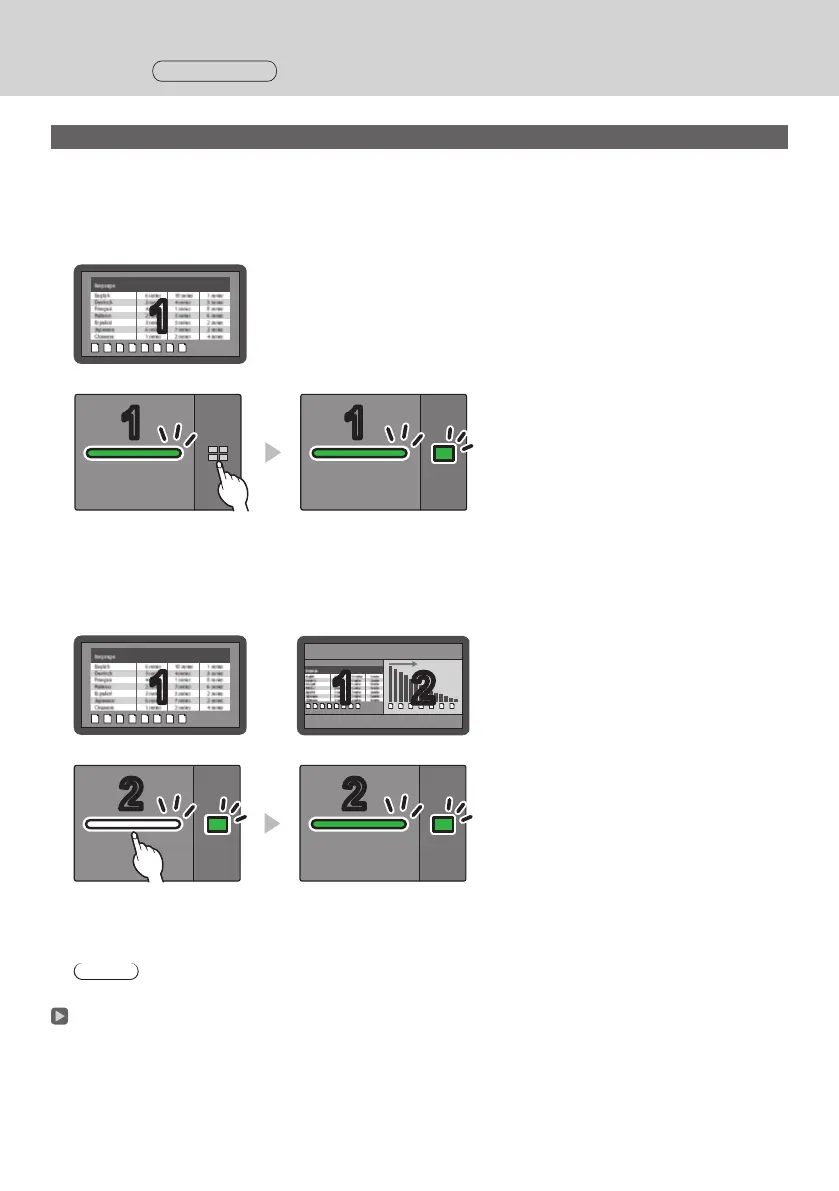
This section describes how to display images simultaneously using multiple transmitters.
Images of up to 4 transmitters can be displayed simultaneously.
1
Press and hold the sub button of the transmitter for 1 second or more during full
screen display.
The sub LED changes to green illumination, and the multi-screen mode is enabled.
Full screen display
11
Sub LED
OFF
Sub LED
Green illumination
(Multi-screen mode)
2
Press the main button of the transmitter of which the image is to be added.
The image is added.
Full screen display
11
Multi-screen display
11 22
White
illumination
(standby)
Green
illumination
Sub LED
Green illumination
Sub LED
Green
illumination
Note
• Audio is not output during multi-screen disuplay.
Multi-screen mode cancellation
Press and hold the sub button of the transmitter for 1 second or more.
• The sub LED changes from green illumination to OFF state, and the multi-screen mode is canceled.
• The multi-screen mode can be canceled only when the main LED is lighting green.



 To Next Page