20 English20
Pairing settings have been made for transmitter and receiver of TY-WPS1 / TY-WPS1W / TY-WPSC1 /
TY-WPSC1W Basic Set.
Pairing by connecting the receiver and transmitter
1
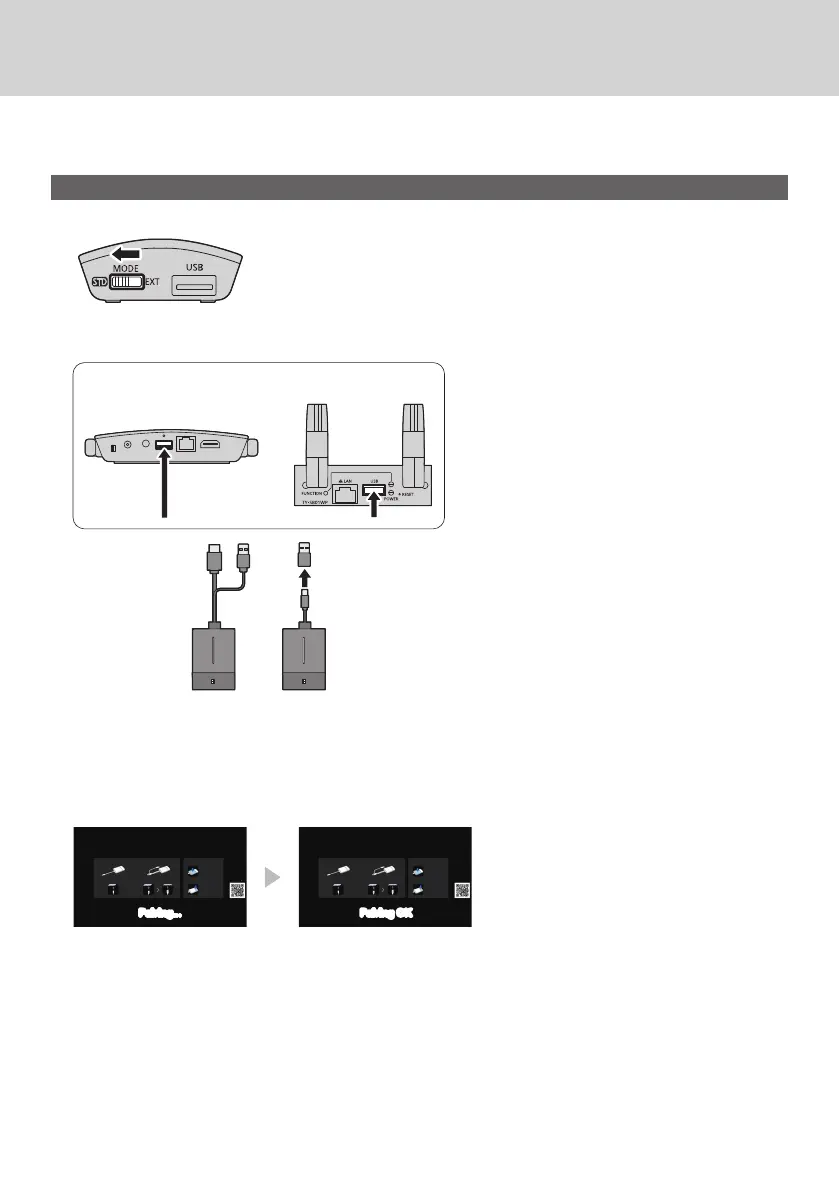
Slide the mode switch to the STD side.
2
Connect the USB terminal of the transmitter to the USB terminal of the receiver /
receiver board.
TY-WPB1/
TY-WPB1W
TY-WPBC1/
TY-WPBC1W
To connect the TY-WPBC1/TY-WPBC1W, use the
conversion adaptor for pairing supplied with the
TY-WPSC1/TY-WPSC1W/TY-WP2BC1/TY-WP2BC1W/
TY-WPBC1/TY-WPBC1W.
Receiver Receiver board
Wait for a while until the LED of the receiver blinks in white. Then, pairing starts automatically.
“Pairing…” (pairing in progress) is displayed on the standby screen.
3
Pairing is complete.
“Pairing OK” is displayed and the LED of the receiver lights up in white.
Pairing... Pairing OK
4
Remove the USB cable of the transmitter from the receiver.
Transmitter Extension Method (Pairing)



 To Next Page