58 English58
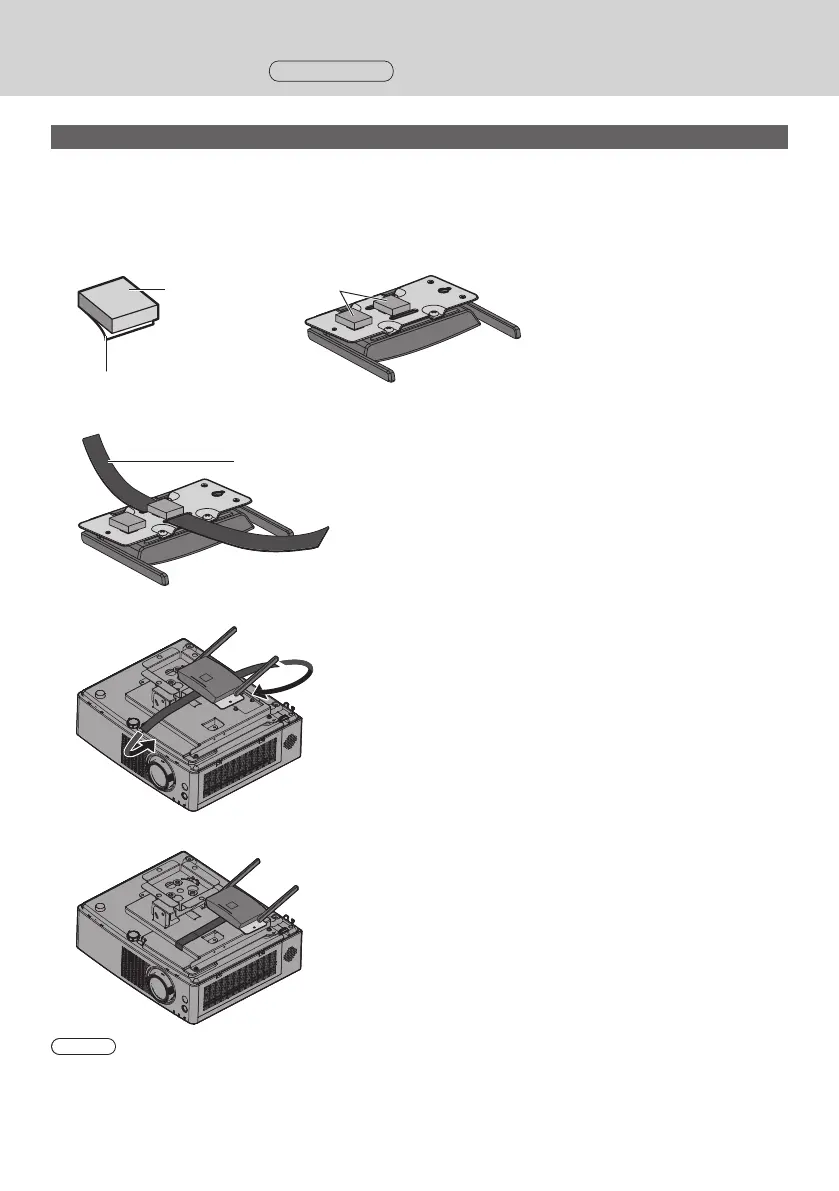
Recommended example for installing on the projector portable model
Use a commercially sold fixing band with a width of 25 mm or less.
1
Mount the base bracket (A-1) to the receiver.
2
Attach 2 sheets B (B-2) to the bracket along the marking-off lines
Remove the double-sided taped release paper from those sheets and attach them to the brackets. Then remove
the protection films.
Release paper
Protection film
B-2
3
Pass the band through the slit of the base bracket (A-1).
Band
4
Install the receiver on the ceiling-hanging base bracket of the projector.
5
Wrap the band through the ceiling-hanging base bracket and fix the receiver.
Note
• The illustrations show the PT-VMZ60 model.
• Depending on the model of projector, the above method may not be used for installation.
Installing the Receiver
Continued



 To Next Page