25English
Connect to the Web page of the receiver to configure the settings of this system.
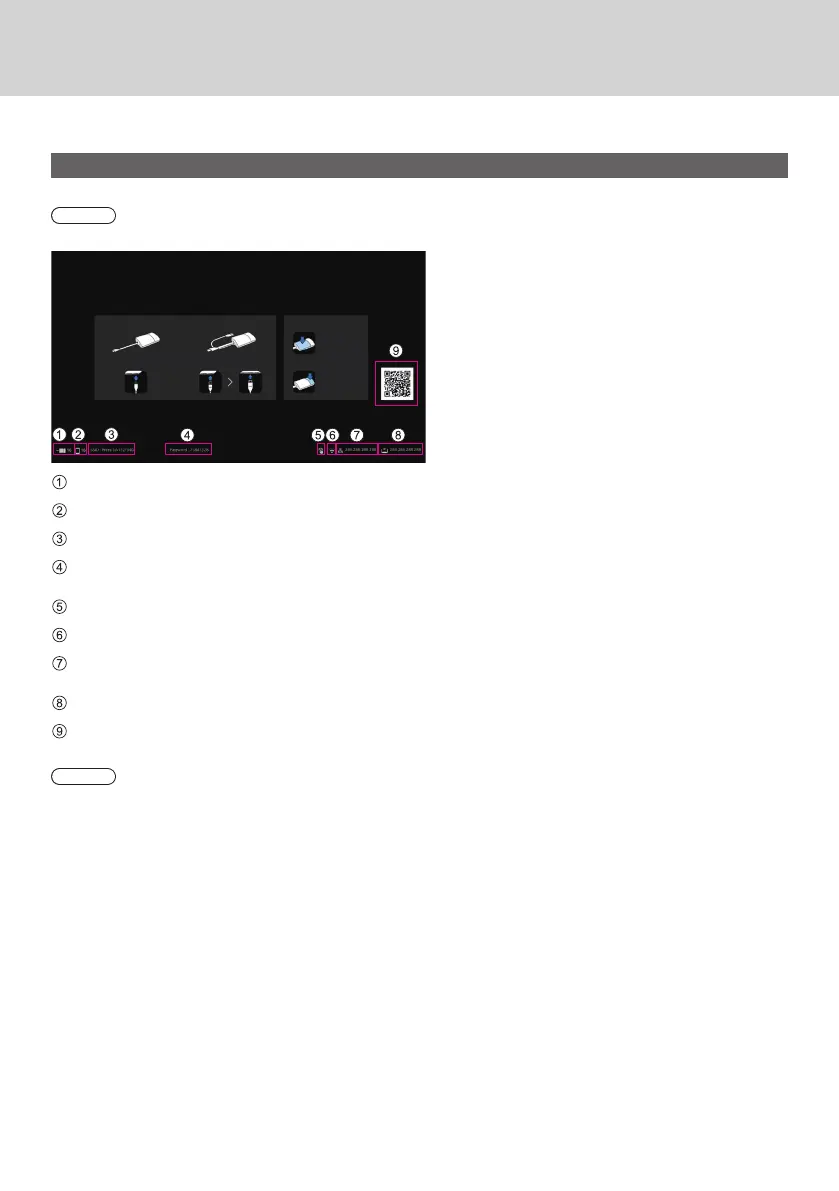
About the standby screen
Turn on the receiver to display the standby screen on the display device.
Note
• For connecting the receiver and display device, see “Connecting the receiver” (page 12).
Displays the number of mobile devices connected via wireless LAN of the transmitter or receiver.
Displays the number of mobile devices connected via external wireless LAN.
Displays SSID. This is used when directly connecting from PC or mobile devices.
Displays the password. This is used when directly connecting from PC or mobile devices and when connecting to
the Web page immediately after purchase or after initialization of data.
Displayed when a mouse or a touch module of the display is connected to the USB terminal of the receiver.
Displayed when connected to a wireless access point or router.
Displayed when connected to an external network (LAN) via a wired LAN or external wireless LAN access point.
Use this IP address when connecting from an external network to the receiver.
Receiver’s IP address for wireless LAN. Use this IP address for wireless LAN connection.
Displays the QR code linked to the site for downloading the operating instructions.
Note
• Select [Device Management] - [Language] to change the displayed language. (page 31)
Setting



 To Next Page