56 English56
Recommended example for installing on the projector system model
1
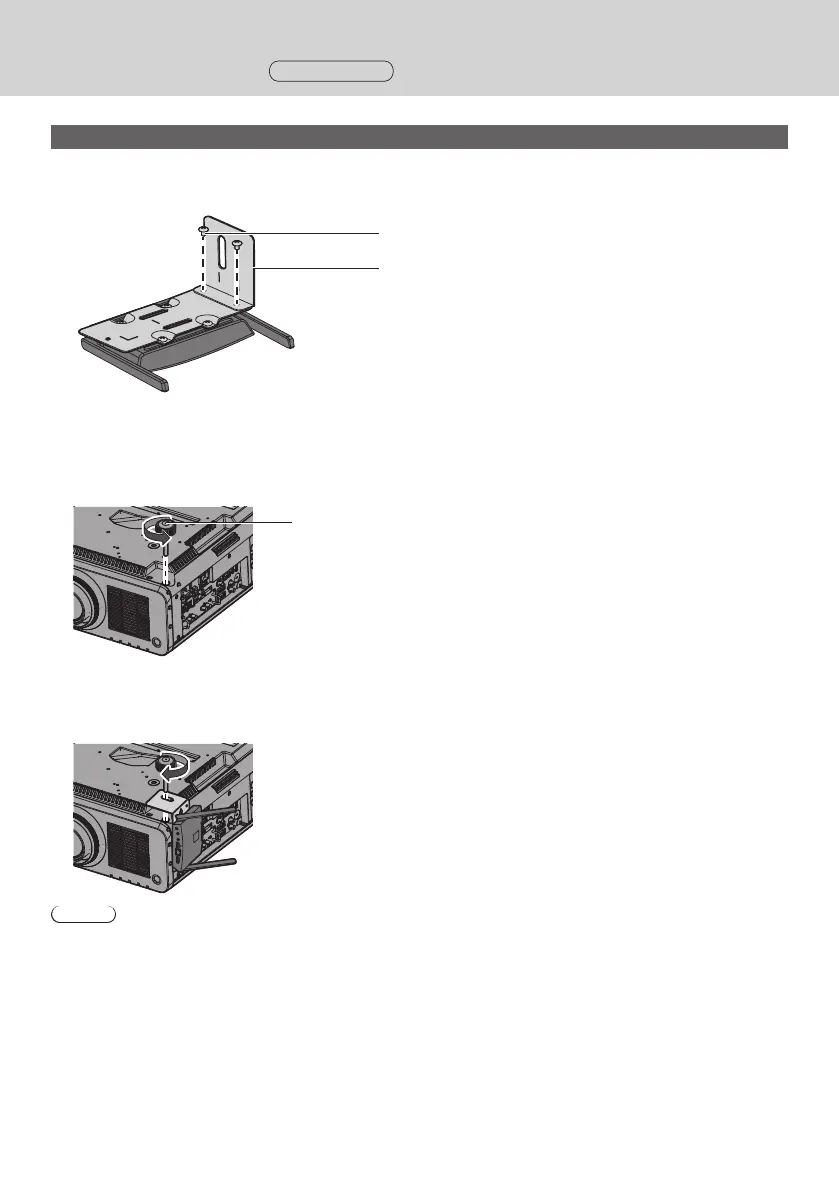
Mount the base bracket (A-1) to the receiver.
2
Fix the connecting bracket C (A-4) to the base bracket (A-1) with 2 screws (C-2).
C-2
A-4
3
Remove the adjuster on the bottom surface of the projector by turning it
counterclockwise.
Install the receiver at a position that does not block the air inlet and air outlet.
Be careful not to allow the receiver to hit the AC cord. Also, the receiver should be installed in such a direction that
the cable to be connected does not interfere with the cable of the projector.
Adjuster
4
Pass the adjuster through the long hole of the connecting bracket C (A-4).
5
While pressing the connecting bracket C (A-4) against the projector so that the
connecting bracket is stabilized, tighten the adjuster to fix it.
Note
• The illustrations show the PT-RCQ10 model.
• Depending on the model of projector, the above method may not be used for installation.
Installing the Receiver
Continued



 To Next Page