User Manual For Cyclone LC Programmers 44
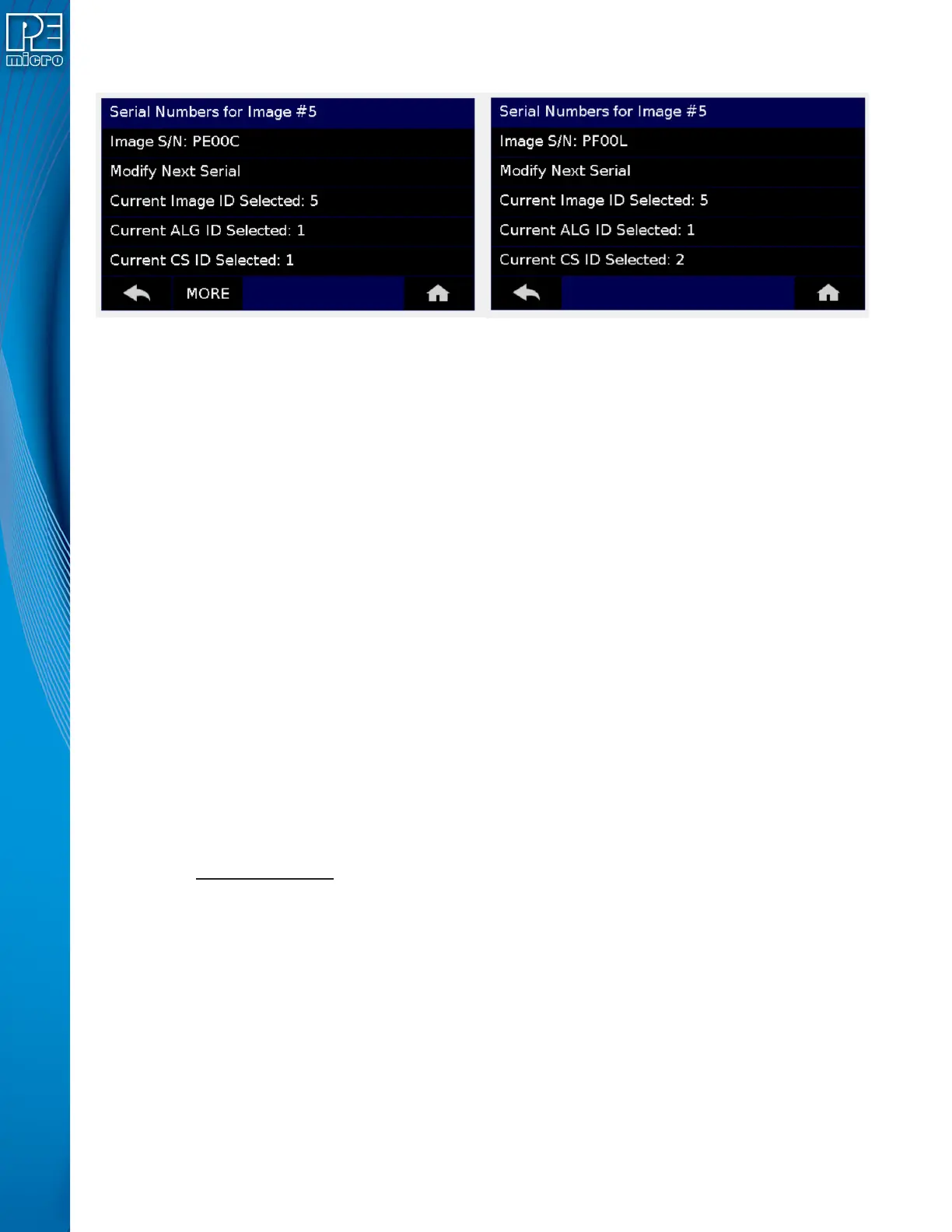
bottom to proceed to the next serial file (if any).
Figure 5-6: Serial Number View With Older Serial Files (CS IDs #1 & #2)
5.2.2.4 Show Image Restriction Stats (Requires FX or ProCryption Security License Activation)
Displays current statistics, if any, for Image Programmed Count & Maximum Allowed, Errors
Logged & Maximum Allowed, and Date Range Allowed. These limits can be set in the Security
Features section of the Cyclone Image Creation Utility (see Section 6.1.8.2 - Image
Restrictions).
Note: When Current Image Stats is displayed as a home screen item, only Image Programmed
Count & Maximum Allowed are displayed on the home screen.
5.2.3 Configure Cyclone Settings
Presents options that allow the user to choose to configure the Cyclone LC network settings, time/
date settings, and LCD touchscreen display settings, or to set the display to dynamic.
5.2.3.1 Edit Cyclone Name
Allows the user to edit the name of the Cyclone using the on-screen keyboard. Click “Done” to
save the new Cyclone name or “Cancel” to exit without saving a new Cyclone name. This name
will be displayed on the Cyclone LC home screen if the Cyclone is configured to do so.
5.2.3.2 Configure Network Settings
Presents options that allows the user to view or edit various IP settings, toggle the IP settings
between static and dynamic, and re-name the Cyclone LC.
5.2.3.2.1 Show Current IP Settings
This menu allows you to view the Cyclone LC IP address, Mask, and Gateway, and MAC address.
You may also tap these entries to edit, as long as the Cyclone is set to Static IP mode.
Dynamic vs. Static
There are two schemes for assigning IP addresses. One is the Static IP addressing mode. This
involves the user manually setting the IP address for every device on the network. In this case, it
falls to the user to ensure the IPs assigned do not conflict and are within the boundaries of the
network. The other is the Dynamic Host Configuration Protocol (DHCP). This involves setting up a
separate server to manage the IP addresses. The server is given a list of valid IP addresses for the
network. Using a predetermined set of rules, each new device that wishes to connect to the
network is given an IP address by the server. This takes the task of managing the validity and
uniqueness of IP addresses out of the user's hands and relegates it to the server. Cyclone LC
programmers are capable of using either Static IP addressing or DHCP.
5.2.3.2.2 Edit Static IP Settings
This menu allows you to edit the Cyclone’s IP address, Mask, and Gateway, and view the
Cyclone’s MAC address. If you are unable to edit these values, you may wish to check to be


 To Next Page