User Manual For Cyclone LC Programmers 92
8.4.2 The Control Tabs
The control tabs allow access to the Cyclone. Through these tabs you can view, add, and erase
Cyclone images, you can view and modify properties, you can modify licenses, see the Cyclone
screen remotely and view/manage Serial Files and Encryption Keys.
8.4.2.1 Images Tab
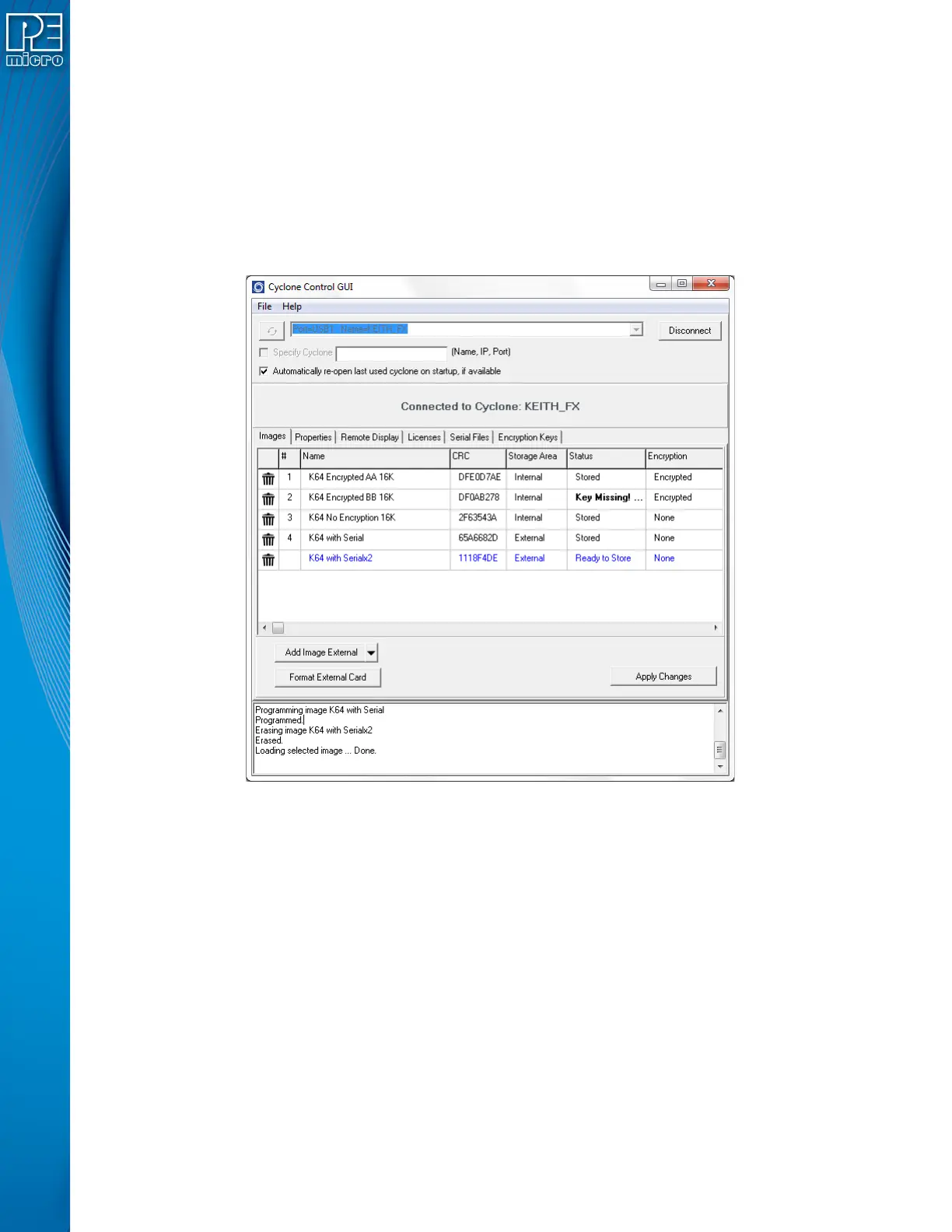
The Images tab allows the user to view and modify the Cyclone images both in internal Cyclone
memory and on external memory cards. To add a new image to the Cyclone, click on the “Add
Image Internal” button and selected the image you want to add. For the changes to take effect, the
“Apply Changes” button needs to be clicked, this will place the image in the Cyclone memory.
Figure 8-4: Images Tab - Image Ready to Store
CYCLONE FX programmers and CYCLONE programmers with the SDHC Port Activation License
can also store images in external memory (an SDHC card). The storage area for the Add Image
button is toggled between Internal and External by clicking on the drop down arrow on the right of
the “Add Image” button. Users can also right-click on an uncommitted image to toggle the storage
between Internal and External.


 To Next Page