User Manual For Cyclone LC Programmers 13
2.3 Creating A Stand-Alone Programming Image
A stand-alone programming (SAP) image is the result of pre-processing the programming algorithms,
data to be programmed, programming options, and scripted programming commands. These are
combined into a single encrypted file. This SAP image can then be loaded onto the Cyclone and used
to program, without need for the Cyclone to be connected to a PC.
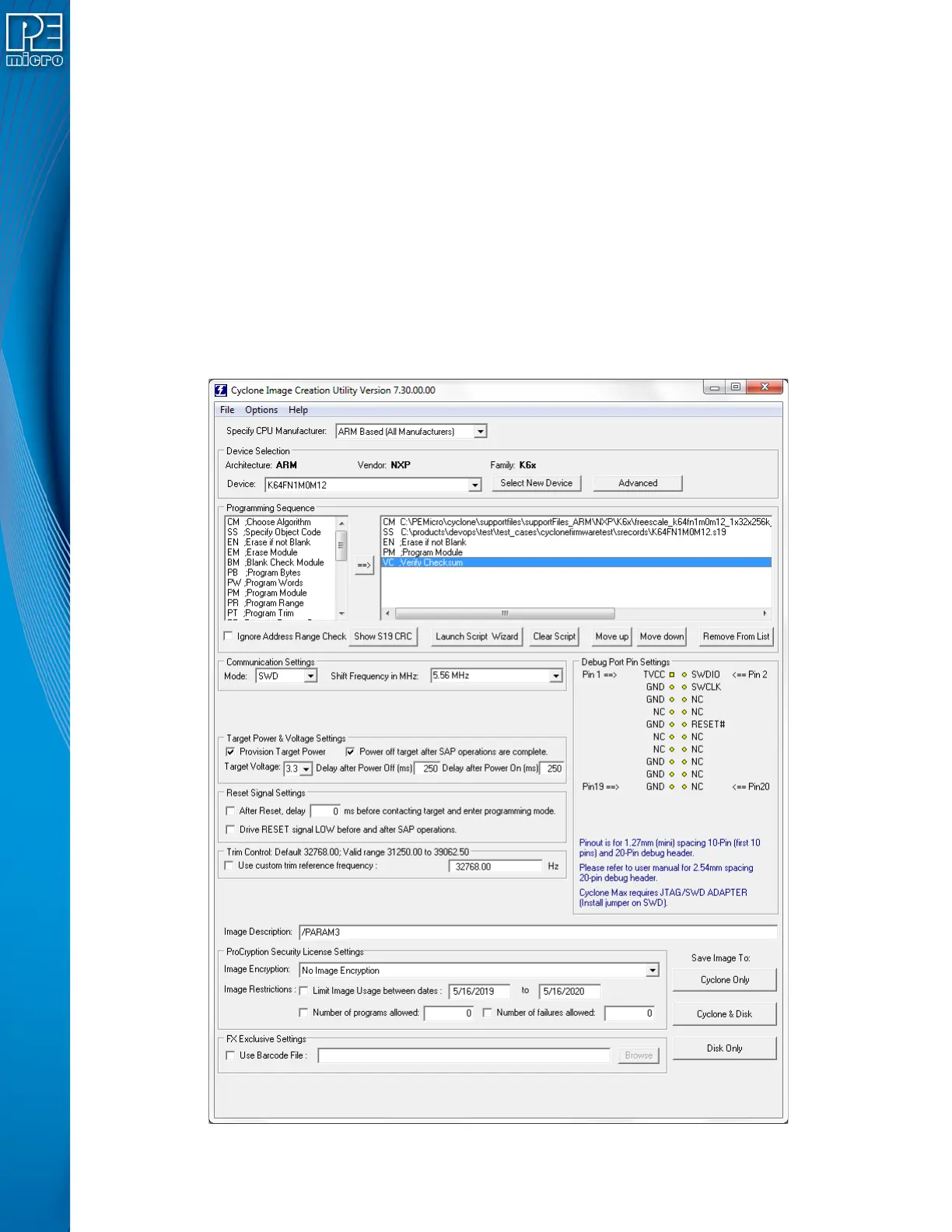
The Cyclone Image Creation Utility, shown below, allows the user to configure and save SAP images.
A simple programming image can be created in 6 steps:
Step 1. Run Cyclone Image Creation Utility
Step 2. Select Device Manufacturer & Device
Step 3. Set Up Programming Sequence
Step 4. Add Basic Programming Commands
Step 5. Configure Additional Settings
Step 6. Save SAP Image To Cyclone


 To Next Page