User Manual For Cyclone LC Programmers 50
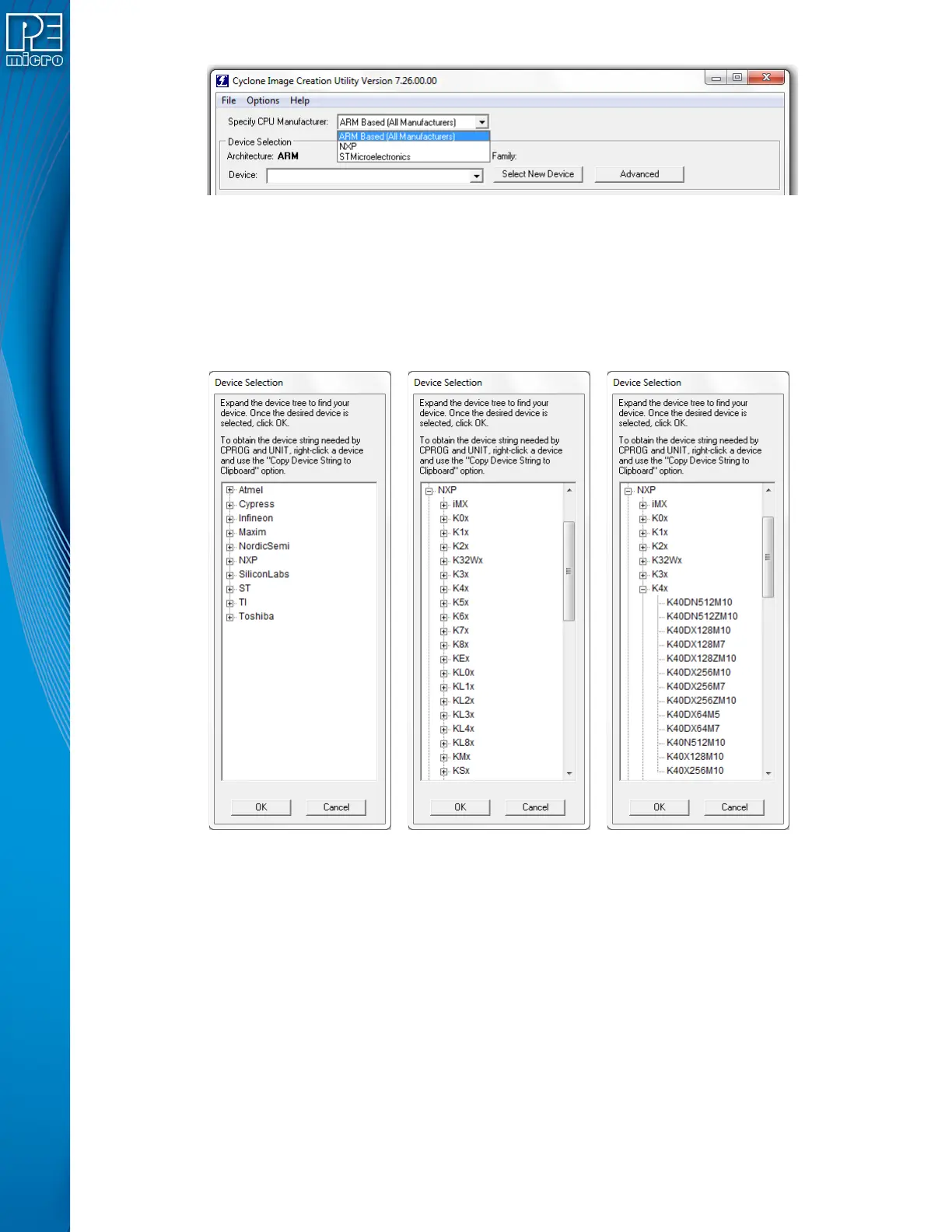
Figure 6-2: Specify CPU Manufacturer
6.1.1.1 ARM-Based Devices
If the user chooses “ARM Based (All Manufacturers)” they should then select their specific device.
A recently used device can be selected from the Device drop-down box on the left (see Section
6.1.1.3 - Device Box). The user may also click the "Select New Device" button. The Device
Selection window will then appear. This dialog directs the user how to navigate the device tree to
select their ARM device.
Figure 6-3: Device Selection - Drill Down To Specific Target Device
6.1.1.2 NXP or STMicroelectronics Devices
If the user chooses NXP or STMicroelectronics from the Specify CPU Manufacturer list, they
should then select the appropriate architecture from the Specify Target Architecture drop-down.


 To Next Page