Using the BASIC Stamp Editor
Page 40 • BASIC Stamp Programming Manual 2.0b • www.parallaxinc.com
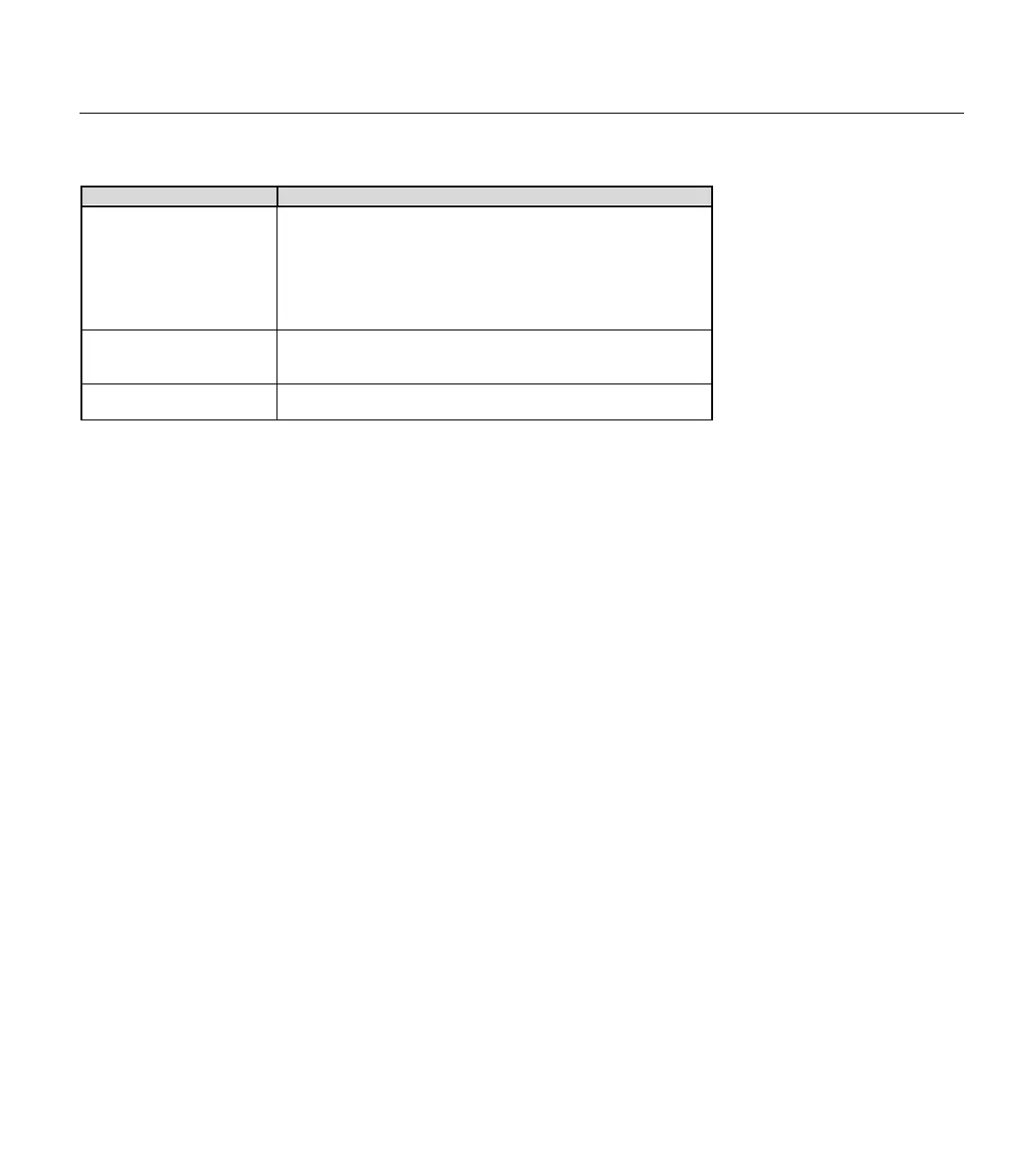
Download Mode Function
Modified (default)
This mode will cause only the source code files that were
modified since the last download to be downloaded next time.
If no files have been modified since the last download, or the
entire project has just been loaded into the editor, all the files
will be downloaded next time. This mode decreases the delay
during downloading projects and should help speed
development and testing.
All
This mode will cause all the source code files to be
downloaded each time. This will be noticeably slow with large
projects.
Current
This mode will cause only the current source code file to be
downloaded, ignoring all the others.
Regardless of the download mode selected, the programs will be
downloaded into the program slot indicated in their tab.
The BASIC Stamp Windows Editor also features a Memory Map (not
shown) that displays the layout of the current PBASIC program, DATA
usage and RAM register usage. Type CTRL+M, or press F7, to activate
this window.
When you activate the Memory Map, the editor will check your program
for syntax errors and, if the program’s syntax is OK, will present you with
a color-coded map of the RAM and EEPROM. You’ll be able to tell at a
glance how much memory you have used and how much remains. Two
important points to remember about this map are: 1) it only indicates how
your program will be downloaded to the BASIC Stamp; it does not "read"
the BASIC Stamp's memory, and 2) fixed variables like B3 and W1 and any
aliases do not show up on the memory map as memory used. The editor
ignores fixed variables when it arranges automatically allocated variables
in memory. Remember, fixed and allocated variables can overlap.
Another useful feature is the Identify function, CTRL+I. This will cause
the editor to try to connect to the BASIC Stamp to determine its firmware
version number. Use the Identify function to quickly determine if the
BASIC Stamp is correctly connected to the PC for programming.
Table 3.2: Project Download
MEMORY MAP FUNCTION.
I
DENTIFY FUNCTION.



 To Next Page