Customer Guide
HPAC Cell Cleaning
©2015 Parata Systems, LLC page 27 of 40 Parata Technical Assistance Center
120-0465 Rev 03 1-888-PARATA1 (727-2821)
6.8 Leaving the cell door open, insert the cell into the Mini and initiate a manual fill
for 0 pills. Refer to the Mini Operator’s Guide for instructions on creating a
manual fill.
Note This process forces air through the cell to remove any remaining moisture.
6.9 Visually inspect the cell:
• If you see any moisture inside the cell, allow it to continue air-drying.
Do not proceed until the cell looks completely dry.
• If the cell looks completely dry, continue to step 6.10.
6.10 Clear any fill errors and remove the cell from the unit.
7. Reassemble the cell:
7.1 Remove the drying cloth from the cell.
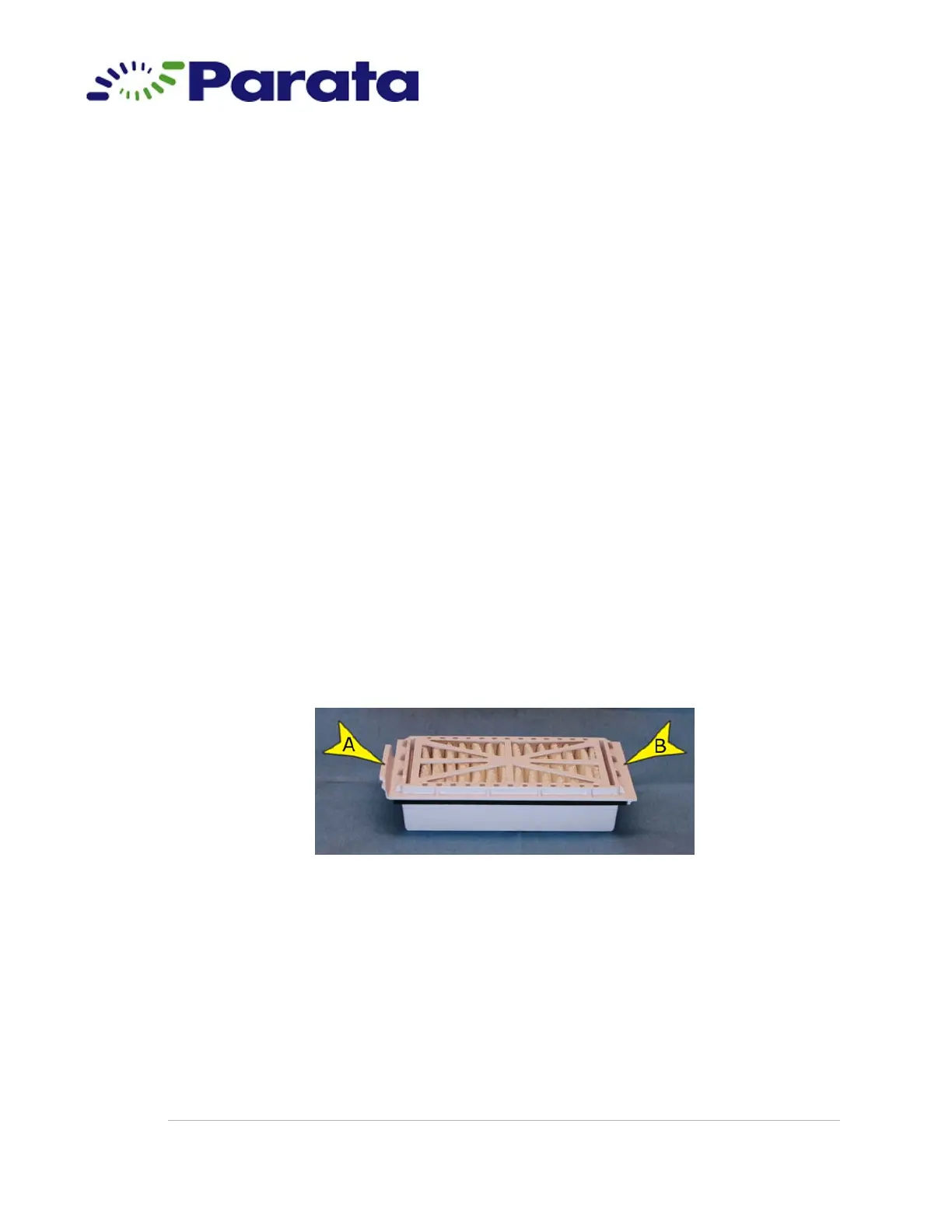
7.2 Install a new pleated breather:
7.2.a Obtain a new pleated breather from the cleaning kit.
Step 7.2.a The breather has a “tab end” (A) and a “flat end”
(B). It fits into the opening on top of the cell with
the tab end toward the cell door.



 To Next Page