EasyManua.ls Logo

Parrot bebop 2 - Flying; Piloting Screen

Parrot bebop 2
37 pages
Print Icon
To Next Page IconTo Next Page
To Previous Page IconTo Previous Page
Loading...
11
Flying
Flying
Note:
Joypad piloting mode is activated by default. To change mode, refer to the
Piloting settings section.
1. Launch the FreeFlight Pro application.
2. Wait until the connection between your smartphone and the Parrot Bebop 2 is
complete.
3. Press Start to pilot the Parrot Bebop 2.
> The piloting screen appears. It locks in landscape format.
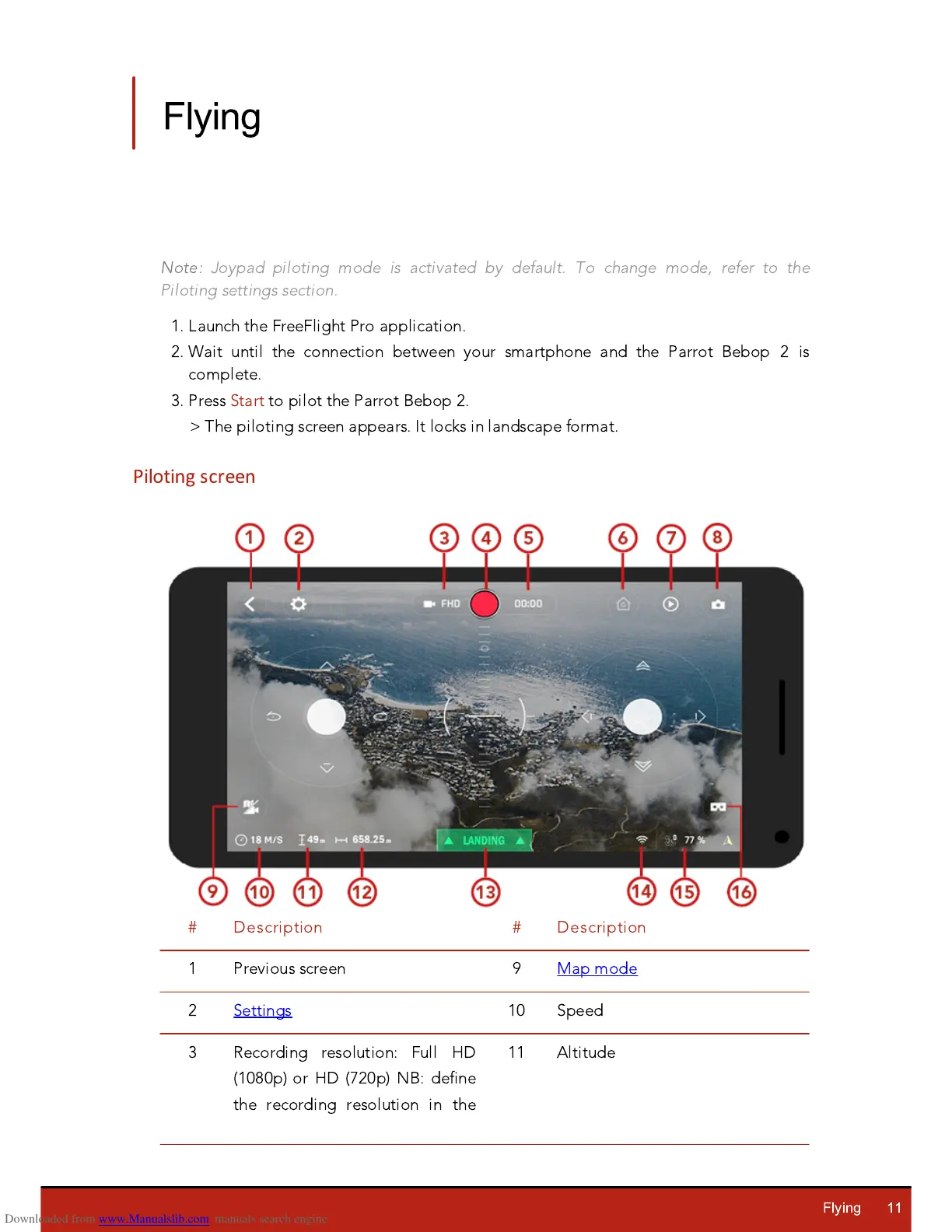
Piloting screen

#
Description
#
Description
1
Previous screen
9
Map mode
2
Settings
10
Speed
3
Recording resolution: Full
H
D
(1080p) or
H
D (720p) NB: define
the recording resolution in the
11
Altitude

Other manuals for Parrot bebop 2

Related product manuals