18
Flying
if the internet connection is lost while flying, the Parrot Bebop 2 will still be located on
the map.
·
wait until the icon turns green to indicate the Parrot Bebop 2 GPS position is
detected.
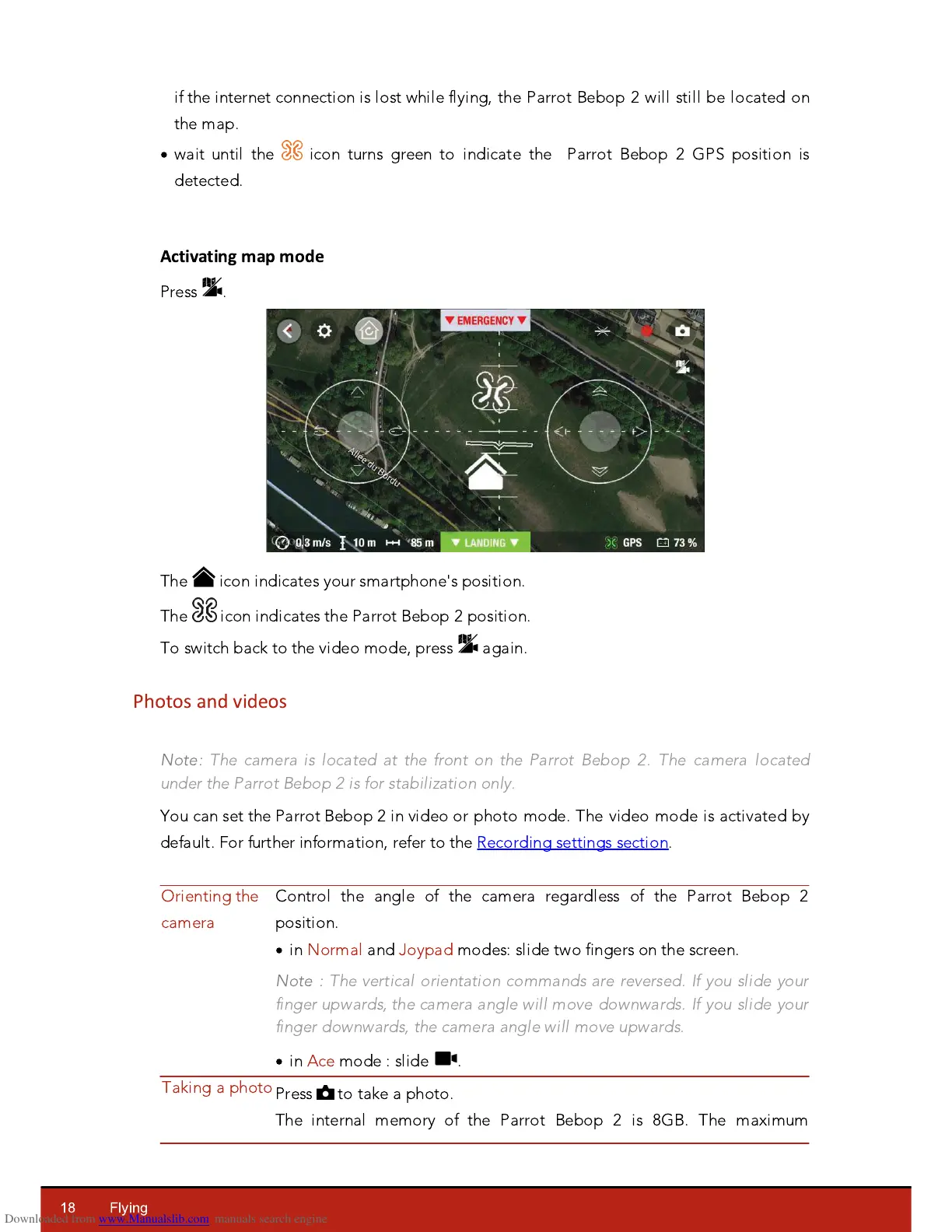
Activating map mode
Press .
The icon indicates your smartphone's position.
The icon indicates the Parrot Bebop 2 position.
To switch back to the video mode, press again.
Photos and videos
Note:
The camera is located at the front on the Parrot Bebop 2. The camera located
under the Parrot Bebop 2 is for stabilization only.
Y
ou can set the Parrot Bebop 2 in video or photo mode. The video mode is activated by
default. For further information, refer to the Recording settings section.
Control the angle of the camera regardless of the Parrot Bebop 2
position.
·
in Normal and
J
oypad modes: slide two fingers on the screen.
Note :
The vertical orientation commands are reversed. If you slide your
finger upwards, the camera angle will move downwards. If you slide your
finger downwards, the camera angle will move upwards.
·
in Ace mode : slide .














 To Next Page