22
Settings
Position, distances and limits
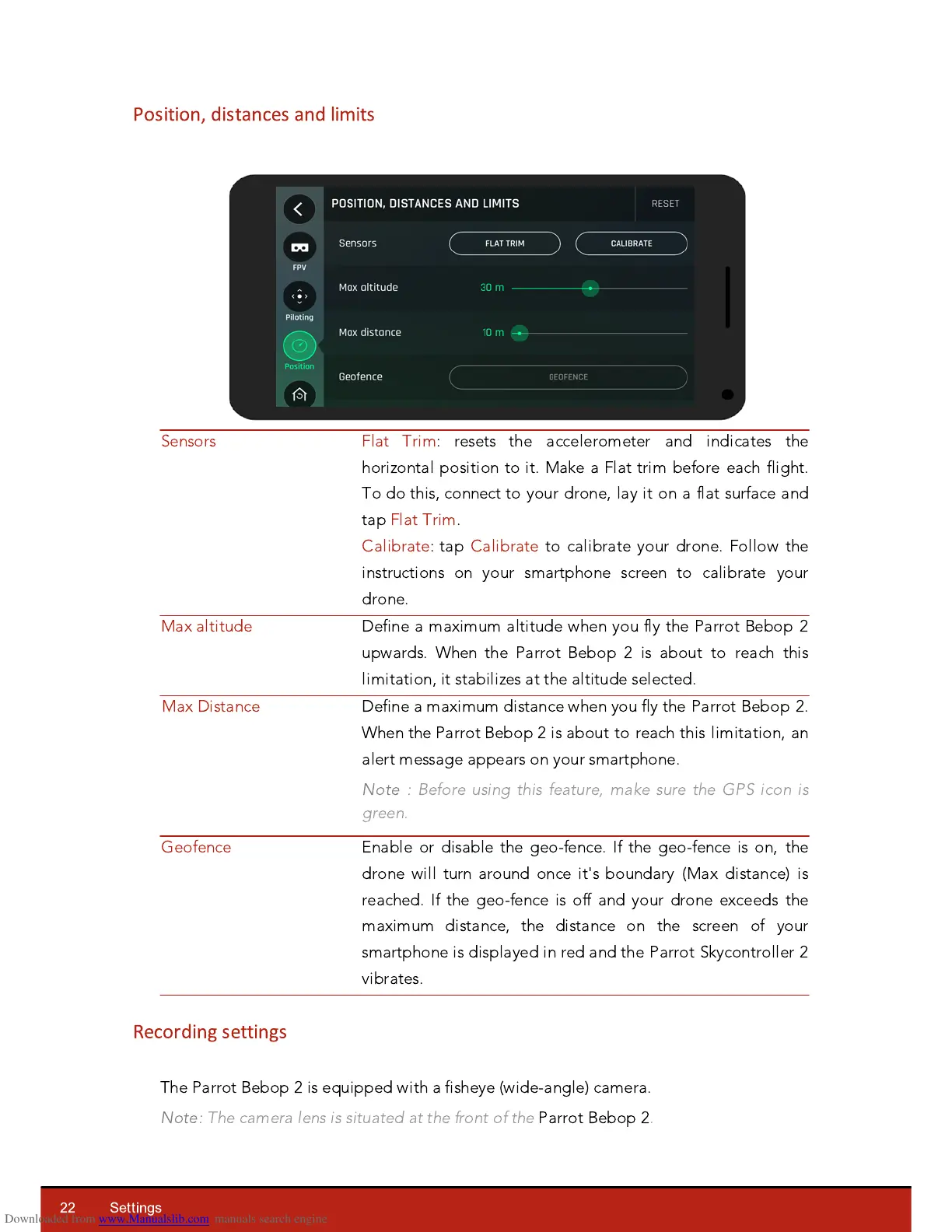
Flat Trim: resets the accelerometer and indicates the
hori
z
ontal position to it. Make a Flat trim before each flight.
To do this, connect to your drone, lay it on a flat surface and
tap Flat Trim.
Calibrate: tap Calibrate to calibrate your drone. Follow the
instructions on your smartphone screen to calibrate your
drone.
Define a maximum altitude when you fly the Parrot Bebop 2
upwards. When the Parrot Bebop 2 is about to reach this
limitation, it stabili
z
es at the altitude selected.
Define a maximum distance when you fly the Parrot Bebop 2.
When the Parrot Bebop 2 is about to reach this limitation, an
alert message appears on your smartphone.
Note :
Before using this feature, make sure the GPS icon is
green.
Enable or disable the geo-fence. If the geo-fence is on, the
drone will turn around once it's boundary (Max distance) is
reached. If the geo-fence is off and your drone exceeds the
maximum distance, the distance on the screen of your
smartphone is displayed in red and the Parrot Skycontroller 2
vibrates.
Recording settings
The Parrot Bebop 2 is e
q
uipped with a fisheye (wide-angle) camera.
Note:
The camera lens is situated at the front of the
Parrot Bebop 2
.














 To Next Page