EasyManua.ls Logo

Parrot bebop 2 - Page 23

Parrot bebop 2
37 pages
Print Icon
To Next Page IconTo Next Page
To Previous Page IconTo Previous Page
Loading...
23
Settings
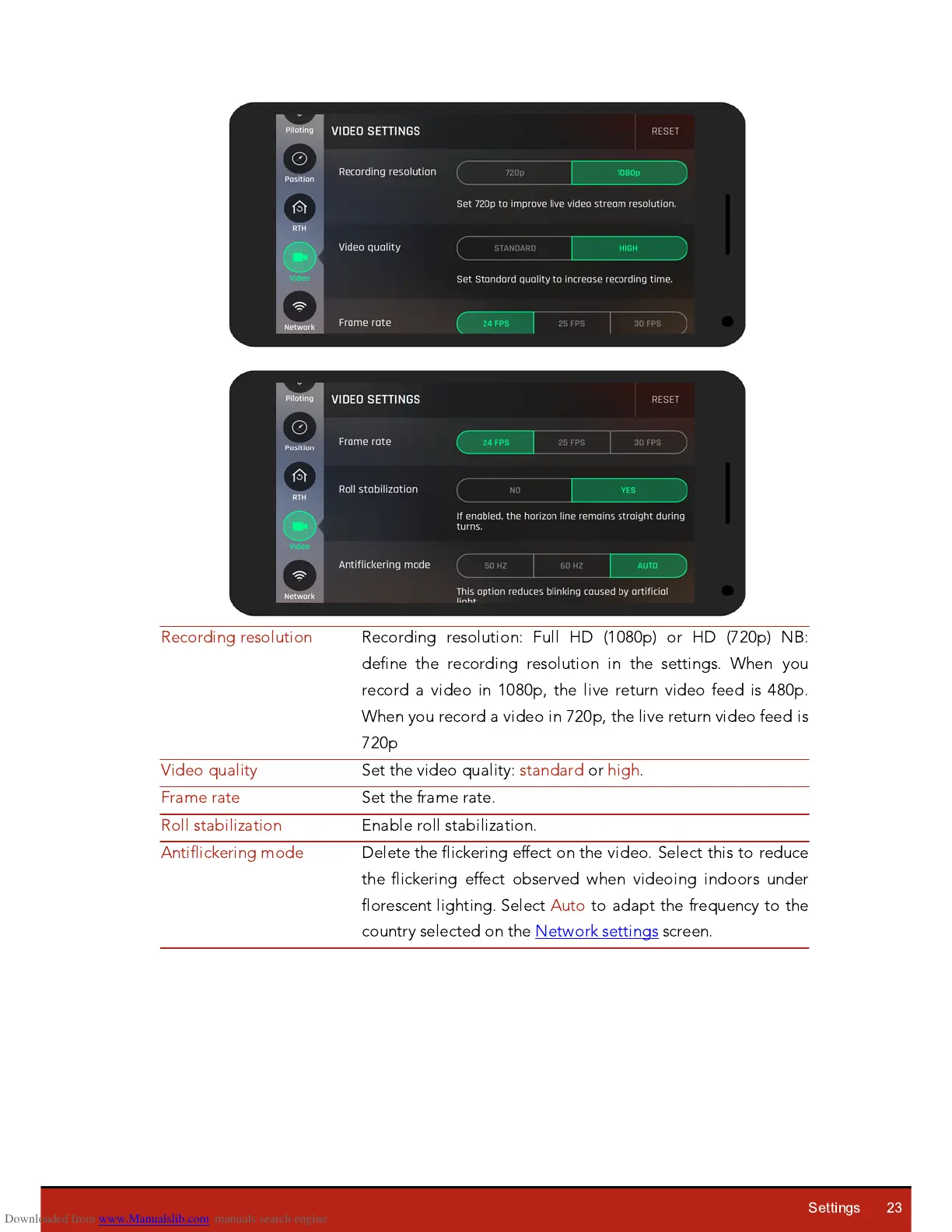
Recording resolution
Recording resolution: Full
H
D (1080p) or
H
D (720p) NB:
define the recording resolution in the settings. When you
record a video in 1080p, the live return video feed is 480p.
When you record a video in 720p, the live return video feed is
720p
Video
q
uality
Set the video
q
uality: standard or high.
Frame rate
Set the frame rate.
Roll stabili
z
ation
Enable roll stabili
z
ation.
Antiflickering mode
Delete the flickering effect on the video. Select this to reduce
the flickering effect observed when videoing indoors under
florescent lighting. Select Auto to adapt the fre
q
uency to the
country selected on the Network settings screen.

Other manuals for Parrot bebop 2

Related product manuals