13
Flying
The icon indicates that the Parrot Bebop 2 position is detected.
Make sure the Parrot Bebop 2 position is detected before taking off to register the
starting point correctly.
To display the last GPS position of the Parrot Bebop 2:
1. Launch FreeFlight Pro.
2. On the main screen, go to FL
Y
&
FILM > Settings.
3. Press See details.
> The latitude and longitude of the Parrot Bebop 2 position appears in the list.
Taking off
1. Place the Parrot Bebop 2 on a flat and dry surface and in a unobstructed and lit area.
2. Press Take Off.
> The Parrot Bebop 2 takes off and hovers at approximately 1 meter above the
ground.
Note:
Make sure the take-off location of the Parrot Bebop 2 is saved. To do so wait for
the icon to turn green.
Movements
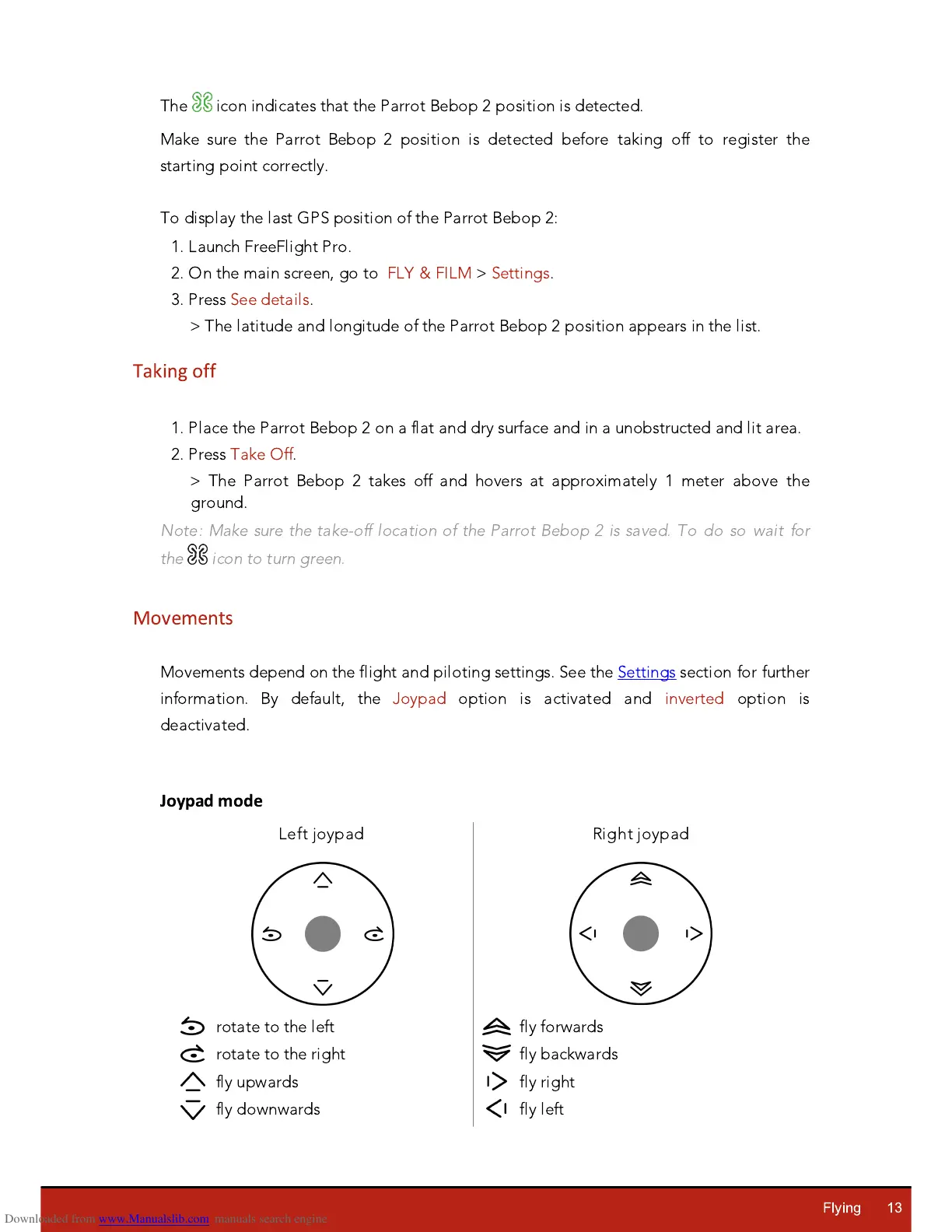
Movements depend on the flight and piloting settings. See the Settings section for further
information. By default, the
J
oypad option is activated and inverted option is
deactivated.
Joypad mode














 To Next Page