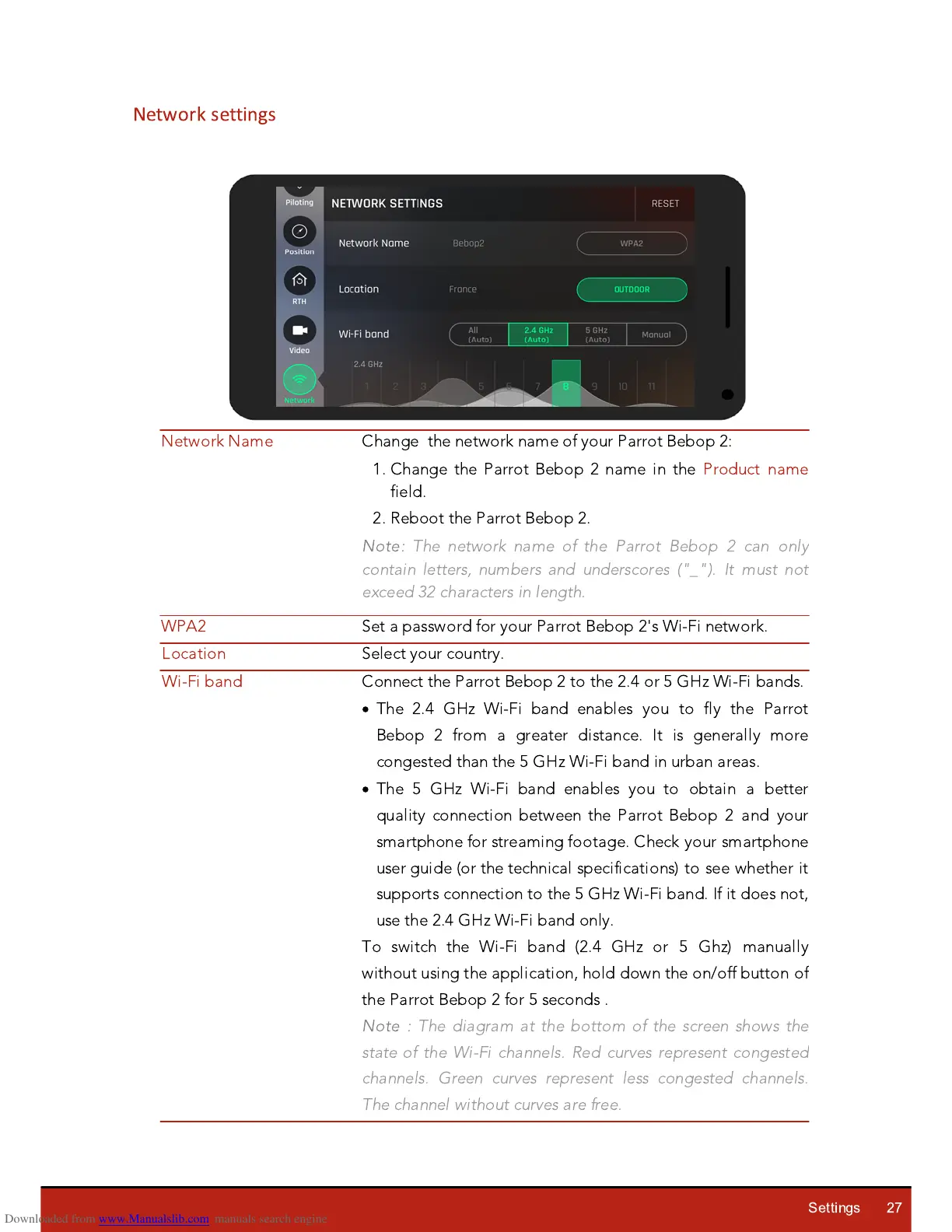
Change the network name of your Parrot Bebop 2:
1. Change the Parrot Bebop 2 name in the Product name
field.
2. Reboot the Parrot Bebop 2.
Note:
The network name of the Parrot Bebop 2 can only
contain letters, numbers and underscores ("_"). It must not
exceed 32 characters in length.
Connect the Parrot Bebop 2 to the 2.4 or 5 G
Hz
Wi-Fi bands.
·
The 2.4 G
Hz
Wi-Fi band enables you to fly the Parrot
Bebop 2 from a greater distance. It is generally more
congested than the 5 G
Hz
Wi-Fi band in urban areas.
·
The 5 G
Hz
Wi-Fi band enables you to obtain a better
q
uality connection between the Parrot Bebop 2 and your
smartphone for streaming footage. Check your smartphone
user guide (or the technical specifications) to see whether it
supports connection to the 5 G
Hz
Wi-Fi band. If it does not,
use the 2.4 G
Hz
Wi-Fi band only.
To switch the Wi-Fi band (2.4 G
Hz
or 5 Gh
z
) manually
without using the application, hold down the on/off button of
the Parrot Bebop 2 for 5 seconds .
Note :
The diagram at the bottom of the screen shows the
state of the Wi-Fi channels. Red curves represent congested
channels. Green curves represent less congested channels.
The channel without curves are free.














 To Next Page