www.123send.net
123 - axept S900 User Guide v1.7
4 Processing a Sale (Contactless)
axept® S800 supports contactless payments (including technologies such as Android Pay, Apple Pay etc.) and can
be used where a cardholder has the contactless feature enabled on their card or device. The following describes
the end-to-end operation of a contactless payment sale:
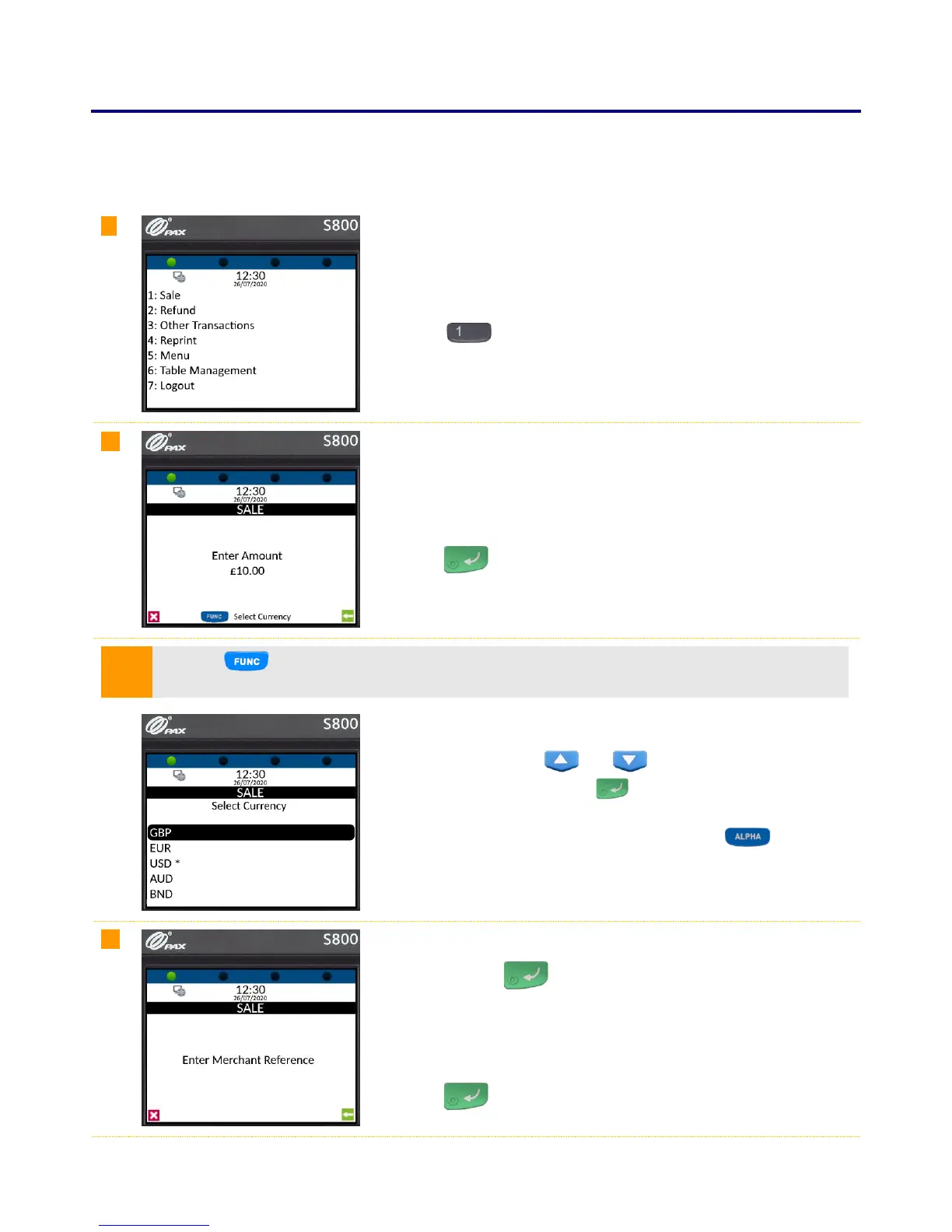
From the main menu, select option 1: Sale
(Press the key on the keypad).
Enter the amount of the sale using the keypad.
(axept® S800 will automatically enter the decimal place for you).
Press the key on the keypad to continue.
Press the key to change to a different currency if required - The option to select different
currencies is only available if specified on the order form and setup with the Acquirer.
Use the navigation keys ( and ) on the keypad to highlight the
required currency and press the key on the keypad to confirm.
(* denotes the current default currency, press the key on the
keypad to change the default to the selected currency)
If required, enter the reference for the transaction. If a reference is not
needed, press the key on the keypad to skip.
(To use alpha characters, press the numeric key containing the alpha
character required multiple times until it is displayed).
Press the key on the keypad to continue.



 To Next Page