EasyManua.ls Logo

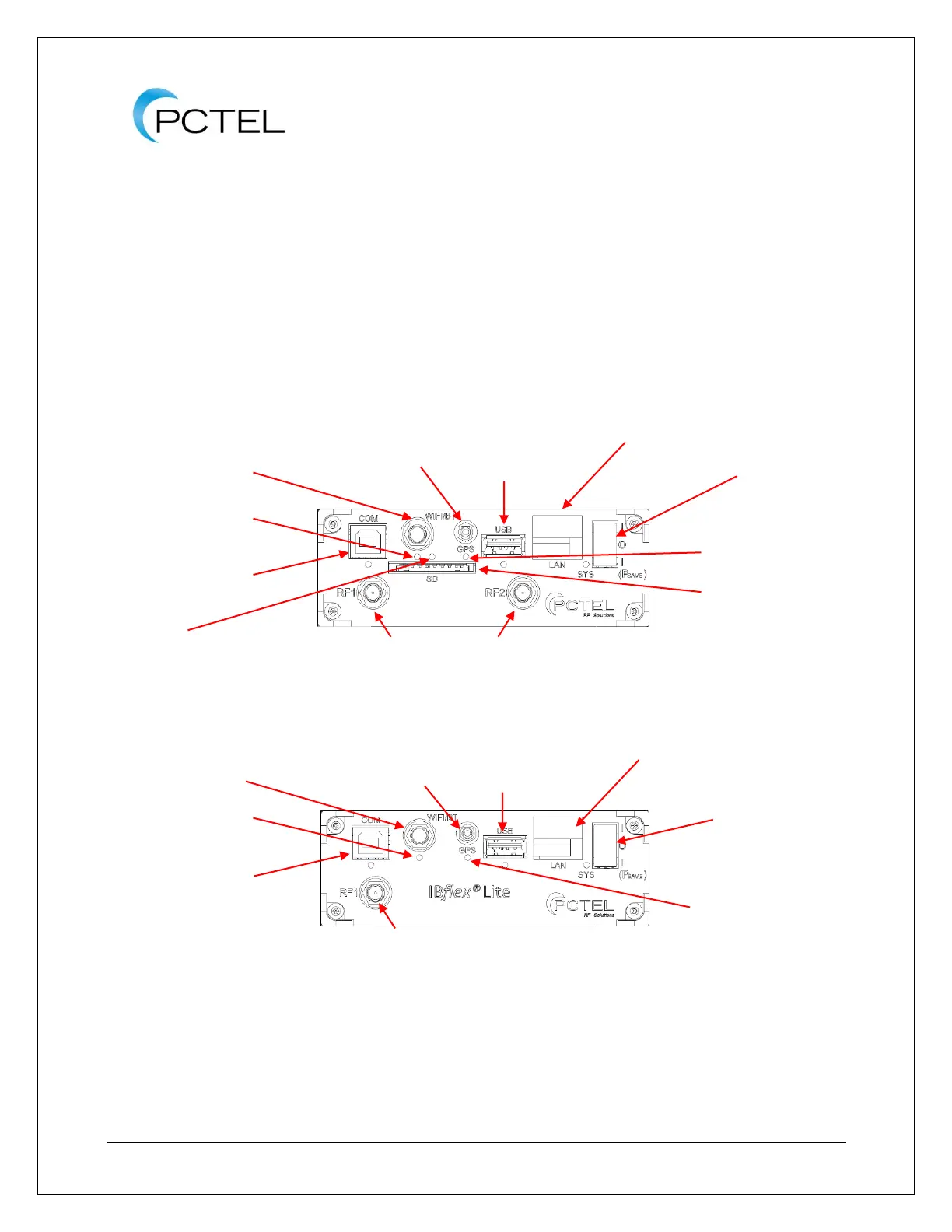
PCTEL IBflex - Leds; Figure 9 - Seegull Ibflex Scanning Receiver Front Display; Figure 10 - Seegull Ibflex Lite Scanning Receiver Front Display

Default Icon
42 pages
Print Icon
To Next Page IconTo Next Page
To Previous Page IconTo Previous Page
Loading...
SeeGull
®
IBflex
®
Reference Manual
PCTEL, Inc. Page 18 of 42 Rev T
8. Turn on power switch. ThePsave” position lowers the power consumption to 10 watts
for cellular technology testing (Wi-Fi testing and/or Wi-Fi/Bluetooth Communications
increases power consumption).
9. If saving data to SD card, insert SD card into SD port. SD card use is limited to 32
Gigabytes. (IBflex Only)
10. If you are using a Windows computer: Install and start the collection software. The
system is now ready for use.
11. If using an Android device: Refer to the Application User Manual. The system is now
ready for use.
Figure 9 - SeeGull IBflex Scanning Receiver Front Display
Figure 10 - SeeGull IBflex Lite Scanning Receiver Front Display
3.3. LEDs
The GPS LED colors indicate the following
states:
Green: GPS module locked to GPS
signal

SMA Connector(s) for RF
antenna(s)
Power switch
SMB Connector for
the GPS Antenna
USB data connector for PCs (COM)
SMA Connector for Wi-Fi
Communications/Bluetooth
USB port for testing
via Wi-Fi adapter,
connecting to
Android device
SD card port
Ethernet Port (LAN)
GPS LED
Bluetooth and Wi-Fi LED
SD LED
SMA Connector for RF antenna
USB data connector for PCs (COM)
Bluetooth and Wi-Fi LED
SMA Connector for Wi-Fi
Communications/Bluetooth
SMB Connector for
the GPS Antenna
USB port for testing
via Wi-Fi adapter,
connecting to Android
device
Ethernet Port (LAN)
Power switch
GPS LED

Table of Contents

Related product manuals