PCTEL, Inc. Page 20 of 42 Rev T
4.4. Ethernet Instructions
The Ethernet feature enables TCP/IP
communication between IBflex and a control
PC (or laptop). PC DHCP connection is
recommended for remote access to the
scanner. The user also has the option of
manually entering a Static IP Address.
Note: If the TCP socket connection is
lost without a proper shutdown, the
scanner must be power cycled before
accepting a new connection.
Ethernet Using DHCP
Using this method, an IP address, Subnet
mask, and Gateway are acquired on the PC
automatically from a DHCP server. The
scanner is then assigned a corresponding
IP address with identical Subnet mask using
SeeGull Assistant. Make sure the selected
IP address for Scanner is not in use or
duplicated.
Set Up PC:
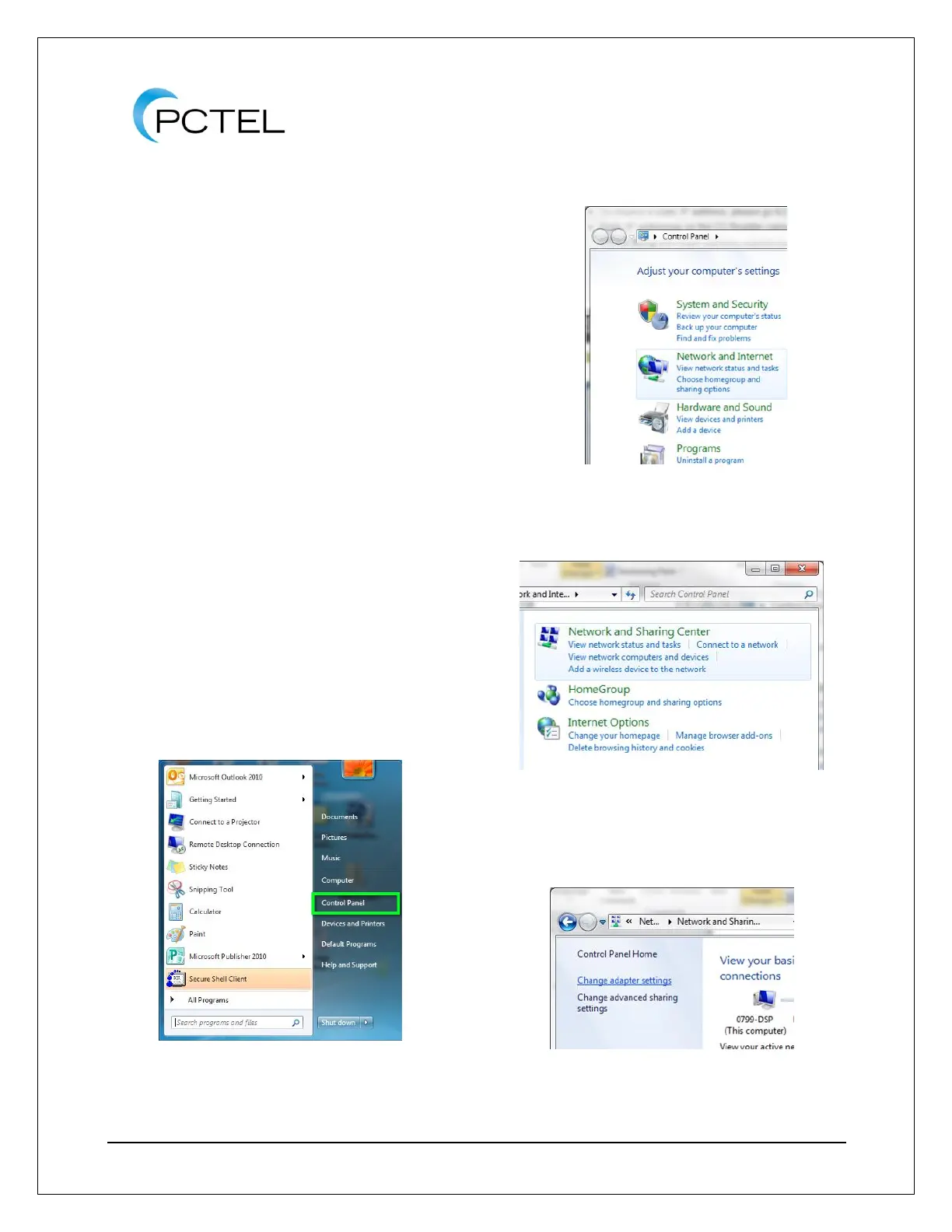
1. Click Start menu, then click on
Control Panel.
Figure 11 - Control Panel
2. Click Network and Internet.
Figure 12 - Network and Internet
3. Click Network and Sharing Center.
Figure 13 - Network and Sharing Center
4. Click Change adapter settings.
Figure 14 - Change Adapter Settings



 To Next Page