EasyManua.ls Logo

Pentax 17 - User Manual

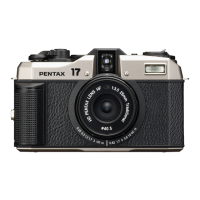
Pentax 17
48 pages
Print Icon
To Next Page IconTo Next Page
Loading...
Chapter 1: Introduction
Read this chapter before use.
This chapter gives you an overview of the PENTAX 17.
Chapter 2: Getting Started
Read this chapter before using the PENTAX 17 for the first time.
This chapter explains necessary preparations before shooting.
Chapter 3 and later
Read these chapters when you want to learn more about the different
camera functions.
These chapters provide information on shooting and settings.
Operating Manual
The serial number is located on the bottom of the camera.
Model: R08010

Questions and Answers

  • C
    changjamesJul 30, 2025
    How to fix Pentax 17 Digital Camera that won't turn on?
    • K
      Kristin PerezJul 31, 2025
      If your Pentax Digital Camera isn't turning on, there are a few potential reasons. First, ensure the battery is correctly inserted. If it is, the battery might be exhausted, so try replacing it. Also, verify that you are using a compatible CR2 3V lithium battery.
  • D
    Darlene LutzAug 7, 2025
    Why does my Pentax 17 keep turning off?
    • G
      Gregory EllisAug 7, 2025
      If your Pentax Digital Camera turns off during use, it could be due to the 'Auto Power Off' function activating because the camera hasn't been used for a while; try pressing the shutter release button halfway. Alternatively, the battery might be low, so replacing it could solve the problem.
  • A
    Aaron LongAug 14, 2025
    Why is the autofocus not working on my Pentax Digital Camera?
    • J
      John TaylorAug 14, 2025
      If the autofocus on your Pentax Digital Camera isn't working, start by cleaning the lens with a soft, dry cloth. Also, check if the shooting range setting is correct by using the zone focusing ring to select the desired zone. Lastly, if the subject is too close, switch to macro mode or move further away.
  • M
    Mary PhamAug 21, 2025
    What to do if the flash does not work on Pentax 17 Digital Camera?
    • O
      osimsAug 21, 2025
      If the flash on your Pentax Digital Camera isn't firing, first check the selected shooting mode to ensure it allows flash operation. Also, confirm that the flash has finished charging.

Summary

Safety Precautions

About the Camera

Important safety warnings and precautions related to the camera's internal components.

About the Battery

Crucial safety information regarding the use and handling of camera batteries.

Handling the Camera and Accessories

Precautions for safely handling the camera and its accessories.

Introduction

Checking the Contents of the Package

Verifying all items are present in the camera package before initial use.

Names and Functions of the Working Parts

Detailed identification and explanation of the camera's external controls and components.

Indicator Lamps

Understanding the meaning of the camera's status and warning indicator lights.

Viewfinder Display

Explanation of the symbols and information shown within the camera's viewfinder.

Getting Started

Attaching the Strap

Instructions on how to securely attach the camera strap to the device.

Inserting a Battery

Step-by-step guide for correctly inserting the camera's power source.

Turning the Camera On

Procedures for powering the camera on and off using the main switch.

Preparing the Film

Essential steps for loading and preparing film for shooting with the camera.

Inserting the Film

Detailed steps for loading a roll of film into the camera correctly.

Rewinding the Film

Guide on how to safely rewind exposed film back into the cartridge.

Holding the Camera

Proper techniques for holding the camera firmly for stable shooting.

Shooting

Shooting in the Full Auto Mode

Basic shooting procedure using the camera's automatic settings.

Setting the Shooting Mode

How to select different shooting modes like Auto, Standard, Bulb, etc.

Using the Flash for Shooting

Instructions for forcing the flash to fire for fill-light or low-light situations.

Bulb Shooting

Procedure for long exposures using the Bulb mode.

Setting the Shooting Range

Adjusting the focus zone for different subject distances.

Compensating the Exposure

Adjusting exposure levels to correct for bright or dark subjects.

Using a Filter

Guidelines for attaching and using external filters with the camera lens.

Appendix

Troubleshooting

Solutions for common camera problems and errors.

Main Specifications

Technical details and features of the PENTAX 17 camera.

Handling Precautions

Important advice for safely carrying, using, and cleaning the camera.

Storing Your Camera

Recommendations for proper storage to maintain camera condition.

Warranty Policy

Details regarding the camera's warranty coverage and service procedures.

Regulatory Compliance Statements

Information on FCC and other regulatory compliance for the device.

Pentax 17 Specifications

General IconGeneral
TypeFilm Camera
FlashBuilt-in
Weather SealingNo
Lens25mm f/3.5
Lens MountFixed
Shutter Speed1/350 sec
Exposure ModesAuto, Program
Video RecordingNo
ViewfinderOptical

Videos

How to Load Your Pentax 17

How to Rewind Your Pentax 17

Related product manuals