16
Getting Started
1
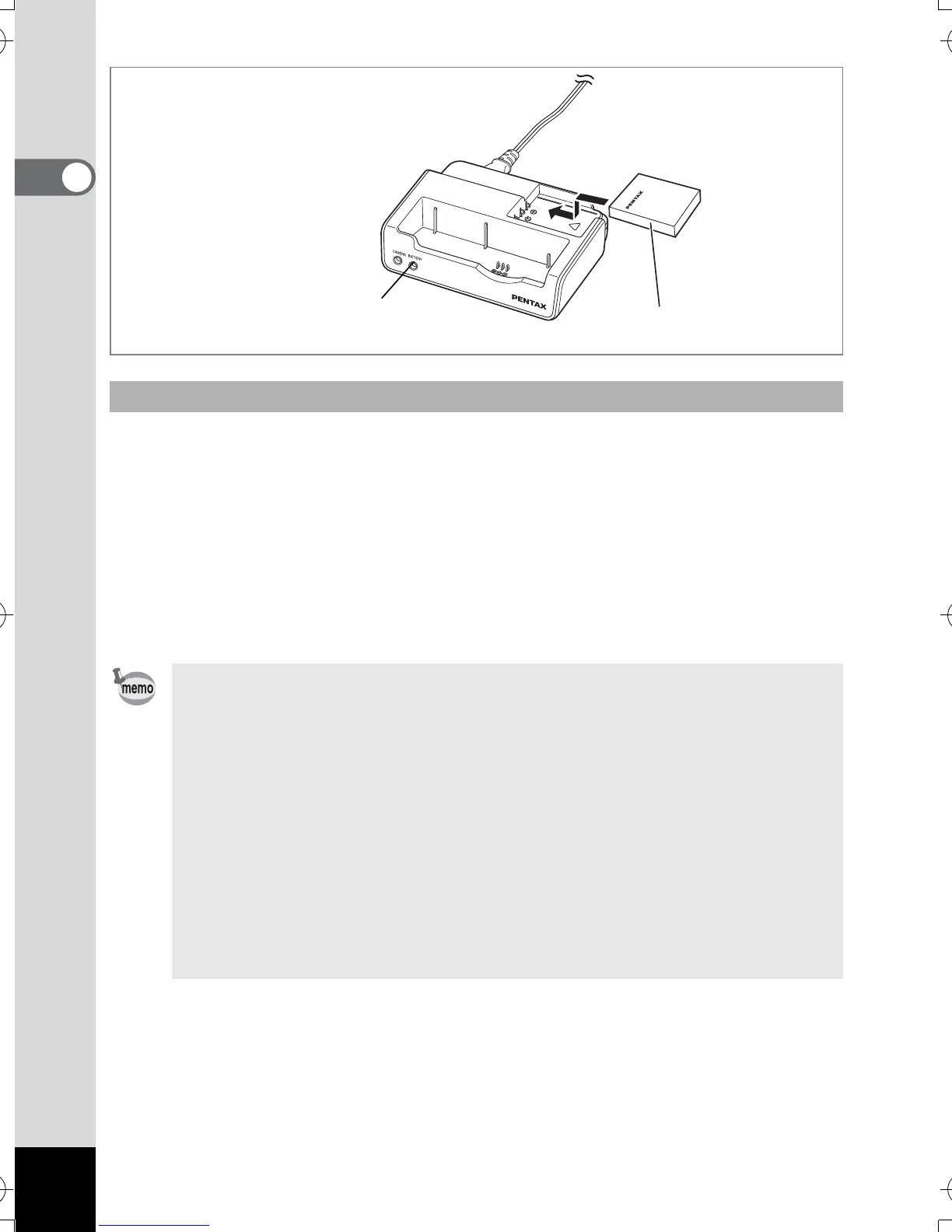
You can remove the battery from the camera and charge it.
3 Place the battery in the battery charging stand so that the
PENTAX name is visible.
The BATTERY charging indicator on the stand lights red while the battery is
being charged and goes out when charging is completed.
4 Remove the battery from the battery charging stand when
charging is completed.
Charging the Battery by Itself
• You can put the camera and the battery together on the battery charging
stand to charge the battery inside the camera and a spare battery.
• The time required for full charge is about 100 minutes.
The appropriate ambient temperature range for charging the battery is
0°C – 40°C (32°F to 104°F).
• The charging time may vary depending on the ambient temperature and
charging conditions.
• When the battery reaches the end of its service life, the time that the
camera can be operated becomes shorter even when the battery is fully
charged. In this event, replace the battery.
• You can also remove the battery from the camera and charge it using the
optional battery charger D-BC8.
3
BATTERY charging
indicator
e_kb386.book Page 16 Monday, February 28, 2005 2:39 PM



 To Next Page