58
Taking Pictures
4
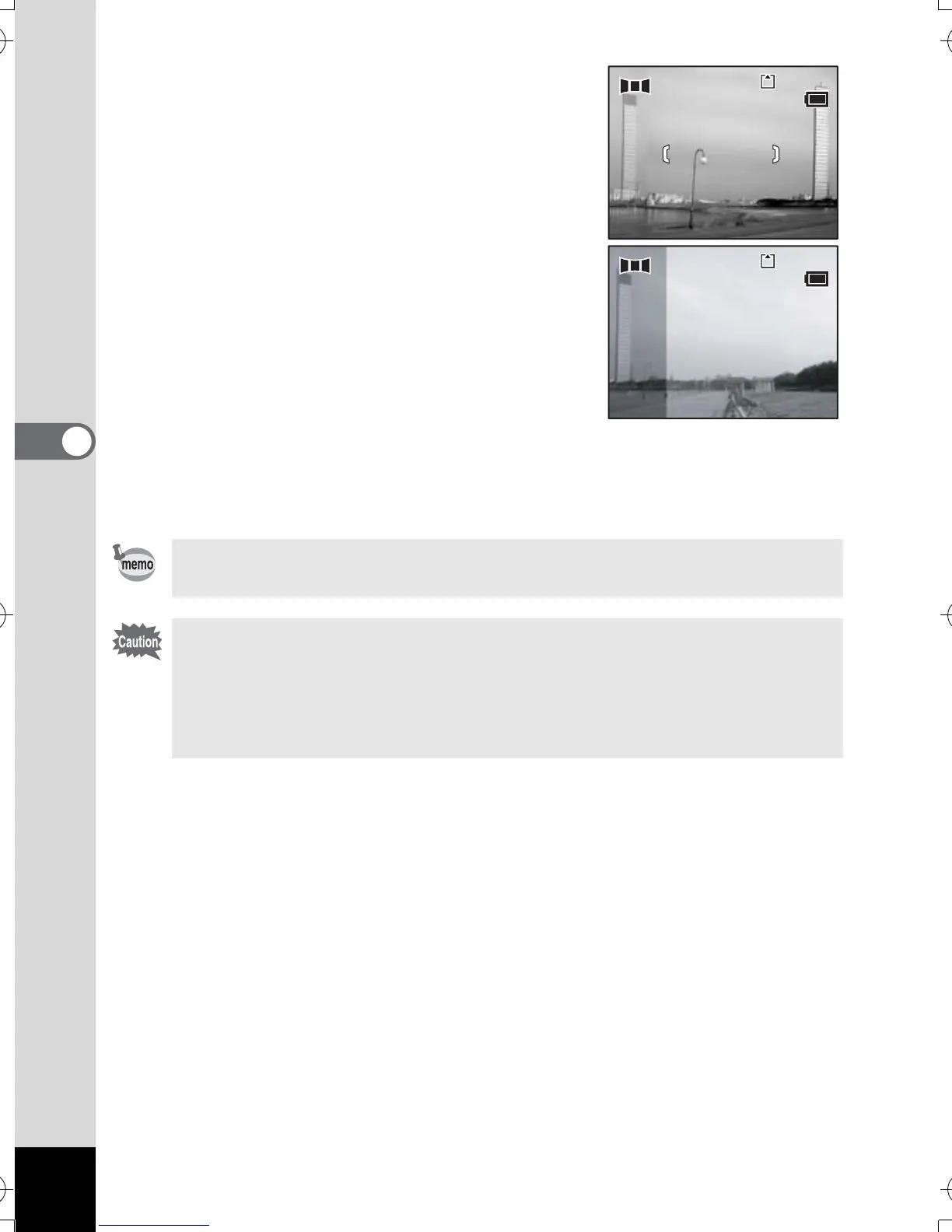
5 Take the first image.
Press the shutter release button to take the
first image. The right edge of the image
appears in half-transparent form on the left
of the LCD monitor.
6 Move the camera to the right and take
the second image.
Move the camera until the half-transparent
image and the actual view overlap and
press the shutter release button. Repeat
Steps 5 and 6 to take the third and
subsequent images.
7 Press the OK button.
The screen returns to Step 4.
To cancel Panorama Assist mode, change to another mode.
• The camera cannot join the images. Use the panorama software
supplied with the camera (ACDSee for PENTAX, ACD
photostitcher). Refer to “ACDSee for PENTAX Users Guide” for
instructions on creating panorama pictures.
• Continuous shooting is not possible in Panorama Assist mode.
11
12:00
11
12:00
3/24/2005
3/24/2005
10
12:00
10
12:00
3/24/2005
3/24/2005
e_kb386.book Page 58 Monday, February 28, 2005 2:39 PM



 To Next Page