EasyManua.ls Logo

Pentax SF10 - Page 19

Pentax SF10
72 pages
Print Icon
To Next Page IconTo Next Page
To Previous Page IconTo Previous Page
Loading...
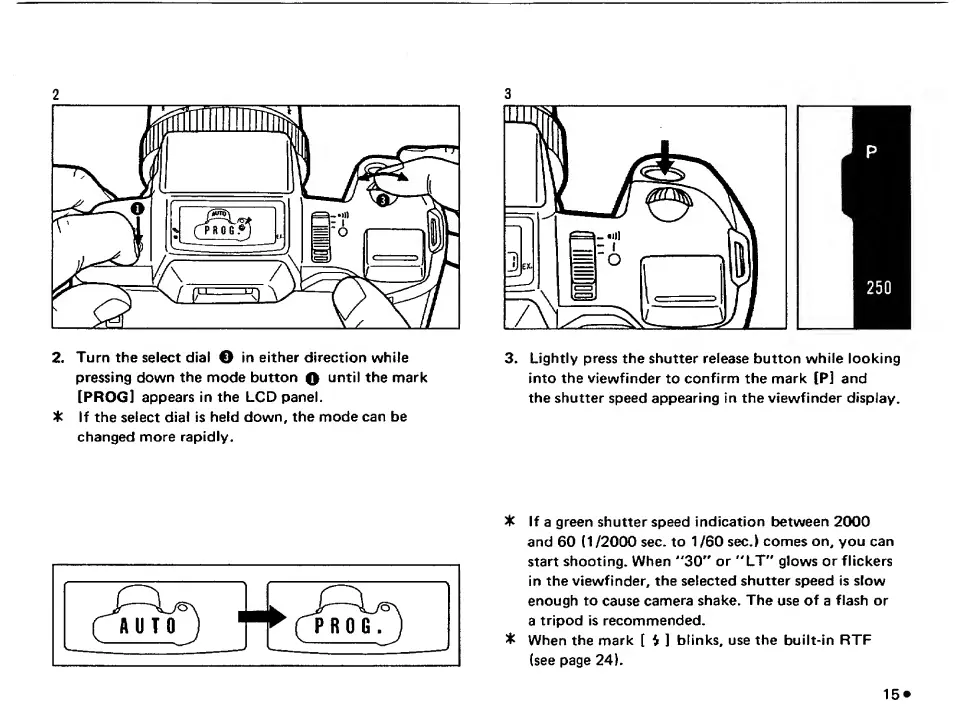
2
2.
Turn
the
select
dial
O
in
either
direction
while
pressing
down
the
mode
button
Q
until
the
mark
[PROG]
appears
in
the
LCD
panel.
t
If
the
select
dial
is
held
down,
the
mode
can
be
changed
more
rapidly.
3
3.
Lightly
press
the
shutter
release
button
while
looking
into
the
viewfinder
to
confirm
the
mark
[P]
and
the
shutter
speed
appearing
in
the
viewfinder
display.
3k
If
a
green
shutter
speed
indication
between
2000
and
60
(1/2000
sec.
to
1
/60
sec.)
comes
on,
you
can
start
shooting.
When
''30''
or
"LT"
glows
or
flickers
in
the
viewfinder,
the
selected
shutter
speed
is
slow
enough
to
cause
camera
shake.
The
use
of
a
flash
or
a
tripod
is
recommended,
3k
When
the
mark
[
$
]
blinks,
use
the
built-in
RTF
(see
page
24).

Related product manuals