EasyManua.ls Logo

Pentax SF10 - Manual Focusing

Pentax SF10
72 pages
Print Icon
To Next Page IconTo Next Page
To Previous Page IconTo Previous Page
Loading...
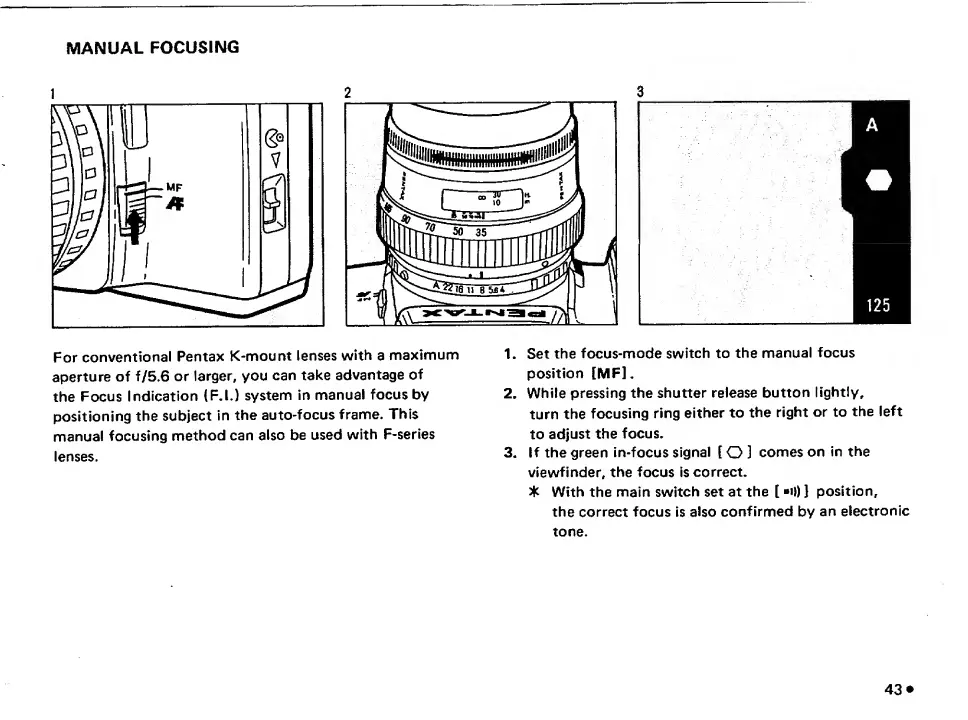
MANUAL
FOCUSING
1
2
3
For
conventional
Pentax
K-mount
lenses
with
a
maximum
1.
Set
the
focus-mode
switch
to
the
manual
focus
aperture
of
f/5.6
or
larger,
you
can
take
advantage
of
position
IMF],
the
Focus
Indication
(F.l.)
system
in
manual
focus
by
2.
While
pressing
the
shutter
release
button
lightly,
positioning
the
subject
in
the
auto-focus
frame.
This
turn
the
focusing
ring
either
to
the
right
or
to
the
left
manual
focusing
method
can
also
be
used
with
F-series
to
adjust
the
focus.
lenses.
3.
If
the
green
in-focus
signal
[
O
]
comes
on
in
the
viewfinder,
the
focus
is
correct.
5k
With
the
main
switch
set
at
the
[
•!))
J
position,
the
correct
focus
is
also
confirmed
by
an
electronic
tone.
43

Related product manuals