EasyManua.ls Logo

Pentax SF10 - Selecting Single Film Advance Mode; Selecting Focus Mode

Pentax SF10
72 pages
Print Icon
To Next Page IconTo Next Page
To Previous Page IconTo Previous Page
Loading...
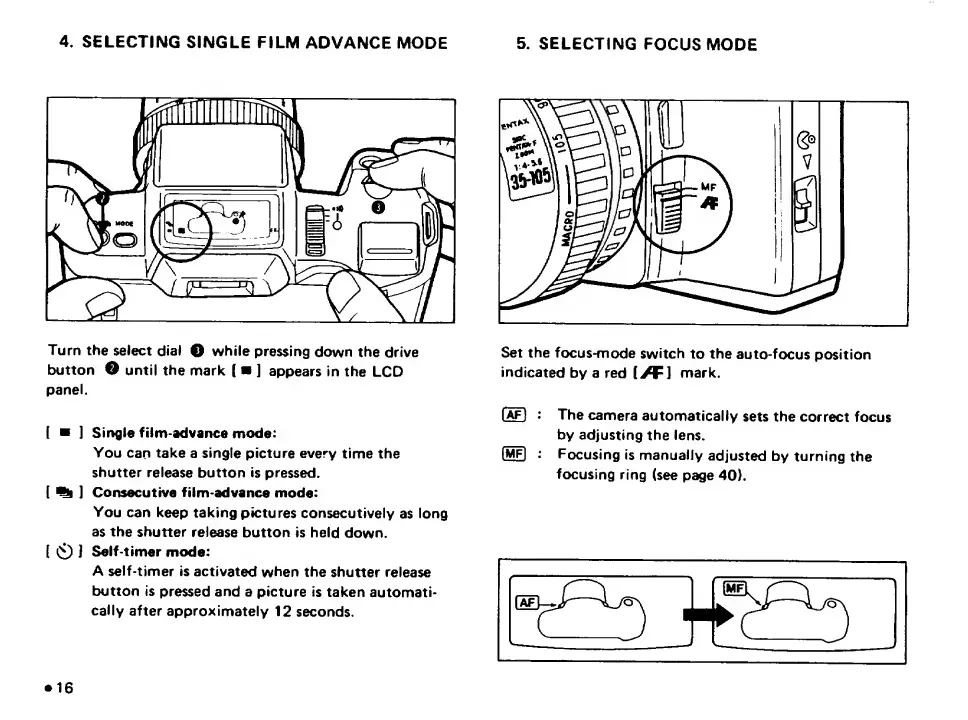
5.
SELECTING
FOCUS
MODE
4.
SELECTING
SINGLE
FILM
ADVANCE
MODE
Turn
the
select
dial
O
while
pressing
down
the
drive
button
O
until
the
mark
(
]
appears
in
the
LCD
panel.
[
]
Single
film-advance
mode:
You
can
take
a
single
picture
every
time
the
shutter
release
button
is
pressed.
[
^
]
Consecutive
film-advance
mode:
You
can
keep
taking
pictures
consecutively
as
long
as
the
shutter
release
button
is
held
down.
[
CD
J
Self-timer
mode:
A
self-timer
is
activated
when
the
shutter
release
button
is
pressed
and
a
picture
is
taken
automati¬
cally
after
approximately
12
seconds.
Set
the
focus-mode
switch
to
the
auto-focus
position
indicated
by
a
red
[>F1
mark.
(^)
:
The
camera
automatically
sets
the
correct
focus
by
adjusting
the
lens.
(me)
Focusing
is
manually
adjusted
by
turning
the
focusing
ring
(see
page
40).

Related product manuals