EasyManua.ls Logo

Pentax SF10 - Shooting with Built-In RTF

Pentax SF10
72 pages
Print Icon
To Next Page IconTo Next Page
To Previous Page IconTo Previous Page
Loading...
11.
SHOOTING
WITH
BUILT-IN
RTF
(1)
Using
the
Programmed
Auto
Flash
mode
In
low
light
or
backlit
situations,
the
camera's
Programmed
Auto
Flash
mode
automatically
selects
the
best
combina¬
tion
of
shutter
speed
and
aperture
according
to
lighting
conditions,
making
flash
photography
accurate
and
easy.
Lenses
with
focal
lengths
between
35mm
and
210mm
(with
the
exception
of
macro
lenses)
can
be
used
in
this
mode.
I
^
(AF)--5/£jj4^7S^
EX.
^
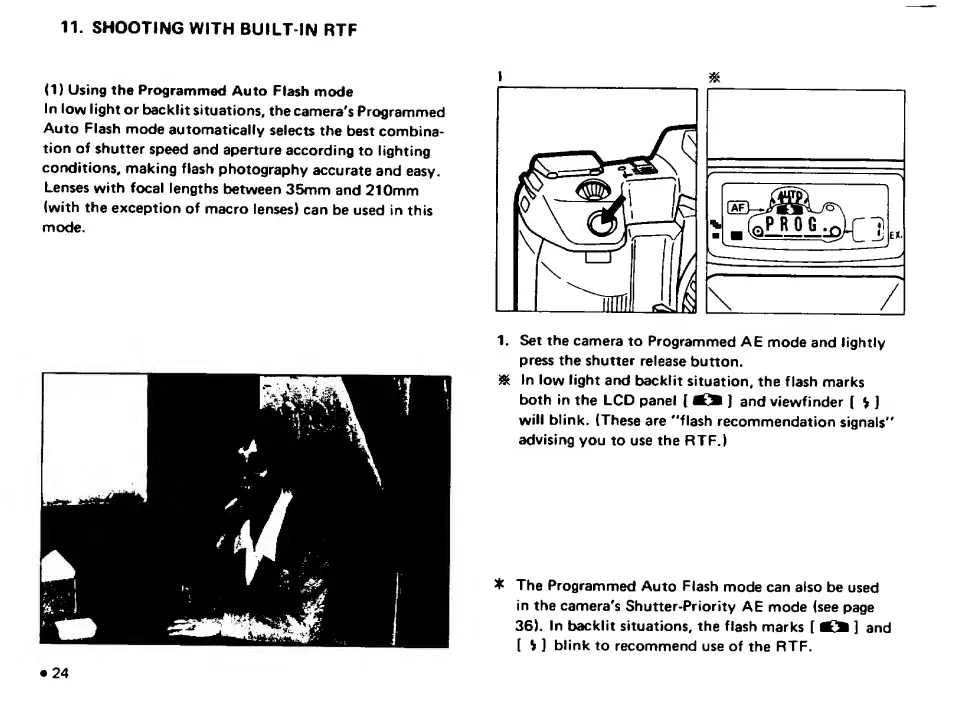
1.
Set
the
camera
to
Programmed
AE
mode
and
lightly
press
the
shutter
release
button.
^
In
low
light
and
backlit
situation,
the
flash
marks
both
in
the
LCD
panel
(
]
and
viewfinder
(
V
]
will
blink.
(These
are
"flash
recommendation
signals"
advising
you
to
use
the
RTF.)
The
Programmed
Auto
Flash
mode
can
also
be
used
In
the
camera's
Shutter-Priority
AE
mode
(see
page
36).
In
backlit
situations,
the
flash
marks
[
]
and
(
H
]
blink
to
recommend
use
of
the
RTF.
24

Related product manuals