EasyManua.ls Logo

Pentax SF10 - Page 29

Pentax SF10
72 pages
Print Icon
To Next Page IconTo Next Page
To Previous Page IconTo Previous Page
Loading...
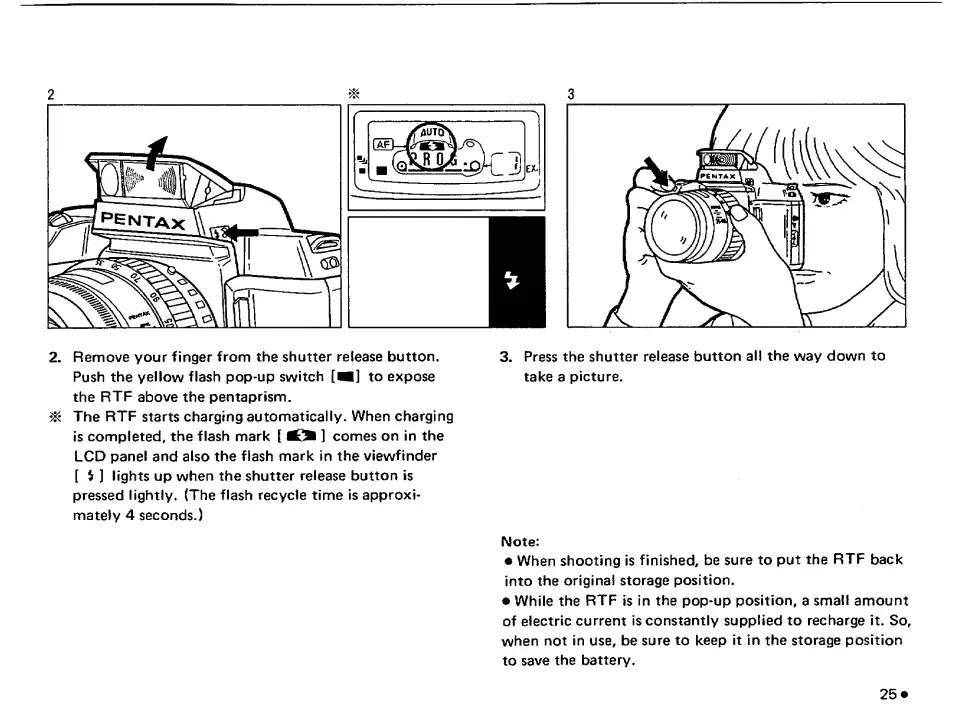
2.
Remove
your
finger
from
the
shutter
release
button.
Push
the
yellow
flash
pop-up
switch
[V]
to
expose
the
RTF
above
the
pentaprism.
^
The
RTF
starts
charging
automatically.
When
charging
is
completed,
the
flash
mark
[
]
comes
on
in
the
LCD
panel
and
also
the
flash
mark
in
the
viewfinder
[
$
]
lights
up
when
the
shutter
release
button
is
pressed
lightly.
(The
flash
recycle
time
is
approxi¬
mately
4
seconds.)
3.
Press
the
shutter
release
button
all
the
way
down
to
take
a
picture.
Note:
When
shooting
Is
finished,
be
sure
to
put
the
RTF
back
into
the
original
storage
position.
While
the
RTF
is
in
the
pop-up
position,
a
small
amount
of
electric
current
is
constantly
supplied
to
recharge
it.
So,
when
not
in
use,
be
sure
to
keep
it
in
the
storage
position
to
save
the
battery.

Related product manuals