EasyManua.ls Logo

Pentax SF10 - Using Bulb Mode

Pentax SF10
72 pages
Print Icon
To Next Page IconTo Next Page
To Previous Page IconTo Previous Page
Loading...
USING
BULB
MODE
This
mode
Is
useful
in
long
exposures
for
photographing
fireworks
and
night
scenes.
The
shutter
remains
open
as
long
as
the
shutter
release
button
is
held
down.
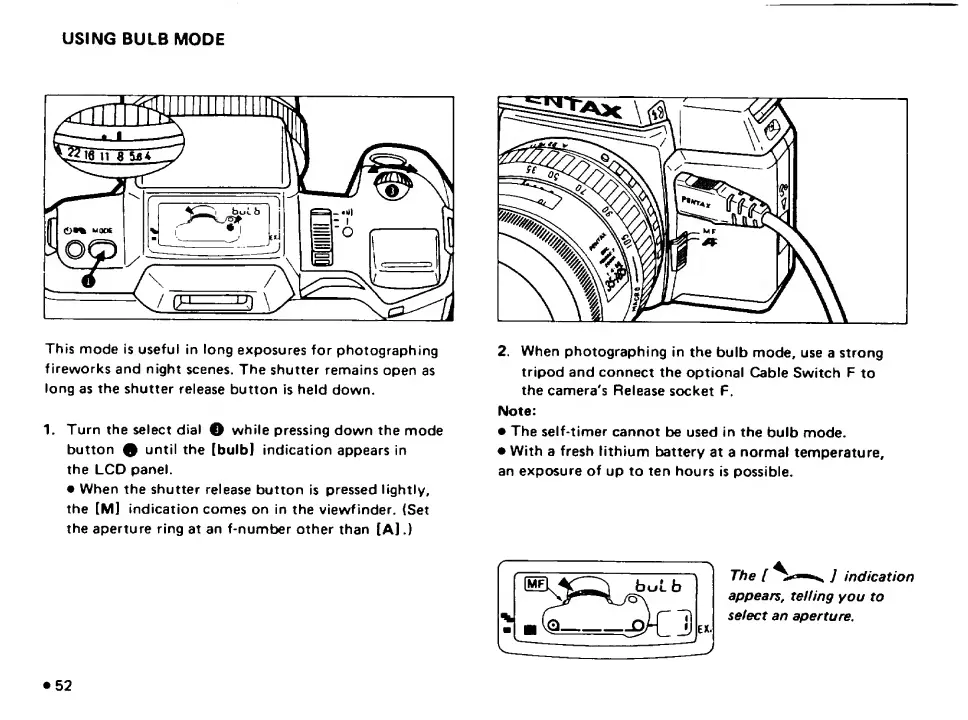
1.
Turn
the
select
dial
o
while
pressing
down
the
mode
button
0
until
the
[bulb]
indication
appears
in
the
LCD
panel.
When
the
shutter
release
button
is
pressed
lightly,
the
[Ml
indication
comes
on
in
the
viewfinder.
{Set
the
aperture
ring
at
an
f-number
other
than
[A].)
2.
When
photographing
in
the
bulb
mode,
use
a
strong
tripod
and
connect
the
optional
Cable
Switch
F
to
the
camera's
Release
socket
F.
Note:
The
self-timer
cannot
be
used
in
the
bulb
mode.
With
a
fresh
lithium
battery
at
a
normal
temperature,
an
exposure
of
up
to
ten
hours
is
possible.
The
[
^
]
indication
appears,
tef/ing
you
to
select
an
aperture.
52

Related product manuals