EasyManua.ls Logo

Pentax SF10 - Using Self-Timer

Pentax SF10
72 pages
Print Icon
To Next Page IconTo Next Page
To Previous Page IconTo Previous Page
Loading...
USING
SELF-TIMER
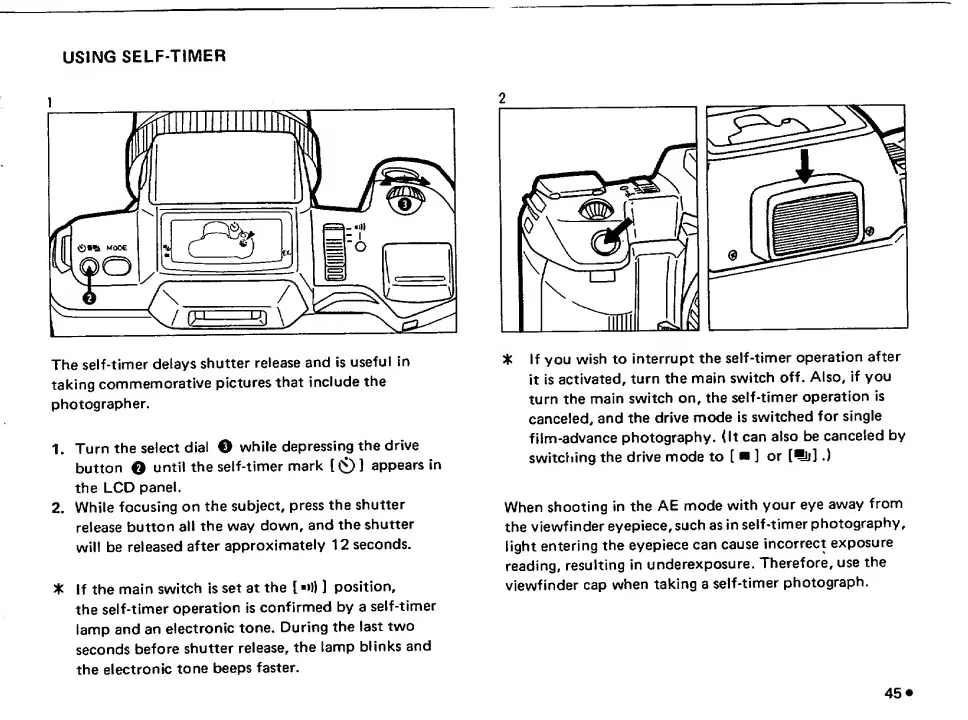
The
self-timer
delays
shutter
release
and
is
useful
in
taking
commemorative
pictures
that
include
the
photographer.
1.
Turn
the
select
dial
O
while
depressing
the
drive
button
O
until
the
self-timer
mark
[0}
appears
in
the
LCD
panel.
2.
While
focusing
on
the
subject,
press
the
shutter
release
button
all
the
way
down,
and
the
shutter
will
be
released
after
approximately
12
seconds.
3k
If
the
main
switch
is
set
at
the
[
>
!))
position,
the
self-timer
operation
is
confirmed
by
a
self-timer
lamp
and
an
electronic
tone.
During
the
last
two
seconds
before
shutter
release,
the
lamp
blinks
and
the
electronic
tone
beeps
faster.
%
If
you
wish
to
Interrupt
the
self-timer
operation
after
it
is
activated,
turn
the
main
switch
off.
Also,
if
you
turn
the
main
switch
on,
the
self-timer
operation
is
canceled,
and
the
drive
mode
is
switched
for
single
film-advance
photography.
(It
can
also
be
canceled
by
switciiing
the
drive
mode
to
[
]
or
[^].)
When
shooting
in
the
AE
mode
with
your
eye
away
from
the
viewfinder
eyepiece,
such
as
in
self-timer
photography,
light
entering
the
eyepiece
can
cause
incorrect
exposure
reading,
resulting
in
underexposure.
Therefore,
use
the
viewfinder
cap
when
taking
a
self-timer
photograph.
45

Related product manuals