EasyManua.ls Logo

Pentax SF10 - Using Focus-Lock Function

Pentax SF10
72 pages
Print Icon
To Next Page IconTo Next Page
To Previous Page IconTo Previous Page
Loading...
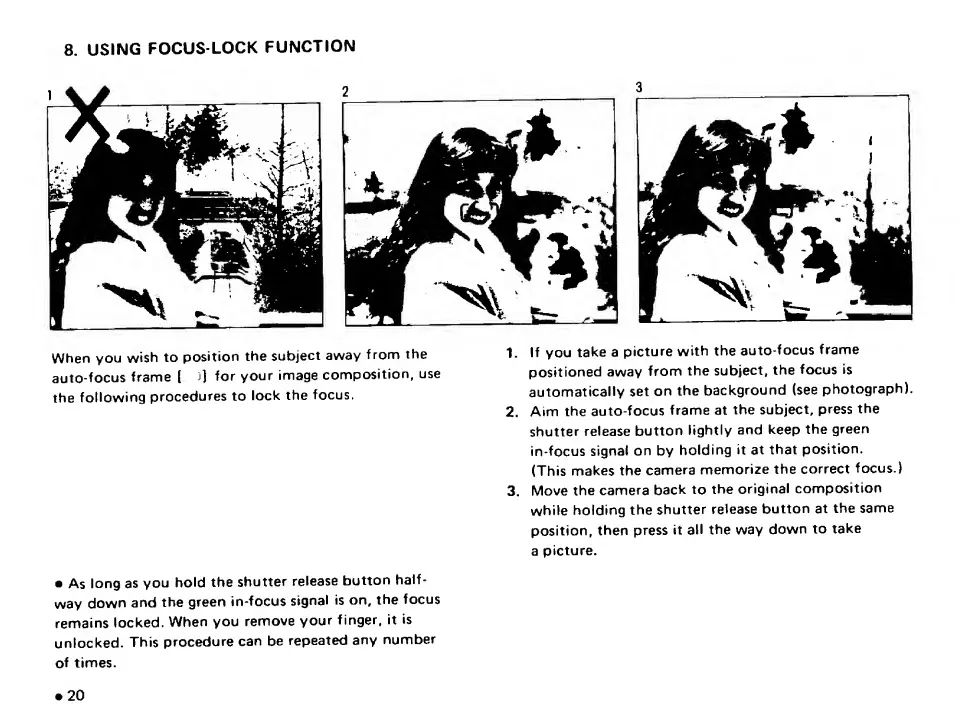
8.
USING
FOCUS-LOCK
FUNCTION
When
you
wish
to
position
the
subject
away
f
ronrj
the
auto-focus
frame
(
j]
for
your
image
composition,
use
the
following
procedures
to
lock
the
focus.
1
.
If
you
take
a
picture
with
the
auto-focus
frame
positioned
away
from
the
subject,
the
focus
is
automatically
set
on
the
background
(see
photograph).
2.
Aim
the
auto-focus
frame
at
the
subject,
press
the
shutter
release
button
lightly
and
keep
the
green
in-focus
signal
on
by
holding
it
at
that
position.
(This
makes
the
camera
memorize
the
correct
focus.)
3.
Move
the
camera
back
to
the
original
composition
while
holding
the
shutter
release
button
at
the
same
position,
then
press
it
all
the
way
down
to
take
a
picture.
As
long
as
you
hold
the
shutter
release
button
half¬
way
down
and
the
green
in-focus
signal
is
on,
the
focus
remains
locked.
When
you
remove
your
finger,
it
is
unlocked.
This
procedure
can
be
repeated
any
number
of
times.
20

Related product manuals