EasyManua.ls Logo

Pentax SF10 - Page 32

Pentax SF10
72 pages
Print Icon
To Next Page IconTo Next Page
To Previous Page IconTo Previous Page
Loading...
(2)
Using
a
manual
aperture
setting:
(Please
read
this
section
after
you
finish
reading
the
^'OPERATION
OF
MAJOR
FUNCTIONS"
section.)
When
you
wish
to
increase
the
depth
of
field,
you
can
manually
select
a
desired
aperture.
In
order
to
select
an
aperture
manually,
the
camera
must
be
set
in
the
Aperture-Priority
AE
mode
(see
page
38)
or
the
Metered
Manual
mode
(see
page
40).
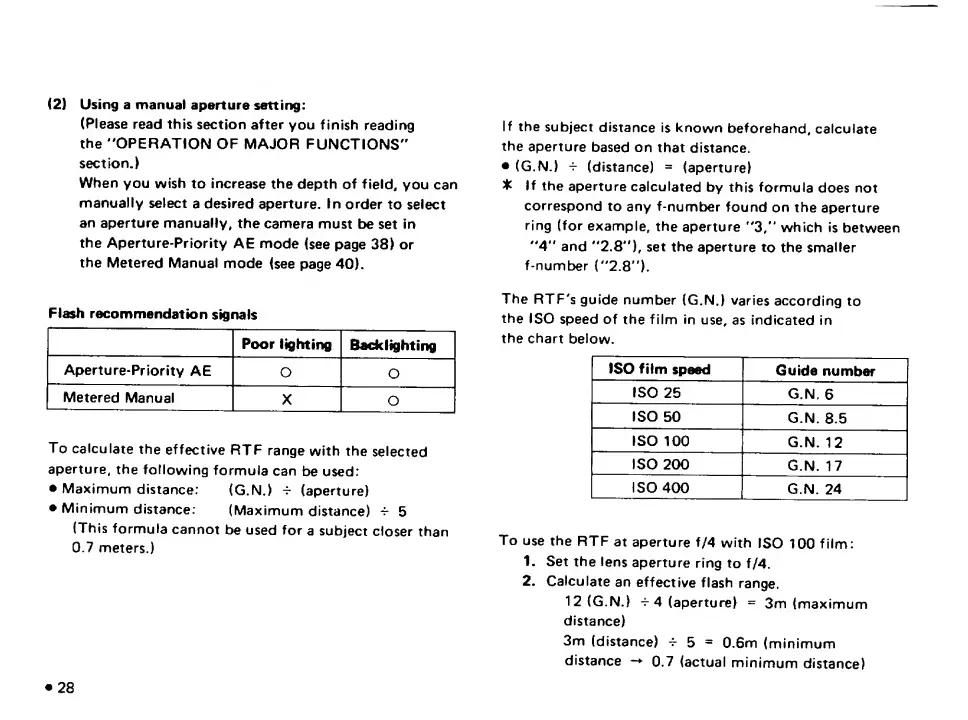
Flash
recommendation
signals
Poor
lighting
Backlighting
Aperture-Priority
AE
O
O
Metered
Manual
X
O
To
calculate
the
effective
RTF
range
with
the
selected
aperture,
the
following
formula
can
be
used:
e
Maximum
distance:
(G.N.)
^
(aperture)
Minimum
distance:
(Maximum
distance)
^
5
(This
formula
cannot
be
used
for
a
subject
closer
than
0.7
meters.)
28
If
the
subject
distance
is
known
beforehand,
calculate
the
aperture
based
on
that
distance.
(G.N.)
-i-
(distance)
=
(aperture)
3k
If
the
aperture
calculated
by
this
formula
does
not
correspond
to
any
f-number
found
on
the
aperture
ring
(for
example,
the
aperture
"3/‘
which
is
between
"4"
and
"2.8'*),
set
the
aperture
to
the
smaller
f-number
("2.8").
The
RTF's
guide
number
(G.N.)
varies
according
to
the
ISO
speed
of
the
film
in
use,
as
indicated
in
the
chart
below.
ISO
film
speed
Guide
number
ISO
25
G.N,
6
ISO
50
G.N.
8.5
ISO
100
G.N.
12
ISO
200
G.N.
17
ISO
400
r
G.N.
24
To
use
the
RTF
at
aperture
f/4
with
ISO
100
film:
1.
Set
the
lens
aperture
ring
to
f/4.
2.
Calculate
an
effective
flash
range.
12
(G.N.)
-i-
4
(aperture)
=
3m
(maximum
distance)
3m
(distance)
^
5
=
0.6m
(minimum
distance
-*
0.7
(actual
minimum
distance)

Related product manuals