EasyManua.ls Logo

Pentax SF10 - Page 38

Pentax SF10
72 pages
Print Icon
To Next Page IconTo Next Page
To Previous Page IconTo Previous Page
Loading...
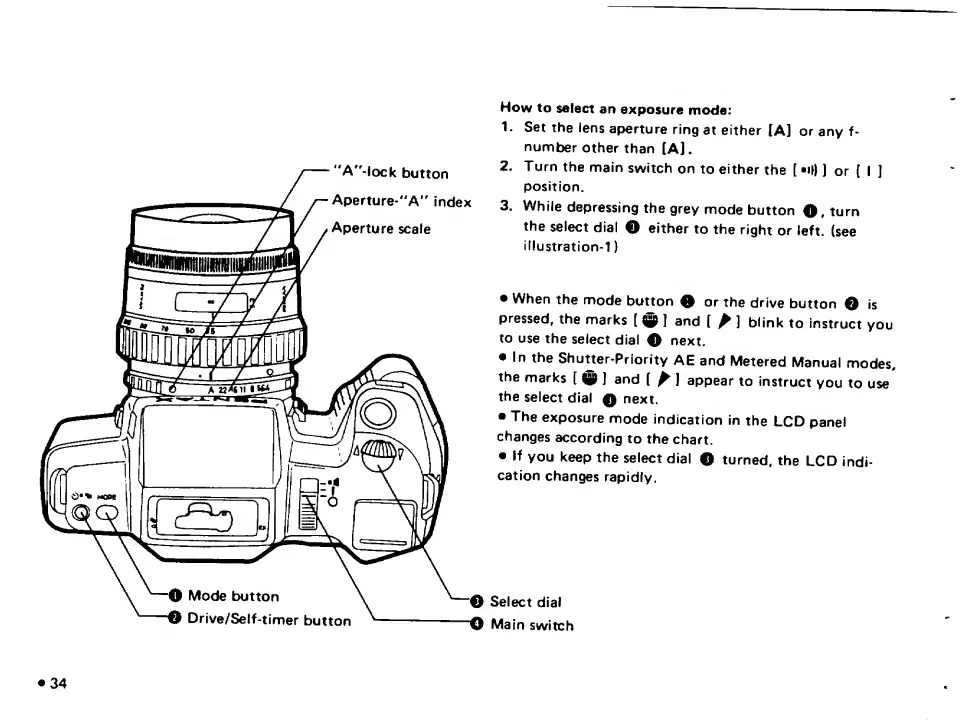
How
to
select
an
exposure
mode:
1.
Set
the
lens
aperture
ring
at
either
lA]
or
any
f-
number
other
than
[A].
2.
Turn
the
main
switch
on
to
either
the
[
•Ol)
or
(
I
I
position.
3.
While
depressing
the
grey
mode
button
O,
turn
the
select
dial
O
either
to
the
right
or
left,
(see
illustration-1)
When
the
mode
button
0
or
the
drive
button
O
is
pressed,
the
marks
[
0
]
and
(
^
]
blink
to
instruct
you
to
use
the
select
dial
0
next.
In
the
Shutter-Priority
AE
and
Metered
Manual
modes,
the
marks
[
0
J
and
(
^
J
appear
to
instruct
you
to
use
the
select
dial
0
next.
The
exposure
mode
indication
in
the
LCD
panel
changes
according
to
the
chart.
If
you
keep
the
select
dial
O
turned,
the
LCD
indi¬
cation
changes
rapidly.
Select
dial
Main
switch

Related product manuals