2018-04
72
HART Multiplexer System KFD*-HM*-16
Operation
7.3 Diagnosis and Troubleshooting
This chapter provides operating instructions to be used if faults occur and describes the
possible causes of such faults. Faults and failures are reported via the following means:
• LED indication, see chapter 7.3.1
• Status/response code, see chapter 7.3.2
• Extended device status, see chapter 7.3.3
7.3.1 LED Indication
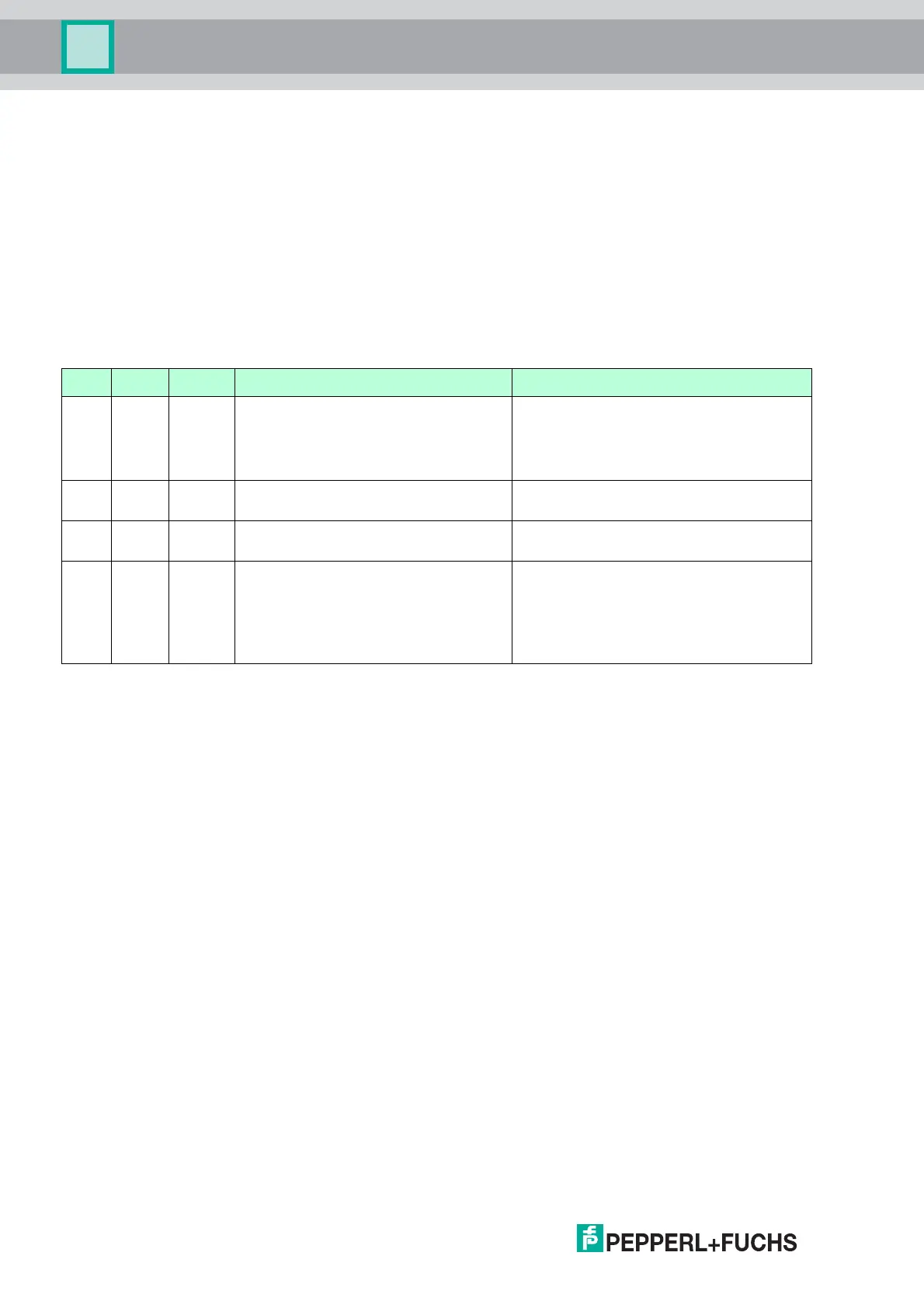
After you have switched the device on, the following fault states can occur during the
initialization process:
Red Green Orange Cause Corrective action
Off Off Off • No power supply present.
• LED(s) faulty.
• Check the power supply.
• Switch on DIP switch 1, briefly
disconnect the power supply. LEDs
flash one after the other.
On On On Device hardware fault (CPU, ROM) Send the device to Pepperl+Fuchs for
repair.
On Off Off Device hardware fault (CPU, ROM) Send the device to Pepperl+Fuchs for
repair.
On On Off • Device hardware fault
(CPU, ROM)
• Device parameterization
(command 161) faulty.
• Send the device to Pepperl+Fuchs for
repair.
• Parameterize the device again. If this
is not successful, the device must be
sent to Pepperl+Fuchs for repair.
Table 7.2



 To Next Page