Chapter 4 TPD1327E
Page 26
How to renew the canister of the fuel
lter
Warning! Discard the used element or canister and
fuel oil in a safe place and in accordance with local
regulations.
Cautions:
• It is important that only the genuine Perkins parts
are used. The use of a wrong canister or element
can damage the fuel injection pump.
• Do not allow dirt to enter the fuel system. Before a
connection is disconnected, clean thoroughly the
area around the connection. After a component
has been disconnected, t a suitable cover to all
open connections.
• The pre-lter and main lter canisters must be
renewed at the same time.
1. Thoroughly clean the outside surfaces of the
lter assembly.
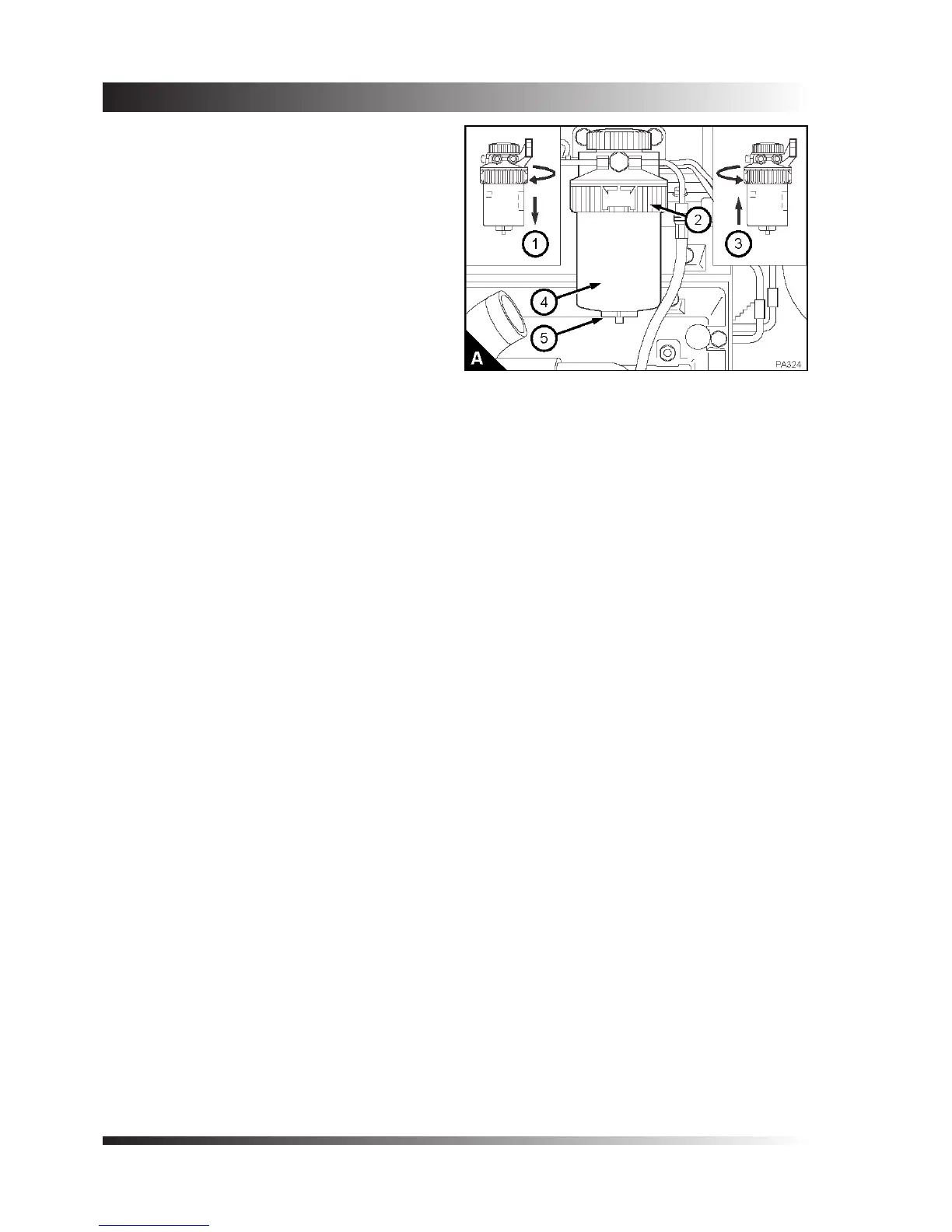
2. Loosen the drain device (A5), if one is tted, at
the bottom of the canister and allow the water/
fuel to drain into a suitable container.
3. Support the lter canister and rotate the clamp
ring (A2) counter-clockwise and remove the
clamp ring.
4. Remove the canister from the lter head by a
direct pull downwards (A1), and discard the old
canister (A4).
5. Ensure the lter head is clean. Ensure that the
lter head and canister seals (on page 27/A2 and
A3) are tted and in good condition. Push the
new canister (A3) fully into the lter head.
6. Support the canister, t the clamp ring (A2) and
rotate it clockwise to fasten the canister to the
lter head.
7. Eliminate the air from the fuel pre-lter and fuel
lter (see page 30).


 To Next Page