Operation
Edition 1 | Operating instructions Sortimat 23 | 40
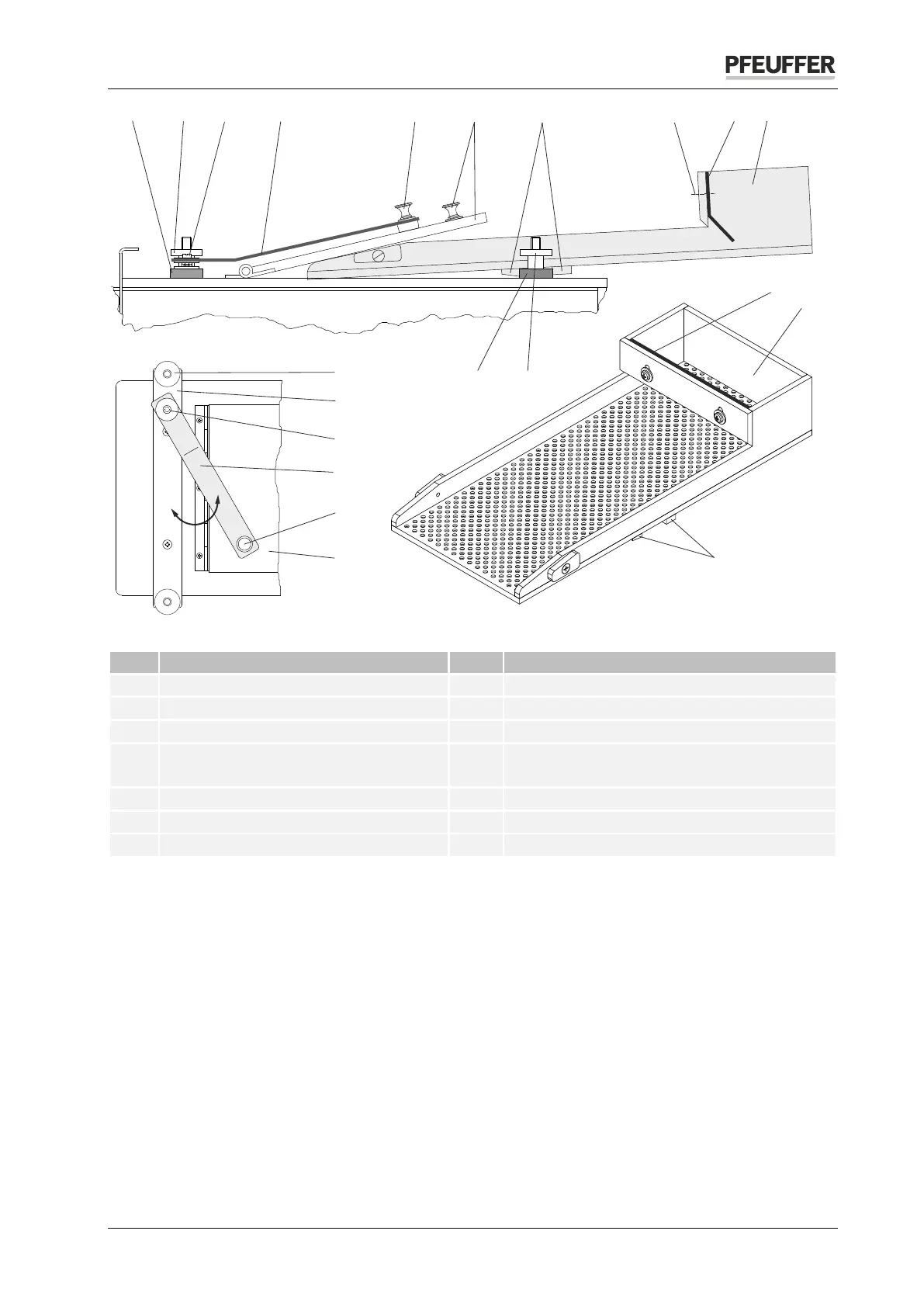
Figure 8: Inserting selecting device
Brass knob on holding bracket
Selecting device for wheat
1 Holding strip 8
Pan head screws with cross slit for adjusting
the guide plate
Holding screw with knurled nut
Holding bracket screw fitting
Remove the built-in screw connection (no. 3) on the holding strip.
Attach the clamping bracket to the holding strip using the supplied screw, washers and nuts, as shown
in the figure above.
Open the cover (no. 6).
Insert the selecting device into the opening in the cover. The cross strips (no. 7) must engage.
Please the cover on the selecting device.
Turn the clamping bracket via the brass knob on the cover. The spring effect of the holding bracket
holds the selecting device via the cover.
Fill the sample into the filling chamber (no. 10) of the selecting device.
Switch the SORTIMAT on using the main switch.
Press the START key.
When all of the sample has run out of the selecting device, switch the device off using the main switch.
6 8
9
4
5
1
2
10
8
9
10
8
3
7
7
1
2
1
3
5
6
4
2
A
B
C
C



 To Next Page