30 31
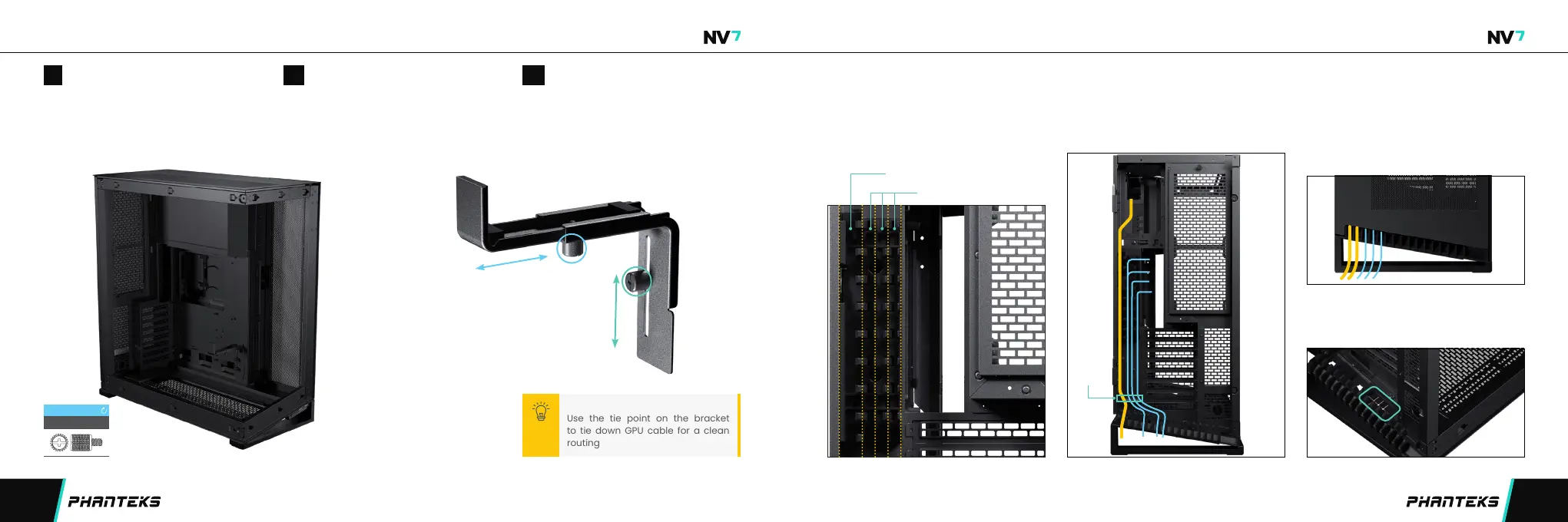
EXTERNAL CABLE MANAGEMENTINSTALLING GPU SUPPORT BRACKET (OPTIONAL)
External cables can be managed with the
cable lanes behind the rear door. The left lane
is larger and can be used for thick cables. The
other three lanes are smaller and made for thin
cables.
Use the velcro tie on the bottom to tie all
cables down to the chassis.
There are two options for the cables to leave
the case:
Option 1: Rear comb
The rear comb can be used to seperate each
cable to leave the case neatly.
Option 2: Bottom grommet
Alternatively, the grommet on the bottom of
the chassis can be used to lead the cables out.
Install the GPU support bracket on the
motherboard cover with 1x thumb screw.
Adjust the depth of the bracket to hold
the GPU tightly and lock with 1x thumb
screw underneath the bracket.
Adjust to the correct height for your GPU
and use the thumb screw to secure it.
INSTALL BRACKET ADJUST HEIGHT
01 02
ADJUST DEPTH
03
adjust height and
lock with this thumb
screw
adjust depth and lock
with this thumb screw
Large lane for PSU power cable
Small lanes for thin cables
velcro tie
CABLE LANES VELCRO TIE COMB OR GROMMET
Use the tie point on the bracket
to tie down GPU cable for a clean
routing
PRO TIP
THUMB SCREW 2x
INSTALL


 To Next Page