EasyManua.ls Logo

Phcbi MCO-230AICUVL - User Manual

Phcbi MCO-230AICUVL
96 pages
Print Icon
To Next Page IconTo Next Page
Loading...
Please read the operating instructions carefully before using this product, and save the operating
instructions for future use.
See page 92 for all model numbers.
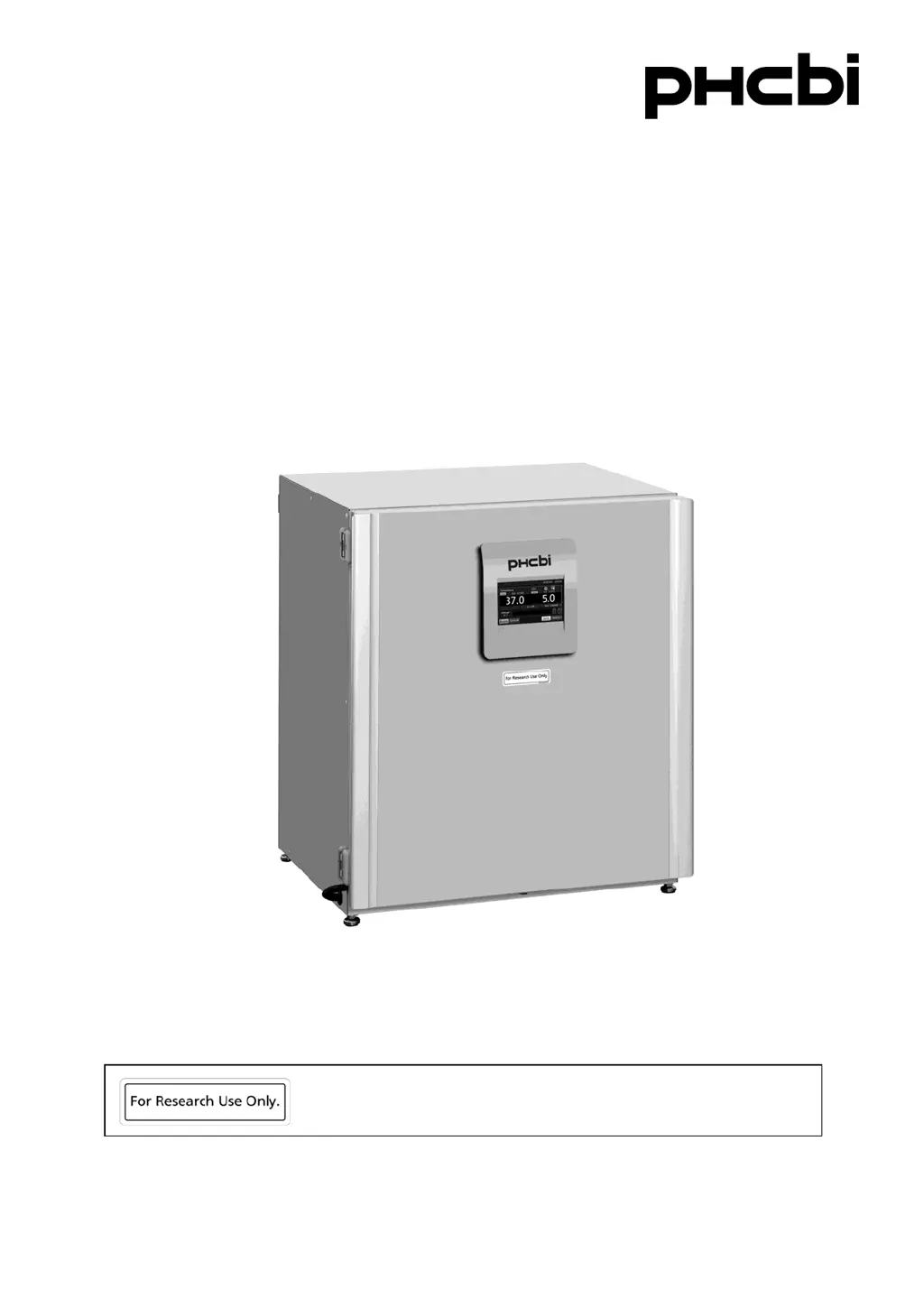
MCO-230AICUVL
Operating Instructions
CO
2
Incubator
This product is for research use only.
Not for clinical diagnosis or treatment of humans or animals.

Table of Contents

Questions and Answers

Summary

Introduction to the CO2 Incubator

Important Usage Notices

Key advisories and disclaimers regarding the use of the CO2 incubator and its documentation.

Precautions for Safe Operation

Understanding Safety Symbols

Explanation of warning, caution, prohibition, and instruction symbols used in the manual.

Ventilation and Environment Safety

Safety requirements related to ventilation, gas handling, and potential oxygen depletion.

Installation Safety Guidelines

Site Selection and Stability

Guidelines for choosing a stable, level installation site away from heat and vibration sources.

Electrical and Grounding Safety

Precautions for proper electrical connection, grounding, and preventing electric shock.

General Operating Safety

Handling Unit and Power Safety

Safety measures for power cords, unit handling, and preventing damage or misuse.

Incubator Components Overview

Unit Identification

Diagram identifying the main parts and external features of the CO2 incubator.

Incubator Components Details

Unit Diagrams and Parts

Visual representation and labeling of the incubator's exterior and interior components.

LCD Touch Panel Interface

Top Screen Display Elements

Description of the main display screen, including temperature, CO2, and status indicators.

LCD Touch Panel Navigation

Touch Panel Keys and Functions

Explanation of the various keys and their functions on the LCD touch panel interface.

Installation Instructions

Selecting the Installation Site

Criteria for choosing an appropriate location for the CO2 incubator.

Installation Procedures

Initial Setup Steps

Steps for unpacking, cleaning, and setting up the incubator's internal components.

Installation Safety and Grounding

Grounding Requirements

Importance and methods for properly grounding the incubator to prevent electrical hazards.

Pre-Operation Procedures

Initial Cleaning Method

Detailed instructions for cleaning the incubator chamber and attachments before first use.

Connecting CO2 Gas Supply

CO2 Gas Cylinder Connection

Procedure for connecting the CO2 gas cylinder to the incubator.

Removing Inner Attachments

Step-by-step Removal Guide

Instructions for safely removing trays, humidifying pan, and fan cover.

Cultivation Best Practices

Precautions for Culture Setup

Guidelines for optimal culture conditions, including spacing and avoiding harmful materials.

Preventing Contamination

Chamber and Water Hygiene

Recommendations for maintaining chamber cleanliness and using sterile distilled water.

Correct Incubator Operation

Initial Operation Steps

Procedure for starting trial or actual operation of the incubator.

Basic LCD Touch Panel Operations

Navigating the Menu System

Guide to accessing and navigating through the incubator's menu structure.

Basic Parameter Settings

Numerical Input Window Usage

How to use the numerical input window for setting parameters on the touch panel.

Setting Core Parameters

Temperature, CO2, and High Limit Alarm

Procedure for setting chamber temperature, CO2 density, and high limit temperature alarm.

Key Lock Functions

Setting the Key Lock

Instructions for enabling and configuring the key lock feature with a password.

Managing Key Lock

Removing the Key Lock

Steps to disable the key lock feature and remove password protection.

Alarm Parameter Configuration

Setting Temperature and CO2 Alarms

How to configure automatic set temperature and CO2 density alarms and their delays.

Alarm Settings and Delays

Temperature and CO2 Alarm Delays

Configuration of delays for temperature and CO2 density alarms, ring back, and remote alarms.

Operation and Alarm Logging

Setting Log Interval

Procedure to set the interval for saving operation and alarm log data.

Viewing Operation Logs

Displaying Operation Data Graphs

How to view logged temperature, CO2 density, and door opening data graphically.

Exporting Operation Logs

Saving Operation Data to USB

Steps to export operation log data to a USB memory device.

Viewing Alarm Logs

Displaying Alarm History

How to display and view recorded alarm events on the incubator.

Exporting Alarm Logs

Saving Alarm Data to USB

Steps to export alarm log data to a USB memory device.

UV Lamp Functions

Using the UV Lamp

Instructions and precautions for operating the UV lamp for disinfection.

UV Lamp Operation Settings

Setting UV Lamp ON Period

How to configure the duration the UV lamp remains lit after door closure.

Advanced UV Lamp Controls

Lighting UV Lamp for 24 Hours

Procedure for activating the 24-hour UV lamp mode for chamber sterilization.

H2 O2 Decontamination Procedure

H2 O2 Decontamination Process Overview

Introduction to the H2O2 decontamination process and its requirements.

H2 O2 Decontamination Steps

Detailed H2 O2 Decontamination Steps

Step-by-step guide for performing H2O2 decontamination, including setup and execution.

H2 O2 Decontamination Warnings

H2 O2 Reagent Handling Precautions

Crucial safety warnings regarding the use and handling of H2O2 reagent.

H2 O2 Decontamination Safety

H2 O2 Gas Resolve Safety

Safety precautions during the H2O2 gas resolve phase, including door locking.

Electric Lock System

Setting User-ID for Auto-Lock

Procedure for registering a User-ID and release password for the auto-lock function.

Auto Lock Configuration

Setting Auto Lock Function

How to enable and configure the automatic door locking feature based on time.

Gas Auto Changer System

Connecting CO2 Gas Cylinders

Instructions for connecting two CO2 gas cylinders for automatic supply line switching.

Automatic CO2 Gas Changeover

Understanding Automatic Switchover

Explanation of how the system automatically switches between CO2 gas cylinders.

Manual CO2 Gas Changeover

Performing Manual Switchover

Procedure for manually changing the CO2 gas supply line.

Standard Gas Calibration

Connecting Standard Gas Cylinder

Instructions for connecting a standard gas cylinder for CO2 density calibration.

Routine Maintenance Schedule

Cleaning Procedures

Recommended monthly procedures for cleaning the incubator chamber and attachments.

Alarms, Safety, and Self-Diagnosis

Alarm and Safety Function Table

Comprehensive table detailing incubator alarms, conditions, displays, and safety operations.

Troubleshooting Guide

Incubator Not Operating or Alarming

Troubleshooting steps for common issues like the incubator not starting or activating alarms.

Product Specifications

Technical Specifications Table

Detailed list of the incubator's technical specifications, dimensions, and features.

Performance Characteristics

Performance Data Table

Table outlining the incubator's performance metrics like temperature control and variation.

Summary

Introduction to the CO2 Incubator

Important Usage Notices

Key advisories and disclaimers regarding the use of the CO2 incubator and its documentation.

Precautions for Safe Operation

Understanding Safety Symbols

Explanation of warning, caution, prohibition, and instruction symbols used in the manual.

Ventilation and Environment Safety

Safety requirements related to ventilation, gas handling, and potential oxygen depletion.

Installation Safety Guidelines

Site Selection and Stability

Guidelines for choosing a stable, level installation site away from heat and vibration sources.

Electrical and Grounding Safety

Precautions for proper electrical connection, grounding, and preventing electric shock.

General Operating Safety

Handling Unit and Power Safety

Safety measures for power cords, unit handling, and preventing damage or misuse.

Incubator Components Overview

Unit Identification

Diagram identifying the main parts and external features of the CO2 incubator.

Incubator Components Details

Unit Diagrams and Parts

Visual representation and labeling of the incubator's exterior and interior components.

LCD Touch Panel Interface

Top Screen Display Elements

Description of the main display screen, including temperature, CO2, and status indicators.

LCD Touch Panel Navigation

Touch Panel Keys and Functions

Explanation of the various keys and their functions on the LCD touch panel interface.

Installation Instructions

Selecting the Installation Site

Criteria for choosing an appropriate location for the CO2 incubator.

Installation Procedures

Initial Setup Steps

Steps for unpacking, cleaning, and setting up the incubator's internal components.

Installation Safety and Grounding

Grounding Requirements

Importance and methods for properly grounding the incubator to prevent electrical hazards.

Pre-Operation Procedures

Initial Cleaning Method

Detailed instructions for cleaning the incubator chamber and attachments before first use.

Connecting CO2 Gas Supply

CO2 Gas Cylinder Connection

Procedure for connecting the CO2 gas cylinder to the incubator.

Removing Inner Attachments

Step-by-step Removal Guide

Instructions for safely removing trays, humidifying pan, and fan cover.

Cultivation Best Practices

Precautions for Culture Setup

Guidelines for optimal culture conditions, including spacing and avoiding harmful materials.

Preventing Contamination

Chamber and Water Hygiene

Recommendations for maintaining chamber cleanliness and using sterile distilled water.

Correct Incubator Operation

Initial Operation Steps

Procedure for starting trial or actual operation of the incubator.

Basic LCD Touch Panel Operations

Navigating the Menu System

Guide to accessing and navigating through the incubator's menu structure.

Basic Parameter Settings

Numerical Input Window Usage

How to use the numerical input window for setting parameters on the touch panel.

Setting Core Parameters

Temperature, CO2, and High Limit Alarm

Procedure for setting chamber temperature, CO2 density, and high limit temperature alarm.

Key Lock Functions

Setting the Key Lock

Instructions for enabling and configuring the key lock feature with a password.

Managing Key Lock

Removing the Key Lock

Steps to disable the key lock feature and remove password protection.

Alarm Parameter Configuration

Setting Temperature and CO2 Alarms

How to configure automatic set temperature and CO2 density alarms and their delays.

Alarm Settings and Delays

Temperature and CO2 Alarm Delays

Configuration of delays for temperature and CO2 density alarms, ring back, and remote alarms.

Operation and Alarm Logging

Setting Log Interval

Procedure to set the interval for saving operation and alarm log data.

Viewing Operation Logs

Displaying Operation Data Graphs

How to view logged temperature, CO2 density, and door opening data graphically.

Exporting Operation Logs

Saving Operation Data to USB

Steps to export operation log data to a USB memory device.

Viewing Alarm Logs

Displaying Alarm History

How to display and view recorded alarm events on the incubator.

Exporting Alarm Logs

Saving Alarm Data to USB

Steps to export alarm log data to a USB memory device.

UV Lamp Functions

Using the UV Lamp

Instructions and precautions for operating the UV lamp for disinfection.

UV Lamp Operation Settings

Setting UV Lamp ON Period

How to configure the duration the UV lamp remains lit after door closure.

Advanced UV Lamp Controls

Lighting UV Lamp for 24 Hours

Procedure for activating the 24-hour UV lamp mode for chamber sterilization.

H2 O2 Decontamination Procedure

H2 O2 Decontamination Process Overview

Introduction to the H2O2 decontamination process and its requirements.

H2 O2 Decontamination Steps

Detailed H2 O2 Decontamination Steps

Step-by-step guide for performing H2O2 decontamination, including setup and execution.

H2 O2 Decontamination Warnings

H2 O2 Reagent Handling Precautions

Crucial safety warnings regarding the use and handling of H2O2 reagent.

H2 O2 Decontamination Safety

H2 O2 Gas Resolve Safety

Safety precautions during the H2O2 gas resolve phase, including door locking.

Electric Lock System

Setting User-ID for Auto-Lock

Procedure for registering a User-ID and release password for the auto-lock function.

Auto Lock Configuration

Setting Auto Lock Function

How to enable and configure the automatic door locking feature based on time.

Gas Auto Changer System

Connecting CO2 Gas Cylinders

Instructions for connecting two CO2 gas cylinders for automatic supply line switching.

Automatic CO2 Gas Changeover

Understanding Automatic Switchover

Explanation of how the system automatically switches between CO2 gas cylinders.

Manual CO2 Gas Changeover

Performing Manual Switchover

Procedure for manually changing the CO2 gas supply line.

Standard Gas Calibration

Connecting Standard Gas Cylinder

Instructions for connecting a standard gas cylinder for CO2 density calibration.

Routine Maintenance Schedule

Cleaning Procedures

Recommended monthly procedures for cleaning the incubator chamber and attachments.

Alarms, Safety, and Self-Diagnosis

Alarm and Safety Function Table

Comprehensive table detailing incubator alarms, conditions, displays, and safety operations.

Troubleshooting Guide

Incubator Not Operating or Alarming

Troubleshooting steps for common issues like the incubator not starting or activating alarms.

Product Specifications

Technical Specifications Table

Detailed list of the incubator's technical specifications, dimensions, and features.

Performance Characteristics

Performance Data Table

Table outlining the incubator's performance metrics like temperature control and variation.

Phcbi MCO-230AICUVL Specifications

General IconGeneral
BrandPhcbi
ModelMCO-230AICUVL
CategoryAccessories
LanguageEnglish

Related product manuals